


JerryMungo
Honorary Master
- Joined
- Jul 18, 2008
- Messages
- 37,523
- Reaction score
- 6,280
I've been fighting for some time with my MSDN downloads - since Microsoft apparently turfed the transfer manager, you have to put up with slower (one connection at a time) downloads that can't be resumed.
To fix this and use the microsoft download manager, in IE 11 press CTRL-F12, then press F8 and make sure your settings look like this:
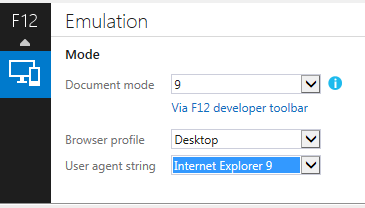
Clicking downloads on the MSDN site in IE should now initiate the download manager as before.
To fix this and use the microsoft download manager, in IE 11 press CTRL-F12, then press F8 and make sure your settings look like this:
Clicking downloads on the MSDN site in IE should now initiate the download manager as before.