Mweb DNS Hijack

Gatecrasher

Executive Member
Joined
Jan 11, 2005
Messages
6,727
Reaction score
624
So I just got an Mweb account which I use only for accessing SAIX news servers. Works fine. I have a TI account for international, and an IS account for local. The traffic is split across the three accounts.

Now, however, whenever I want to Google, I get this:

http://landingpages.mweb.co.za/MWEBADSLCappedPage/tabid/936/Default.aspx

So I'm assuming that I'm accessing the MWEB DNS server, which is then redirecting me to this page. But it is a royal pain the backside, because when I actually visit Google it will be using a different account.

Can someone please give me the www.google.co.za IP address, so I can put it in my hosts file, and hopefully bypass this Mweb nonsense.
 
I have a similar setup, an Axxess account for international and a Mweb account for local but have never seen a landing page like that. It seems that your Mweb account is capped to local now but some international traffic is still trying to get through it, which is why you're being handed that landing page; perhaps a small problem with your routes?

anyhow, here are the ips, although doesn't google roundrobin and load balance www.google.co.za so as not to resolve to a single ip address?

google.co.za (66.249.93.104)
www.google.com (74.125.95.147)
 
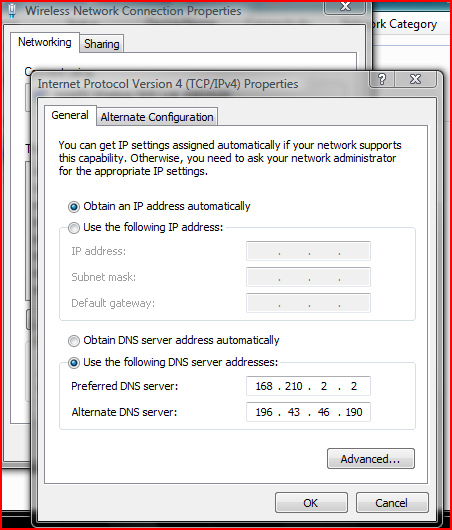
okay here is what you do, go to the TCP/IP v4 setup on your wireless/lan card.
For DNS server, change the obtain DNS automatically, or on the router setup.
Put the following vallues for DNS:

ip_setup.PNG


This will solve the problem hope I could help.
 
@ zamrg: Thanks for the address.

Added it to my Windows hosts file. Now works fine.

There is no problem with the routes. It is definitely the MWEB DNS server's way of kindly informing me that I have used up my international bandwidth. I just don't think they have considered the possibility that users might be connected to more than one account. No problem with other International sites.

@calvincoetzee: Thanks, but I change ISP accounts so often that I don't like to use static DNS servers.
 
Last edited:
@ zamrg: Thanks for the address.

Added it to my Windows hosts file. Now works fine.

There is no problem with the routes. It is definitely the MWEB DNS server's way of kindly informing me that I have used up my international bandwidth. I just don't think they have considered the possibility that users might be connected to more than one account. No problem with other International sites.

@calvincoetzee: Thanks, but I change ISP accounts so often that I don't like to use static DNS servers.

ye, I didn't think about that but then again I don't use mweb's dns servers.

perhaps just hardcore one of saix's dns servers from http://www.saix.net/cgi-bin/saix_dns.pl or even opendns, and then route it over the international TI connection; would save you from having to add hosts :)
 
Well, the hosts idea worked for the main google page, but news and images took me to the same Mweb page. I've just changed the order in which the accounts are connected, now putting the IS account last. So I will be using the IS DNS server. Seems to have done the trick.
 
@calvincoetzee: Thanks, but I change ISP accounts so often that I don't like to use static DNS servers.

Why does it matter, I use 4 diffrent ISP's and use many different networks, the static DNS does not make any difference whether I'm using somebody elses wifi link or switch between Jenny ISP, Mweb, Telkom or IS.

I have mweb on the router, then do PPPoE connections to which ever one of my accounts still have cap.

So far I have had no problems with my configuration.
 
Why does it matter, I use 4 diffrent ISP's and use many different networks, the static DNS does not make any difference whether I'm using somebody elses wifi link or switch between Jenny ISP, Mweb, Telkom or IS.

I have mweb on the router, then do PPPoE connections to which ever one of my accounts still have cap.

So far I have had no problems with my configuration.

In the past I've had many DNS problems, mostly due to using SAIX DNS servers on IS connections, and IS DNS servers on SAIX connections. To the point where the only reliable solution was to use Opendns. Finally, I fixed the Linksys script to always use the dynamic DNS from the last made connection. That has worked well for a long time... until I used Mweb.
 
I see, interesting, oh well good luck with your connection.
All I know is that getting the landing page is very annoying because it doesn't go away even when switching accounts or even different routers by the look of things.
 
The subject for this thread is MISLEADING!

"Mweb DNS Hijack", hopefully someone with powers will fix it.
 
I get the sam eproblem all the time when switching between MWEB and Telkom accounts. If I access an intl site on my MWEB account then I get the same error message, and keep getting it even when I have switched accounts. To solve the problem I need to do a ipconfig/flushdns, usually sorts the problem out within a couple of minutes.
 
The subject for this thread is MISLEADING!

"Mweb DNS Hijack", hopefully someone with powers will fix it.

Why misleading? A DNS server should return the correct IP address for an URL. Why does Mweb's DNS server redirect your Google request to their marketing page? If that's not a hijacking, what is?
 
http://en.wikipedia.org/wiki/DNS_hijacking

You must remember there is a gateway IP address that either your router or pppoe connection utilizes. If it were the DNS server every single time you browsed regardless of using ipconfig /flushdns you would get served the same page. There must be some sort of gateway/radius checking going on that is pointing you to that site. Wireless hotspots as an example, you connect to it and stick www.google.co.za into your favourite browser, you are then redirected to a website inside a walled garden telling you that you have to buy bandwidth before you can surf. This is essentially what is happening here, must be some sort of config issue somewhere.

Maybe post a tracert when you try to browse google?
 
http://en.wikipedia.org/wiki/DNS_hijacking

Maybe post a tracert when you try to browse google?

Both ping and tracert of www.google.co.za or www.google.com gave an Mweb IP (196.2.63.26). Tracert showed the request going out of my IS local connection, and ending at Mweb. The only way it would go out via that route is if the DNS server had previously returned the incorrect IP address for Google.

It would be a different story if I tried to access Google via the Mweb account. Nothing wrong if my browser was redirected at that point. But a DNS server should return the correct address.
 
Last edited:
Why not use the OpenDNS servers @
208.67.222.222
208.67.220.220
?

That's what I am trying to do... but something keeps re-setting them in the router. Now I am trying to change them in the TCP/IP properties first.
 
nope, no matter what you do... the settings always revert back to the M-web DNS settings. How can they do that on my router?
 
Top
Sign up to the MyBroadband newsletter
X