Network printer stuck on 'paused'

Caliph

Senior Member
Joined
Aug 1, 2013
Messages
699
Reaction score
174
I have 2 pc's both running Windows 8.1 connected to a Samsung SCX 4623 printer. By default, the printer is not a network printer, so I have it connected to the on-board print server on my Dlink 2750U router via USB. The pc's connect to the printer over the wireless network.

This configuration has been working fine for about 8 months now. All of a sudden, I see that the printer status on both the pc's is showing 'paused'. For some reason, it cannot be unpaused. I tried:

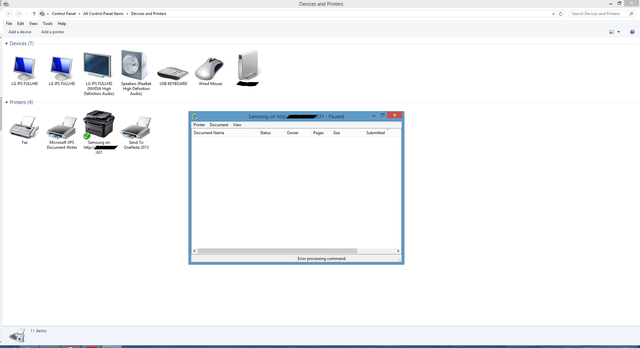
  1. Devices and printers/ Samsung printer/ Printer and try to uncheck 'pause printing'. Doesn't work - gives message 'Error processing command'
  2. Check drivers are up to date
  3. Soft reset printer manually through the menu
  4. Remove printer from network and added again
  5. Switch on/off
 
printers... :sick:

remove the device drivers etc. via print management. delete the files manually if you have to. might require some user rights adjustment. (reboot after every change. edit: do not power on the pc with the printer usb plugged in and it is not installed, install the software before plugging in the printer)

reflash the printer firmware and your router firmmware that its plugged into via usb.

try operate printer directly connected to pc.
 
  1. Select Start.
  2. Type Command .
  3. Right-click “Command Prompt” and select “Run as administrator“.
  4. Type net stop spooler then press “Enter“.
  5. Type del %systemroot%\System32\spool\printers\* /Q then press “Enter“.
  6. Type net start spooler then press “Enter“.
  7. The print queue on your Windows should now be cleared.
 
  1. Select Start.
  2. Type Command .
  3. Right-click “Command Prompt” and select “Run as administrator“.
  4. Type net stop spooler then press “Enter“.
  5. Type del %systemroot%\System32\spool\printers\* /Q then press “Enter“.
  6. Type net start spooler then press “Enter“.
  7. The print queue on your Windows should now be cleared.

^ hope its just that!
 
Sometimes something is stuck in the queue and it wont let you send anything else to the printer. Give it a bash hope it works :)
 
  1. Select Start.
  2. Type Command .
  3. Right-click “Command Prompt” and select “Run as administrator“.
  4. Type net stop spooler then press “Enter“.
  5. Type del %systemroot%\System32\spool\printers\* /Q then press “Enter“.
  6. Type net start spooler then press “Enter“.
  7. The print queue on your Windows should now be cleared.

I tried this. Still stuck on pause.
 
Verify that your router settings did not change.
e.g. Clear print server queue on router, user accounts, IP addresses etc.
 
Verify that your router settings did not change.
e.g. Clear print server queue on router, user accounts, IP addresses etc.

The IP address assigned to the printer is automatically generated. The printer is detected by both pc's, problem is releasing jobs. I'm beginning to think the Windows update buggered something up.
 
on that window, click on the text printer, make sure there is no tick next to pause printing. if there is just click pause printing to remove it.
733505
 
on that window, click on the text printer, make sure there is no tick next to pause printing. if there is just click pause printing to remove it.
View attachment 733505

Devices and printers/ Samsung printer/ Printer and try to uncheck 'pause printing'. Doesn't work - gives message 'Error processing command'

Doesn't allow me to uncheck that tick.
 
Top
Sign up to the MyBroadband newsletter
X