Nokia ONT - LAN stuck at 100mbps.

charlieharper

Expert Member
Joined
Jun 1, 2007
Messages
3,882
Reaction score
2,005
Location
South Coast, KZN
My fibre is finally up and running. Happy days.

So I have a 200/100 line from Openserve via Afrihost (thanks for the awesome help @AfriNatic ).

After multiple speedtests I realised, I'm not getting above about 93mbps.

Took me all morning to troubleshoot, but came to the conclusion that the ONT (Nokia G-240G-E) is somehow only set to be 100mbps. Of course, it's locked and I have no access to it.

I plugged laptop directly onto the ONT, did speedtest, results was about 90/90mbps. Okay, at least I know nothing wrong Afrihost side, you're off the hook. ;)

I then noticed, it showed the link to the ONT is only 100mbps, despite being a gigabit ethernet port on laptop.

See screenshot

2020-12-10 14.01.01.png


I then decided to plug my old ZTE router (used for Afrihost mtn Fixed LTE, which is a gigabit router) into my main router and checked out stats.

It came back 1000mbps.
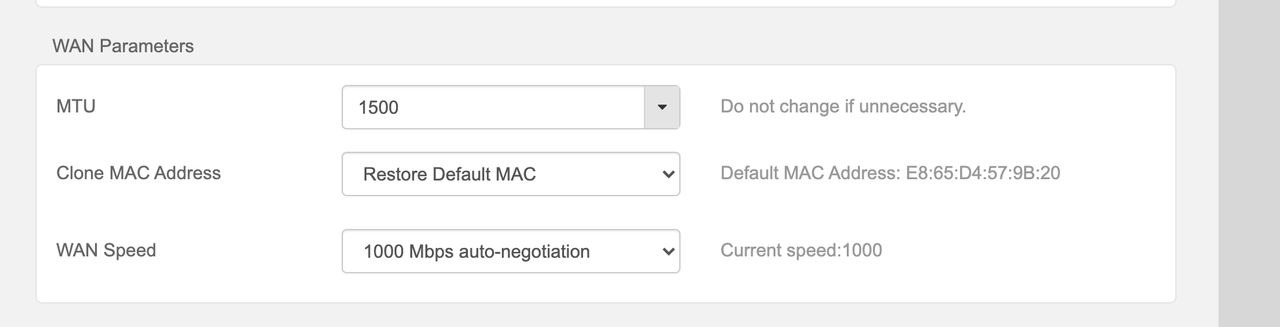
Screenshot-2020-12-10-at-13-52-38.png


I then plugged the ONT back into my main router and quickly, "Current Speed" switched back to only 100mbps.
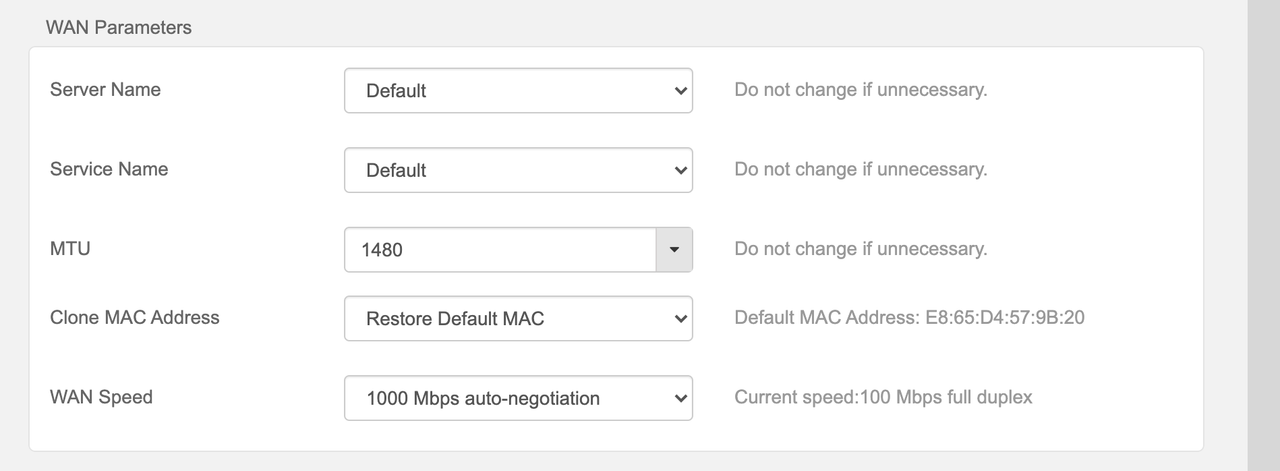
Screenshot-2020-12-10-at-13-59-33.png


So my conclusion is the ONT's LAN is set to only 100mbps instead of 1gbps.

Anyone ever had something like this happening?

Brand new installation, line only activated this morning.

@AfriNatic said a factory reset of the ONT could potentially fix the issue, however, it's not recommended and could potentially lead to downtime till Openserve reprovision the ONT manually from their side.
 
Last edited:
My fibre is finally up and running. Happy days.

So I have a 200/100 line from Openserve via Afrihost (thanks for the awesome help @AfriNatic ).

After multiple speedtests I realised, I'm not getting above about 93mbps.

Took me all morning to troubleshoot, but came to the conclusion that the ONT (Nokia G-240G-E) is somehow only set to be 100mbps. Of course, it's locked and I have no access to it.

I plugged laptop directly onto the ONT, did speedtest, results was about 90/90mbps. Okay, at least I know nothing wrong Afrihost side, you're off the hook. ;)

I then noticed, it showed the link to the ONT is only 100mbps, despite being a gigabit ethernet port on laptop.

See screenshot

View attachment 972818


I then decided to plug my old ZTE router (used for Afrihost mtn Fixed LTE, which is a gigabit router) into my main router and checked out stats.

It came back 1000mbps.
Screenshot-2020-12-10-at-13-52-38.png


I then plugged the ONT back into my main router and quickly, "Current Speed" switched back to only 100mbps.

Screenshot-2020-12-10-at-13-59-33.png


So my conclusion is the ONT's LAN is set to only 100mbps instead of 1gbps.

Anyone ever had something like this happening?

Brand new installation, line only activated this morning.

@AfriNatic said a factory reset of the ONT could potentially fix the issue, however, it's not recommended and could potentially lead to downtime till Openserve reprovision the ONT manually from their side.
Have you tried manually setting the WAN speed from 'auto negotiation' to 1000Mbps ?
 
OP has already tried that....

Not sure how that would fix the problem anyway?

(Please do not say use Cat6 instead of CAT5e....)
Was originally using one of those flat fly lead LAN cables i got free with some or other device, changed to a regular CAT5e and it worked.
Nothing to argue here - it fixed the issue (for me)

[edit] I shared your skepticism when I was told to try a new cable
 
Thanks. Going to test one more time with my dad's Windows machine later tonight just to confirm, will try multiple cables, etc.
 
  • Like
Reactions: Yuu
Okay, nice.

Tested on Dad's laptop work laptop. Does 1 gigabit connection to ONT, no issues. Speed test around the 180mbps range. All good.

So for some reason my router detects the ONT only as 100mbps.

Will run 1 or 2 more tests tomorrow to try and see what's up, else I'll get another router that I know I can 'force' 1000mbps full duplex. Lol
 
  • Like
Reactions: Yuu
So I went through all the ethernet cables I own.
All of them Cat5e.

Perhaps routers are more sensitive to a cable than say, some laptops?

Should I go buy a Cat6 tomorrow and test my luck? They pretty cheap I think.
 
So I went through all the ethernet cables I own.
All of them Cat5e.

Perhaps routers are more sensitive to a cable than say, some laptops?

Should I go buy a Cat6 tomorrow and test my luck? They pretty cheap I think.

A decent quality cat5e should be able to do 1Gbps without any issues.

You can still get a free router from us? You can just order it and if you want it delivered the delivery fee is R249. It's not a fancy router but it would work. It's a Huawei WS5200.
 
  • Like
Reactions: Yuu
A decent quality cat5e should be able to do 1Gbps without any issues.

You can still get a free router from us? You can just order it and if you want it delivered the delivery fee is R249. It's not a fancy router but it would work. It's a Huawei WS5200.
Sounds good, will DM you.
 
I upgraded my Openserve Fibre connection (with Afrihost) from 50/25 to 100/50 a few months ago, and after the upgrade I landed up with 50/50 instead of 100/50 which was odd. So I contacted @AfriNatic and he said the profile on Afrihost's side was upgraded on the upload side to 50, but was still stuck on 50 down. He then did something on Afrihost's side and all of a sudden I had my 100/50 connection working perfectly. Not saying you have the same issue, but just something to consider, that it might be an issue on Afrihost's side.
 
I upgraded my Openserve Fibre connection (with Afrihost) from 50/25 to 100/50 a few months ago, and after the upgrade I landed up with 50/50 instead of 100/50 which was odd. So I contacted @AfriNatic and he said the profile on Afrihost's side was upgraded on the upload side to 50, but was still stuck on 50 down. He then did something on Afrihost's side and all of a sudden I had my 100/50 connection working perfectly. Not saying you have the same issue, but just something to consider, that it might be an issue on Afrihost's side.

This is a different case as @op had a 200Mbps service from installation. The issue you are describing only happens when upgrading.
 
  • Like
Reactions: Yuu
So I was busy working.. suddenly the connection dropped.. stone dead, all lights on ONT dead except LAN1 and Power was on. Came back about 10 minutes later and behold,

Screenshot 2020-12-11 at 10.04.24.png

Router now detects ONT as 1000mbps device.
 
Top
Sign up to the MyBroadband newsletter
X