One desktop problem and one laptop problem.

waynegohl

Ancient Astronaut
Joined
Nov 4, 2007
Messages
41,471
Reaction score
34
Location
Planet X
Every now and again my LAN or High Speed Internet icon comes up on my screen and says it is uplugged. it pops up then disappears and i cannot connect yet my wife on her pc which is connected to the internet through the ethernet box is still ok. When i reboot my pc then it works. Why is this?

The second problem i have is that the power supply my daughter has for her laptop has a worn section on it right at the box (we use the power supply to the wall as the battery don't work), and i was quoted R450.00 for a new power supply which is almost more that the price i paid for her laptop.
Is there a way the cable can be fixed or should we just save up for a new power supply?

Thanks.
 
Mr Libs i have no idea what you mean but the desktop has the flashing ethernet problem and the laptop has the worn power cable problem.
 
@wayne - on the desktop, go to My Computer, right-click on My Computer, go to Manage, go to device Manager

Select your network adapter in the list, right-click on it, select the 'Advanced' tab, scroll down to "Speed and Duplex", select 10mb full and see if it solves the issue.
 
i get connection type which is set to auto-negotiation and validat packet length which is enabled.

under connection type i have 10base T half duplex and 10base T full duplex and 100base Tx half and 100base Tx full.
 
The second problem i have is that the power supply my daughter has for her laptop has a worn section on it right at the box (we use the power supply to the wall as the battery don't work), and i was quoted R450.00 for a new power supply which is almost more that the price i paid for her laptop.
Is there a way the cable can be fixed or should we just save up for a new power supply?

Buy a universal generic for cheaper.

Have you read your own post as it's hard to make out what you are saying?
 
Wayne, regarding your second problem: rather save up the R450 and buy a new adapter. Trying to fix the wire might cause trouble later. R450 is not that bad... DWPC wants to charge me R860 for a second adapter for my Fujitsu.
 
Buy a universal generic for cheaper.

Have you read your own post as it's hard to make out what you are saying?

sorry man at a glance it makes sense but what does not make sense to you?

sorry ponder but what is a universal generic?
 
Last edited:
Wayne, regarding your second problem: rather save up the R450 and buy a new adapter. Trying to fix the wire might cause trouble later. R450 is not that bad... DWPC wants to charge me R860 for a second adapter for my Fujitsu.

ok i will look at that then or a cheaper one. the thing is when i bought the laptop many years ago i paid R500 for it and i guess spending R450 on a external power supply was not an option but then again it might still be cheaper at the end of the day as all she does is play games and listen to music on it.
 
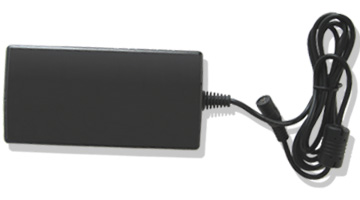
905669_091017162618_acadap.jpg


guys i found this but am worried about that pin connection as the one i have has that one male pin thing, like a normal power supply, will this work?
 
ok cool thanks buddy.


aaahhh haaa now i know what a universal generic is.
 
Wayne, regarding your second problem: rather save up the R450 and buy a new adapter. Trying to fix the wire might cause trouble later. R450 is not that bad... DWPC wants to charge me R860 for a second adapter for my Fujitsu.

1447233-1635826716-b.gif


dj_jyno is this your adapter?
 
ok cool thanks buddy.

no problemo.

Just make sure the voltage(V) is the same or slightly higher. The current has to be the same or higher(A) or if no current rating is given go for the same wattage(W) or higher.
 
ok thanks cause the one i have in my hands here says 65w and the one in the 1st pic above is also a 65w but the connection is different.
 
Mr Libs, thanks for the help on my Lan connection problem. i did what you suggested and although my computr has crashed about 20 times today when it comes back on i still have internet connectivity.


thanks you very much.
 
Top
Sign up to the MyBroadband newsletter
X