OS dropping connection??

Thestealth

Expert Member
Joined
Mar 22, 2007
Messages
2,920
Reaction score
878
Location
iCape Town
Hi guys

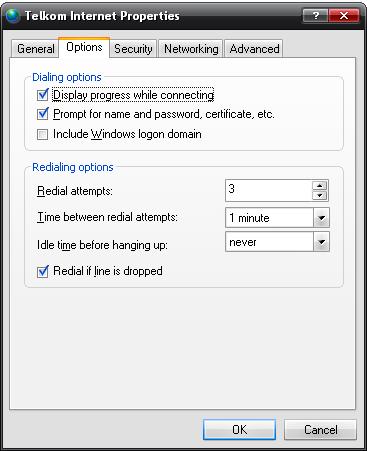
I'm running XP SP2 on my other box at home. The ADSL sync is fairly stable and I've set up the connection (PPPOE) to dial up if the connection drops, however this doesn't appear to be happening. My other machine stays connected all the time, it appears as if the OS or a service is causing the connection to drop for some reason. I'm running XP SP2 with all the updates, DLink 2500U router (bridge mode), and PPPoE to axxess (saix local). Any suggestions?
 
Hi guys

I'm running XP SP2 on my other box at home. The ADSL sync is fairly stable and I've set up the connection (PPPOE) to dial up if the connection drops, however this doesn't appear to be happening. My other machine stays connected all the time, it appears as if the OS or a service is causing the connection to drop for some reason. I'm running XP SP2 with all the updates, DLink 2500U router (bridge mode), and PPPoE to axxess (saix local). Any suggestions?

why not setup the Dlink to dial the connection?
 
The modem is in bridge mode (LLP/SNAP) and my dial up's run using PPPoE. Am I missing something here PostmanPot and Tau1z? I also have another (wireless) router connected to the switch at home.
 
The modem is in bridge mode (LLP/SNAP) and my dial up's run using PPPoE. Am I missing something here PostmanPot and Tau1z? I also have another (wireless) router connected to the switch at home.

I see what you mean. Windows calls it PPPoE in the set up connection dialogue which was a bit confusing. :p

If both boxes connect in the same way and are set up the same way then it could very well be a nasty little service causing the connection to drop and not redial. Do you have to restart in order to reconnect?
 
No need to restart PostmanPot, only need to "dial up" again. I suspect it's a service but I don't know which. I've already taken my AV out of the equation but it's still doing it
 
Start | Run | cmd | OK
net start "Remote Access Auto Connection Manager"
net start "Remote Access Connection Manager"

fixed?
 
Andres101, I'll give this a go at home this afternoon. thanks for the info. Can you tell me if I need to run this everytime the connection drops?
 
maybe i am having a slow friday...why not just let the modem deal with the connection? Instead of dialing out from each machine?
 
maybe i am having a slow friday...why not just let the modem deal with the connection? Instead of dialing out from each machine?

I run different connections to different accounts throughout the day. One machine is linked to news servers and torrent sites all day and the other one just surfs internationally :o
 
Top
Sign up to the MyBroadband newsletter
X