PC Upgrade Assistance

Pulserider

Senior Member
Joined
May 28, 2012
Messages
713
Reaction score
152
So I have a very old computer I plan to replace. My current computer is a 1st Gen i5, 8 GB Ram, GeForce 640GT, SSD. I currently play games it can handle but would like for something more power.

I purchased so long a good second hand GeForce RTX 3060 12GB card, which I like to pair with either a AMD or Intel CPU. I am leaning towards AMD. What will be a good spec to pair with this graphics card, that wont break the bank and wont cause a bottle neck with the graphics card. I was hoping for @10K with the CPU, Ram, Case, PSU, SSD.
 
Case should be fine, but power supply might not be up for the task I believe.
 
So for starters if your PSU is as old as that first gen good to change the PSU just in case

AMD wise can still rock at 5600X on a B550 series board dont have to go X570 boards if you not going to do heavy overclockign especially with a 3060 etc with at least 16gb ddr4 ram 32 still not a standard gaming wise mostyoutubers will say 32 is min they lying.

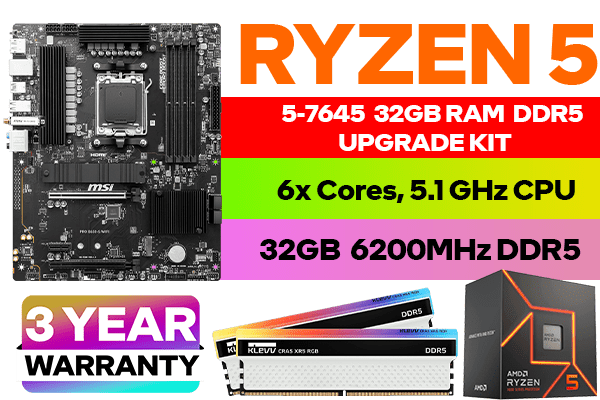
There is also upgrade kits with the AMD 7500F which is pretty much like the 7600 (both Ryzen 5)
would be DDR5 of course but then you on pare with current gen again 16gb is fine but do leave room for upgrades on the Ram in case in a short few years you need to add another 16gb to the system

https://www.techguysa.co.za/products/ryzen-5-7500f-a620m-16gb-upgrade-kit/ <--- for example now it is a A620 board (A series entry level while B is mid range and X is high end)

Entry level vs mid vs high end does not affect gaming (unless you looking at the finer technical details by a frame or so would be more PCIE lanes which again you wont notice it so a R2000 mobo vs a R20 k mobo will not increase your FPS.)

and PSU wise depends on your 3060 i might be wrong but at least a 550W PSU but id go for 650 or 750W if it still fits in your budget gold rated modular make it look nice if bronze is your budget then so be it.

750W leaves future room for GPU upgades but not those RTX 4080 type of Cards (recommends 750W but id suggest 100W above the recommended to be safe and prevent CPU /GPU bottlenecking).
 
Case should be fine, but power supply might not be up for the task I believe.

Case should be fine, but cases have come a long way since first gen i5. Get yourself a decent (phanteks, fractal, etc) new one if you can afford to. It's a joy to work in compared to using a decade old case.

I don't think Ryzen 5000 series makes much sense for a new build these days, unless you can get it for an absolute steal. The 7500F mentioned above is a good value for money CPU. I didn't look at the link, so can't comment on that specific price. Going with AMD Ryzen 7000 means you will most likely be able to upgrade to the next 4 generations when they release using the same MB. Ryzen 5000 is a dead end.

A B650 motherboard is a great place to start, and only go to either the X670 or 620 if you really know what you're gaining or giving up.
For individual motherboard reviews, check out Buildzoid and Hardware Unboxed on youtube. Last I heard, the MSI Tomahawk B650 was a good choice for the money, although I don't know if you can fit it into your budget. Motherboards are pretty expensive these days.

SSD - go for NVMe, these days it cheaper than SATA and get one with DRAM. Again, PCIe 4.0 if you can swing it. Sometimes there are sales netting you a top end 7000mbps ssd for not too much. I'd rather go for bigger rather than faster though.
 
I think the best for me here is to go per component. Next maybe the case with a decent power supply like mentioned. Then to spend now too little money and then at a short time I feel like if I just could spend a little more I have something better spec wise.

Regarding the new processors AM5, which is a value for money decent type, mid range processor? My other thought is also not too buy the best processor and then the GPU is the bottleneck. A good balance between these two hardware.
 
I think the best for me here is to go per component. Next maybe the case with a decent power supply like mentioned. Then to spend now too little money and then at a short time I feel like if I just could spend a little more I have something better spec wise.

Regarding the new processors AM5, which is a value for money decent type, mid range processor? My other thought is also not too buy the best processor and then the GPU is the bottleneck. A good balance between these two hardware.
The GPU will be the bottleneck for most games, (almost) no matter which current CPU you get. The 7500F is almost as fast as the 7600 and notably cheaper. It's what I would recommend for a budget sensitive build.

I prefer saving and buying it all in one, unless you find a great sale for a specific component. No use having components in the cupboard depreciating.
 
The GPU will be the bottleneck for most games, (almost) no matter which current CPU you get. The 7500F is almost as fast as the 7600 and notably cheaper. It's what I would recommend for a budget sensitive build.

I prefer saving and buying it all in one, unless you find a great sale for a specific component. No use having components in the cupboard depreciating.

Thats true, I appreciate the advice. So regarding the 7500F that will be the fit for the GPU? Motherboard wise? Then also what will be a good PSU wattage here.
 
with at least 16gb ddr4 ram 32 still not a standard gaming wise mostyoutubers will say 32 is min they lying.

A bit half and half depending on the game, what is generally happening with some games like escape from tarkov is that the game uses up to 14gb ram and if you add in things like open web browsers, discord, ram for the OS, etc, you breach the 16gb limit (more likely around 15gb after hardware reserve), and your pc starts using swap space for ram which negatively affects gaming performance with stutters, etc. You can't arbitrarily buy 18gb ram or 21gb ram, to keep dual channel you're either going to be using 24gb or 32gb to rid using swap space depending on how many dimm slots you have. Taking all of that into account, including price/performance, longevity, availability, etc, 32gb as the next minimum isn't completely lying (though it's misleading without explanation) as that is the only next logical break point for ram after 16gb. If you have 4 dimm slots you can start off with 2 x 8gb ram and then get another 2 x 8gb ram when the need arises, but if you only have 2 slots then 2 x 16gb isn't a bad consideration.
 
A bit half and half depending on the game, what is generally happening with some games like escape from tarkov is that the game uses up to 14gb ram and if you add in things like open web browsers, discord, ram for the OS, etc, you breach the 16gb limit (more likely around 15gb after hardware reserve), and your pc starts using swap space for ram which negatively affects gaming performance with stutters, etc. You can't arbitrarily buy 18gb ram or 21gb ram, to keep dual channel you're either going to be using 24gb or 32gb to rid using swap space depending on how many dimm slots you have. Taking all of that into account, including price/performance, longevity, availability, etc, 32gb as the next minimum isn't completely lying (though it's misleading without explanation) as that is the only next logical break point for ram after 16gb. If you have 4 dimm slots you can start off with 2 x 8gb ram and then get another 2 x 8gb ram when the need arises, but if you only have 2 slots then 2 x 16gb isn't a bad consideration.
Yet we can now buy 12 and 24gig sticks :-)
 
Yet we can now buy 12 and 24gig sticks :)

Yea that's now, show me a consumer 12gb or 24gb stick of ddr4 or ddr3 or ddr2.
 
with at least 16gb ddr4 ram 32 still not a standard gaming wise mostyoutubers will say 32 is min they lying.
As @Mystic Twilight said, depends on the game and whats running in the background. Heck I play one daily that's been out for years and the game on its own hovers at 24gb ram usage. Have played others creeping up beyond 14gb too.
16gb has passed being the minimum a while ago.
 
There is also upgrade kits with the AMD 7500F which is pretty much like the 7600 (both Ryzen 5)
would be DDR5 of course but then you on pare with current gen again 16gb is fine but do leave room for upgrades on the Ram in case in a short few years you need to add another 16gb to the system

https://www.techguysa.co.za/products/ryzen-5-7500f-a620m-16gb-upgrade-kit/ <--- for example now it is a A620 board (A series entry level while B is mid range and X is high end)
Also.. who in their right mind recommends a single stick of ram for a ryzen cpu intended for gaming :P .. if it was an office pc sure.
Heck that single stick of ram will actually cripple the 3060's performance too
 
Does your 3060 work in your current PC?.

AMD's new AM5 Motherboards are fairly expensive still, so there is nothing wrong with an AM4 CPU given that you seem to keep your PC equipment around for a long time. Something to consider is that an AMD 6 core CPU will likely draw less power than your current CPU, so with AMD you might not need a new PSU, which can save you R1500 or more.

AMD just released the 5600X3D at $200, which is an amazing deal for the money, especially since the motherboards are so much cheaper. You can get Ryzen 7600X performance for around R1000 or more less. Your 3060 will be the bottleneck, so you won't see the benefit of going AM5.

Also notice how much cheaper AM4 motherboards are compared to AM5;
1708443441949.png
 
Last edited:
As @Mystic Twilight said, depends on the game and whats running in the background. Heck I play one daily that's been out for years and the game on its own hovers at 24gb ram usage. Have played others creeping up beyond 14gb too.
16gb has passed being the minimum a while ago.
Agree 16GB is minimum for running the game, but just keeping your chrome open with a dozen in the background can consume 3-5GB of RAM.

A guideline I use, is that you want as much RAM as a current gen console Plus whatever windows typically needs to run a non gaming workload. i.e. 16GB+8GB.

So 32 is the best to get for now.

Also note that upgrading from 2 RAM stick to 4 RAM stick may create stability and performance issues due to the additional pressure on the memory controller.
 
So I have a very old computer I plan to replace. My current computer is a 1st Gen i5, 8 GB Ram, GeForce 640GT, SSD. I currently play games it can handle but would like for something more power.

I purchased so long a good second hand GeForce RTX 3060 12GB card, which I like to pair with either a AMD or Intel CPU. I am leaning towards AMD. What will be a good spec to pair with this graphics card, that wont break the bank and wont cause a bottle neck with the graphics card. I was hoping for @10K with the CPU, Ram, Case, PSU, SSD.
GeForce goes better with Intel.

Get Crucial ram, normal is fine, as for motherboard get that first before you get the ssd. Get an NVME drive ideally and not an SSD, SSD is older tech now 550mbps vs 3500/7000mbps

Quite honestly, get the cheapest motherboard as you already have a gfx card. Just decide if it need wifi too, a stock standard cooler is fine too, get a nice case so it look more bling but dont overspend.

In all the years building gaming and cad machines, these super conductor crap motherboards made no difference, unless you want specific audio or specific onboard graphics and connections.
 
Agree 16GB is minimum for running the game, but just keeping your chrome open with a dozen in the background can consume 3-5GB of RAM.

A guideline I use, is that you want as much RAM as a current gen console Plus whatever windows typically needs to run a non gaming workload. i.e. 16GB+8GB.

So 32 is the best to get for now.

Also note that upgrading from 2 RAM stick to 4 RAM stick may create stability and performance issues due to the additional pressure on the memory controller.
Not really

4x pipes are better than 2 for multi-threading CPUS. All it would do is consume a bit more power.

Check if the Board supports Quad Channel Mode. Its designed for that. Multi-tasking

AMD tends to like dual channel though. Jamming it all into 2 pipes rather than Intel that kicks off pipe 3-4 to start with the next tasks already.
 
Agree 16GB is minimum for running the game, but just keeping your chrome open with a dozen in the background can consume 3-5GB of RAM.

A guideline I use, is that you want as much RAM as a current gen console Plus whatever windows typically needs to run a non gaming workload. i.e. 16GB+8GB.

So 32 is the best to get for now.

Also note that upgrading from 2 RAM stick to 4 RAM stick may create stability and performance issues due to the additional pressure on the memory controller.
No 4 is better than 2
 
Top
Sign up to the MyBroadband newsletter
X