Please help

Shnorkiller

Well-Known Member
Joined
Jul 26, 2012
Messages
297
Reaction score
0
Hi, hoping someone here can help me out a bit, my pc has been off for about a week or so and when I turned it on a little earlier I was presented with the unpleasant message of "disk boot failure, insert system disk and press enter".

This is pretty odd seeing as nothing was wrong the last time I turned it off, anyone have some advise for me?.

Much apreciated!
 
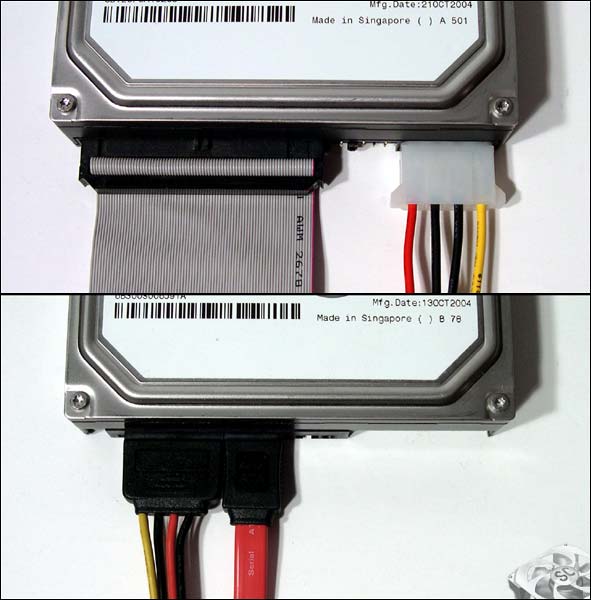
Switch off your PC, open up the left side panel and make sure these cables are firmly in your hard drive, take them out and put them back in if you have to, you will have one of the following sets of cables. Switch on your Pc and see if it boots up, if it does close the side panel again.

sata-ide_lg.jpg
 
I've had this happen plenty of times before. In my case it was my bios which had restored to default settings and therefore my PC was booting off the wrong drive.

Give that a check aswell.
 
Okay well it seems the cables are still plugged in. The pc has 2 hard drives, I know it boots off c, if I go into hard drive boot priority, it seems to show both drives, I just don't know which is which as their names are "ST380011A" and "ST380815AS". First and second boot are both set to hard disk. It still doesn't seem to be working, anything else I can try?.

Thanks for all the help so far!
 
Happened to me so many times. That feeling when your balls drop and you get a cold sweat, only to find its a boot sequence issue :p
 
Happened to me so many times. That feeling when your balls drop and you get a cold sweat, only to find its a boot sequence issue :p

Such a relief!!

And it's a pretty old pc, not going to spend much money on it, but thanks for the heads up!
 
+1 for the CMOS battery - particularly that it's an older PC; just remember to setup the time etc after replacing it ;-)
 
Top
Sign up to the MyBroadband newsletter
X