Pls help with Mecer Wireless ADSL2+ Router

avdp

Senior Member
Joined
Mar 15, 2008
Messages
583
Reaction score
0
Location
Gauteng
Hi,

I am a total noob. I have the above router setup (by our IT guy), connected to 2 PCs, PS3 and iPhones.

It has a firewall setup, with IP adresses, subnet masks etc defined that I have to enter in the PS3 and iPhones if I want to connect to the wireless.

What I need to know : I want to disable the firewall (I think that is the problem), because I want to use WinScp with SSH to get into my iPhone. If I try and connect with WinScp, but with the firewall on, it doesnt allow me access. If I enter that IP address in WinSCP it says 'network error : cannot assign address'.

Is it because of the firewall? Do I disable it by simply logging into the router and pressing the disable button under firewall options? And if I want to re-enable it, is it just a question of pressing the 'enable' button again? What happens regarding the preset IP adress, subnet masks etc?

My IT guy is not very helpful in this regard, as he doesnt believe I should disable the firewall, and I dont want to have to call him out, and be told 'I told you so!'.

Pls help.

Thx
 
Access the router config page, navigate to the firewall and then select/configure the firewall to allow those 2 services to have access to your network. When configuring those two services access you will be asked to which Ip's on the network they should go to.

This would then allow you to still have your firewall on.
 
Thx

I have got into the router, under firewall there is only the option to enable or disable.

Under interface setup, wireless, there is the option Wireless Mac Address Filter where you can add mac addresses? How do I setup a mac address?

Thx
 
Thx

I have got into the router, under firewall there is only the option to enable or disable.

Under interface setup, wireless, there is the option Wireless Mac Address Filter where you can add mac addresses? How do I setup a mac address?

Thx

On your iPhone go to Settings, General, About

Yo will see Wi-Fi Address - thats the Mac address i think

Add that to ur Routers firewall..see if that works
 
Thx fxit!

Whoa, I am now so confused. I have my IP address for router and the IP address of my iPhone, (similar but not same). If I type in iPhone address in WinSCP, after adding that Mac address, it says 'cannot assign requested address'. If I type in the routers IP it says 'Network Error : Connection Refused'.

I have disabled the firewall and added that Mac address under Interface, Wireless, Wireless Mac Address Filter (with it activated).

ANy other ideas please?

Thx
 
Ok well the reason it said 'Network Error : Connection Refused' when you typed in the router IP address is because that would be SSH'ing into the router and you cant SSH into your router...

So scrap the router IP address idea..

You need the IP address of the iPhone which you get from the Wi-Fi settings on the iPhone as i have explained...

If you have any 3rd party antivirus or firewall, disable them too to see if that might be the problem (norton/windows firewall etc) and try to connect again using the iPhone's IP address
 
Ok, Windows Firewall off, Kaspersky Antivirus off. Still get cannot assign requested address.

So is it the Dest IP or the Gateway IP? The Dest IP is the one I manually type into my iPhone, and thats the one that says Network Error :Cannot Assign Requested Address????

Underneath the option to disable my Firewall on the Router, there is another option SPI : Enabled or Disabled, this is disabled?????
 
Last edited:
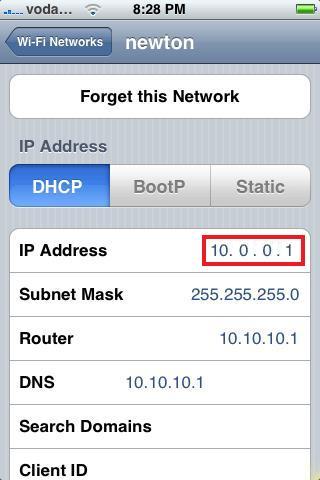
Hmm i have DCHP enabled on my router so it automatically assigns an IP to my iPhone which i get from here

iphone-wireless.jpg


But yeah it should be destination IP address..

I really dont know what else to tell you :( sorry
 
Well mines under "LAN Setup"

"DHCP Client List"

But then again u dont have DHCP enabled i think...

We need some networking guru to help you out here...
 
Ok, I figured out my DHCP is disabled. I am still reading....
What will happen if I enabled it?
Ok, if I enable, it opens a list of options, with starting IP addresses etc.
 
Should I leave the starting IP address blank?

Ok, I cant. Should I just add one to the default?
 
Thx for all the help. I'll play with it for a bit and let you know
 
Top
Sign up to the MyBroadband newsletter
X