Problems flashing Sonoff Basic

blunt

Expert Member
Joined
May 1, 2006
Messages
4,162
Reaction score
814
Location
Cape Town
Wonder if anyone can help

I have a Sonoff Basic ("RF R2 POWER V1.0") which I've hooked up to the FTDI adapter (3.3v, GND to GND, TX to RX, RX to TX).
If I just plug it in to the USB port it boots up like a regular sonoff, LED flashes etc.
I then unplug the USB, hold down the black button on the Sonoff, plug the USB in and keep the button pressed down (for up to 10s), let go and it doesn't boot up like normal, no LED's lighting up on the sonoff which as far as I know is a good indicator its in flash mode. I then run the Tasmota PyFlasher but it just sits on "Serial port COM13" (which is the right one) and does nothing. The FTDI TX/RX never flicker like when it's not in flashing mode.

If I open Termite it just says waiting for port.

Any ideas what could be wrong?

20200109_162423.jpg
 
You need to bridge r21 as well if I'm not mistaken.
 
Wonder if anyone can help

I have a Sonoff Basic ("RF R2 POWER V1.0") which I've hooked up to the FTDI adapter (3.3v, GND to GND, TX to RX, RX to TX).
If I just plug it in to the USB port it boots up like a regular sonoff, LED flashes etc.
I then unplug the USB, hold down the black button on the Sonoff, plug the USB in and keep the button pressed down (for up to 10s), let go and it doesn't boot up like normal, no LED's lighting up on the sonoff which as far as I know is a good indicator its in flash mode. I then run the Tasmota PyFlasher but it just sits on "Serial port COM13" (which is the right one) and does nothing. The FTDI TX/RX never flicker like when it's not in flashing mode.

If I open Termite it just says waiting for port.

Any ideas what could be wrong?

View attachment 764194

Having just flashed one similar on Sunday. Your steps are correct. I first check that the connection between FTDI and sonoff is working by connecting UsB to PC. Flashing blue (Pow) / green (Basic) means connection established.

I then disconnect USB.

Press the button on Basic/Pow. Continue holding and THEN connect to USB and keep button on SONOFF pressed for 10 seconds (I count to 11) before letting go.

Then in PsyFlasher. It autodetects com port. I choose the BIN file and then press flash and off it goes. If the device is not in flash mode , you just get that funny ....^^^...^^^ in the connection attempt in that console if i recall correctly.

Definitely only have either Psyflasher or Termite open at once. Only one app can connect/control to the FTDI at a single time. For me, I only open termite after the psyflasher tells me that flashing is complete and I have closed psyflasher. <<- This could be the reason Termite is telling you waiting for port. Also termite connect to FTDI/Sonoff is useless unless the sonoff is running Tasmota. With EWElink firmware ... you see nothing. At least in my experience.
 
Having just flashed one similar on Sunday. Your steps are correct. I first check that the connection between FTDI and sonoff is working by connecting UsB to PC. Flashing blue (Pow) / green (Basic) means connection established.

I then disconnect USB.

Press the button on Basic/Pow. Continue holding and THEN connect to USB and keep button on SONOFF pressed for 10 seconds (I count to 11) before letting go.

Then in PsyFlasher. It autodetects com port. I choose the BIN file and then press flash and off it goes. If the device is not in flash mode , you just get that funny ....^^^...^^^ in the connection attempt in that console if i recall correctly.

Definitely only have either Psyflasher or Termite open at once. Only one app can connect/control to the FTDI at a single time. For me, I only open termite after the psyflasher tells me that flashing is complete and I have closed psyflasher. <<- This could be the reason Termite is telling you waiting for port. Also termite connect to FTDI/Sonoff is useless unless the sonoff is running Tasmota. With EWElink firmware ... you see nothing. At least in my experience.
Thanks - asked a friend of mine he also said my steps seem right.
I'm going to find another windows PC and see if that makes a difference. ESPtool doesn't play well on my mac when I tested it out there

You need to bridge r21 as well if I'm not mistaken.
Dont actually see an r21 on these I think thats for the RF ones.
 
Thanks - asked a friend of mine he also said my steps seem right.
I'm going to find another windows PC and see if that makes a difference. ESPtool doesn't play well on my mac when I tested it out there


Dont actually see an r21 on these I think thats for the RF ones.
OK, you did mention RF in your original post though ;)
 
sheesh :)

All this new-fangled technology... My venerable R1s are a lot less confusing :D
 
sheesh :)

All this new-fangled technology... My venerable R1s are a lot less confusing :D
yeah i have about 9 Basics spare after I bought the R3's (DIY mode) that I'm now wanting to Tasmota, bought them at different times so I have some others that dont have the big black wires on and are also R2s but don't say RF. Some have their holes soldered shut others dont.
 
@Dairyfarmer which usb to serial do you use as a matter of interest?

Left to right
Pin 1 - ground
Pin 2 - tx -> rx on Sonoff
Pin 3 - rx -> tx on Sonoff
Pin 4 - don't use
Pin 5 - 3.3 or 5v depending on the jumper

You do need a usb cable to connect it to the computer.
Used NodeMCU flasher for Windows
 

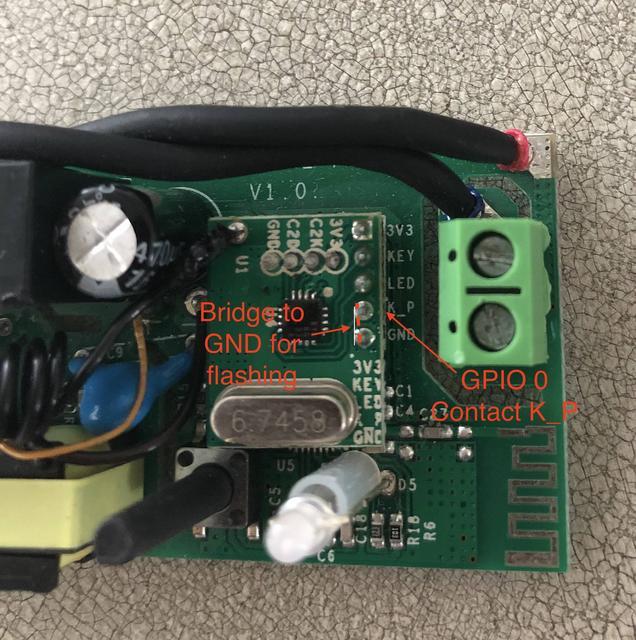
The R2 V1.0 version of the Sonoff RF uses an ESP8285 which is covered by a horizontally orientated RF expansion board. Entering flash ready mode can be achieved by grounding K_P (which is connected to GPIO0) to the neighbouring GND pin on the RF board during power on.

tNTwDPE.jpg


I don't know why people don't use the Tasmota website and the links from it...


tNTwDPE.jpg


I don't know why people don't use the Tasmota website and the links from it...
Unfortunately we're not all as wonderful as you. It ended up being an issue with the two windows laptops I tried - just did the exact same steps on a third Windows laptop and it worked.
 
For those non passive aggressive geniuses out there the ftdi adaptor (prolific) i have doesn't seem to work in windows 10 despite the drivers installing just fine - windows 7 it works.
 
For those non passive aggressive geniuses out there the ftdi adaptor (prolific) i have doesn't seem to work in windows 10 despite the drivers installing just fine - windows 7 it works.
Crap. I guess I was just lucky with my ftdi .. bought from pi shop. Definitely works on windows. Don't recall even needing to manually install drivers. Welcome to Tasmota :)
 
PS: @SauRoNZA dont worry about aggressively googling profilic ftdi adaptors to find out if there an article stating it doesnt work in windows 10, or there is a way around getting it to work in windows 10 - I'm sure there must be something out there, I'll just assume there is one and admit defeat to your superiority :)
 
Top
Sign up to the MyBroadband newsletter
X