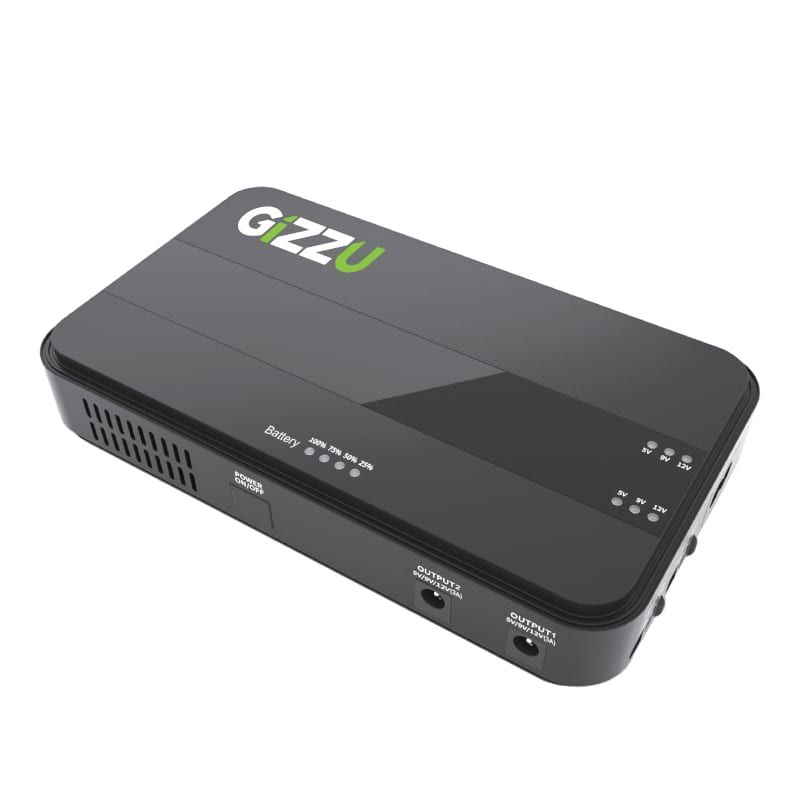
Question about this Mini UPS - please help

Olorin

Well-Known Member
Joined
May 27, 2018
Messages
369
Reaction score
141

s-zoom.file


Does anyone own this specific mini UPS? My only concern is that my fiber box and router power connectors are of different size, so what I need to know is if there is an adapter included in the box for different size router/fiber boxes.

I need to order one ASAP as stock is flying off the shelves so your advice on this would be most appreciated.
 

s-zoom.file


Does anyone own this specific mini UPS? My only concern is that my fiber box and router power connectors are of different size, so what I need to know is if there is an adapter included in the box for different size router/fiber boxes.

I need to order one ASAP as stock is flying off the shelves so your advice on this would be most appreciated.
Works with my Huawei B618s-22d
 
Thanks guys appreciate the help, will order. Just another question, probably a stupid one. But I just bought an AVR that powers my home theatre system - before my power goes out with load shedding should I turn the equipment off at the remote and then at the wall socket? Or is turning off the equipment with the remote good enough? I'm just worried about loadshedding possibly damaging my amp as it's pretty expensive (for me anyway).
 
Thanks guys appreciate the help, will order. Just another question, probably a stupid one. But I just bought an AVR that powers my home theatre system - before my power goes out with load shedding should I turn the equipment off at the remote and then at the wall socket? Or is turning off the equipment with the remote good enough? I'm just worried about loadshedding possibly damaging my amp as it's pretty expensive (for me anyway).

When the power turns back on surges are common. It can damage you equipment. Turning it off with the remote is not sufficient. Either turn it off at the plug, plug it out, and/or get a decent surge protection plug, e.g.


If you run it off an inverter or UPS it usually provides surge protection, but remember to use a surge plug for your inverter/ups.

You can also install a whole house surge protector in your DB, e.g.


But these usually only kick in at very high surges, so you might still damage more sensitive equipment.
 
When the power turns back on surges are common. It can damage you equipment. Turning it off with the remote is not sufficient. Either turn it off at the plug, plug it out, and/or get a decent surge protection plug, e.g.


If you run it off an inverter or UPS it usually provides surge protection, but remember to use a surge plug for your inverter/ups.

You can also install a whole house surge protector in your DB, e.g.


But these usually only kick in at very high surges, so you might still damage more sensitive equipment.
Thank you very much, appreciate it!
 
If anyone has this unit please advise - so I received the unit today, plugged in the ONS and router, and when I turned it on for the first time three lights were already on ie (75% charged). I don't know if this is normal, if brand new units are supposed to start with zero charge and build up to 100% or already at 75% with my unit - could it be that my unit is a used unit as I ordered the unit from Takealot? Or am I being silly?

I had load shedding, a little over 2 hours. A few minutes prior to loadshedding I turned the power off, after load shedding I noticed I still had 3 lights on with the 4th light flashing so 75% charge, until I turned the power back on and then this changed from 75% (3 lights) to only 1 light with the 2nd light flashing so less than 50% battery remaining.

Is this normal from a brand new unit?
 
If anyone has this unit please advise - so I received the unit today, plugged in the ONS and router, and when I turned it on for the first time three lights were already on ie (75% charged). I don't know if this is normal, if brand new units are supposed to start with zero charge and build up to 100% or already at 75% with my unit - could it be that my unit is a used unit as I ordered the unit from Takealot? Or am I being silly?

I had load shedding, a little over 2 hours. A few minutes prior to loadshedding I turned the power off, after load shedding I noticed I still had 3 lights on with the 4th light flashing so 75% charge, until I turned the power back on and then this changed from 75% (3 lights) to only 1 light with the 2nd light flashing so less than 50% battery remaining.

Is this normal from a brand new unit?
most lithium batterys are pre charged at factory .if sold as at factory state ie flat .the first initial charge can take ages to wake the battery up .so quite normal
 
I guess I'm just trying to understand how this battery works. I just had loadshedding now, 2 hours .... all four lights were still on just prior to the power kicking back in, meaning still full charge? However as soon as the power kicked back in, it went down to 2 lights, and the third light was flashing.

So I don't know if the 4 lights on during loadshedding even at the 2 hour mark was an accurate representation of how much battery was still left. Just seems a bit weird that when the power comes on it's much, much less than what it showed before that.
 
each light represents 25%, so theoretically if it uses even 26% during LS, third light will flash for charging.

have similar unit and i noticed that
 
each light represents 25%, so theoretically if it uses even 26% during LS, third light will flash for charging.

have similar unit and i noticed that
How does it go from 4 lights on when running on battery to only 2 lights on with 3rd flashing when charging immediately after?
 
No idea, but im sure it uses about 26-30% in the 2 hours
 
Just an update, got the Gizzu, up and running for a few weeks and works perfectly. So here is a possibly stupid question - I'm usually away on the weekends, and what I've done recently is just before I lock up and go, I turn the mini UPS off- the logic being that the battery isn't being used when load shedded since I'm not there I can turn the power off to everything anyway. Since I would otherwise be load shedded 6-8 times over the weekend, that would use some of the battery and especially over time so I figured rather turn it off when I'm not there.

Is that a foolish thing to do? Must I leave it on always, even if I'm not there?
 
  • Like
Reactions: Yuu
Just an update, got the Gizzu, up and running for a few weeks and works perfectly. So here is a possibly stupid question - I'm usually away on the weekends, and what I've done recently is just before I lock up and go, I turn the mini UPS off- the logic being that the battery isn't being used when load shedded since I'm not there I can turn the power off to everything anyway. Since I would otherwise be load shedded 6-8 times over the weekend, that would use some of the battery and especially over time so I figured rather turn it off when I'm not there.

Is that a foolish thing to do? Must I leave it on always, even if I'm not there?
Not at all, carry on. :thumbsup:
 
  • Like
Reactions: Yuu
Just an update, got the Gizzu, up and running for a few weeks and works perfectly. So here is a possibly stupid question - I'm usually away on the weekends, and what I've done recently is just before I lock up and go, I turn the mini UPS off- the logic being that the battery isn't being used when load shedded since I'm not there I can turn the power off to everything anyway. Since I would otherwise be load shedded 6-8 times over the weekend, that would use some of the battery and especially over time so I figured rather turn it off when I'm not there.

Is that a foolish thing to do? Must I leave it on always, even if I'm not there?
What will the power draw be anyway when it's idle?
 
Top
Sign up to the MyBroadband newsletter
X