RAID 5 - SQL 2000 Database

Peon

Expert Member
Joined
Sep 28, 2006
Messages
3,835
Reaction score
1,123
Location
In my burrow
I have a client running Server 2003 and SQL 2000.

Client pc's are hanging when apps write or read. Long story short I identified the storage subsystem. Its a complete mess with individual partitions on arrays. C drive on a raid 0 or 1 mirror. Nightmare.

Anyway. Im going to use a dedicated disk for C and the remaining 5 drives im going to rebuild into a RAID-5 array. Let the db reside on this said array.

Im hoping there are some SQL admins who have RAID knowledge, or the other way round. RAID gurus with SQL insight. I have some questions I would like to ask.

Peon
 
C drive as a mirror how is that a nightmare?

Best practice is database on one drive and logs on another physical drive
 
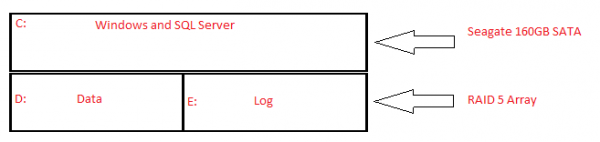
See they added a 160gb sata drive by letting it hang in the chassis. Using this a log disk. But performance is terrible. TheGuy, you must see the organizing of the hdd's. They have partitioned arrays, thinking as you say, have different disk for files and db's. Yet they all the same array. Robbing peter to pay paul.

As best I can see with my limited SQL knowledge, its the read/requests that are slow. There is atleast 5 secs in between each request. There are only 5 terminals connected to this server. Ive perfmon'd and tested. No net bottleknecks, no ram problems. The CPU avg's about 45 percent load. In perfmon add disk counters etc,etc and they hit the roof consistently. Hence I believe its a harddrive or raid array issue.

My plan, which I hope will alleviate the problem or improve performance. Is to run windows of a dedicated Sata drive connected directly to the mobo. The remaining 5 drives which are all SCSI, put them in a RAID 5 array. They controller is a bit old and I dont believe it has the option to choose RAID 10. Besides, Im looking for READ/REQUEST improvement.

So put the 5 remaining SCSI's in RAID 5 with 64k cluster size.

"Is this the right thing to do Master, asks the young padawan...."
 
SATA disk for log that needs to keep up with the data on SCSI? Not right. If you're striping RAID5, you could still create a volume for LOG and a volume for DATA. Best practise is best practise.
 
my 5 cents:

Having a C drive on RAID1 is GOOD.
If one drive fails the other can take over.

C partition on 2 x fast SATA drives (RAID1)

D & E partitions on RAID5 - SCSI wide 10K or SAS 10K/15K RPM (with at least 1 hot spare, depending on RAID5 drive count)
a RAID controller with battery backed up cache - important when the power fails or someone falls over a plug and switches off/lightning kills the UPS.

The benefit of SQL on RAID10or01 (over5/6) only comes into play with MANY concurrent reads/writes / MANY concurrent users.
RAID10 and 01 is also rather expensive (u need double the amount of disks)

Having separate RAID spindles purely for log files is nice but also expensive.
I guess it depends on what kind of performance you're looking at.

I have numerous SQL2005 boxes (HP) each running 8-odd databases on RAID5 + hotspares.
No performance issues.

remember, it's never a good idea to try and "over optimize" a SQL config.
KISS - Keep It Simple Stupid.
:-)


PS: My SQL boxes all have multiple network cards configured in "TEAM" mode and they all connect to GB switches.
Power users connect to the Gb switches and "normal" users are on 100BaseT.
With client side apps it makes a difference, with a web based app not so much.


Some pretty pictures from MS. http://msdn.microsoft.com/en-us/library/ms190764.aspx
 
Last edited:
my 5 cents:

Your chosen cluster size (on the DB array) must be smaller than your RAID stripe size. (Otherwise the RAID performs multiple writes for each cluster that's written = slow/counter productive)
1 cluster should fit into 1 stripe.

Having a C drive on RAID1 is GOOD.
If one drive fails the other can take over.

C partition on 2 x fast SATA drives (RAID1)

D & E partitions on RAID5 - SCSI wide 10K or SAS 10K/15K RPM (with at least 1 hot spare, depending on RAID5 drive count)
a RAID controller with battery backed up cache - important when the power fails or someone falls over a plug and switches off/lightning kills the UPS.

The benefit of SQL on RAID10or01 (over5/6) only comes into play with MANY concurrent reads/writes / MANY concurrent users.
RAID10 and 01 is also rather expensive (u need double the amount of disks)

Having separate RAID spindles purely for log files is nice but also expensive.
I guess it depends on what kind of performance you're looking at.

I have numerous SQL2005 boxes (HP) each running 8-odd databases on RAID5 + hotspares.
No performance issues.

remember, it's never a good idea to try and "over optimize" a SQL config.
KISS - Keep It Simple Stupid.
:-)


PS: My SQL boxes all have multiple network cards configured in "TEAM" mode and they all connect to GB switches.
Power users connect to the Gb switches and "normal" users are on 100BaseT.
With client side apps it makes a difference, with a web based app not so much.


Some pretty pictures from MS. http://msdn.microsoft.com/en-us/library/ms190764.aspx

I have only the following to work with:

1x 160GB sata drive
5x 146gb Ultra320 10K rpm drives

Cant put in a new server, server MUST run Sql 2000 or app wont work. Mentioned SQL 2008 is backward compatible with 2000, dev replies certain scripts wont work. I cant answer as I have less than no experience in SQL matters. I was thinking of putting in a Dell PowerEdge SAN, and and and...bill too expensive.

Bottomline, I have to somehow improve their current setup.

Their current setup is 2 of the scsi drives are being used for C:, the remaining 3 scsi's are being used for the db, a 160gb sata was added to house logs, even though the 3 db scsi's have more than enough space to house the logs. Then they partitioned the 3 scsi's disk into 4 partitions.

I will remember your input of 1 cluster 1 stripe. Naturally one first specifies the stripe size before formatting and setting the cluster size. What size should I make a stripe? Could I make a stripe 64k and a cluster 32k?


How is the HDD performance outside of SQL?
IF OK, Check your table indexes

One of the developers will be assisting me on Saturday when I make this change. I will mention to him the table indexes. When you say, performace outside of SQL, what do you mean. Like copying files from the HDD's to an external?
 
I'd lose the 160Gb SATA and get another 146 SCSI (total of 6 SCSI drives),
Depending on what your RAID controller can do (age/brand?) and your required disk space on RAID?


option1:
2 x 146 SCSI in RAID1 (C drive with Windows + swop file + SQL program files)
3 x 146 SCSI RAID5 (D drive with database + logs)
1 x 146SCSI as a hot spare.

Option2:
3 x 146SCSI in RAID0 (drives C & D)
Mirror the 2nd set of 3 drives, gives you RAID0+1 (a mirror of stripes)

option 3:
2 x 146 SCSI in RAID1
now RAID0 the lot and you have RAID10 (a stripe of mirrors)


Options 2 and 3 will be (slightly) faster than option 1 but options 1 gives the most space.
I'd go with one.


on stripe versus cluster size:

You create the stripe size during the RAID logical volume creation.
If you just click, click, click (defaults?) then the RAID controller decides what's the best stripe size for the array type and logical disk size.
This (defaults) is more than sufficient in most cases.
 
Last edited:
SATA disk for log that needs to keep up with the data on SCSI? Not right. If you're striping RAID5, you could still create a volume for LOG and a volume for DATA. Best practise is best practise.

I'd lose the 160Gb SATA and get another 146 SCSI (total of 6 SCSI drives),
Depending on what your RAID controller can do (age/brand?) and your required disk space on RAID?


option1:
2 x 146 SCSI in RAID1 (C drive with Windows + swop file + SQL program files)
3 x 146 SCSI RAID5 (D drive with database + logs)
1 x 146SCSI as a hot spare.
....

See, that is their current setup.

2x 146 SCSI RAID 1
3x 146 SCSI RAID 5

Except logs on sata drive. And it ties up to what unskinnybob said.

So on Saturday, all I would be doing is moving the logs back onto the 3 db drives. Does it make a difference if they partioned?
 
EDIT - NTFS cluster size has very little to do with performance of a RAID5 systems (the OS is not reading/writing data, the RAID controller is)

Example:
RAID5 with 3 hard drives, with a stripe size of 64KB. (forget about clusters for now)
So you save a 10 meg file to the RAID array - Windows hands the file to the RAID controller)
The RAID controller takes the 10 meg file and divides it by 64 (the stripe size) and the result (CA 156) = the amount of read/write operations the RAID members will have to divide amongst themselves.
156 / 3 drives = 52 (write operations of 64KB each, per drive).

You can see how increasing the stripe size can improve performance.
Less consecutive reads/writes per drive = less queued activity for each drive = faster throughput.


The really BIG issue with NTFS & RAID is:
A volume cluster can be created over a stripe boundary instead of next to the stripe boundary.
This is because Windows uses a factor of 512 bytes to create volume clusters.
This behavior causes a misaligned partition. Two disk groups are accessed when a single volume cluster is updated on a misaligned partition.

http://support.microsoft.com/kb/929491
 
Top
Sign up to the MyBroadband newsletter
X