Setting up a local network over 500M (maybe slightly more)

|tera|

Master of Messengers
Joined
Mar 31, 2006
Messages
25,903
Reaction score
2,952
Location
terra
Greetings :)

We've got some signal issues (LTE) on the property I live.
We were discussing creating a small LAN. From the location with the best signal and throughput, to an area about 500M away.
Doing it via ethernet sounds like an exercise and fiber might need to be used (which is costly).

So, because I haven't done this before. Which outdoor WiFi kit or solution would work?
Or should we attempt it via ethernet?

Saving money is a concern here and having a responsive network experience is needed.

We're thinking of getting a 1TB mobile deal (decades away from fiber here).
So the connection will be shared from the Router with the SIM, to the extended connection we need to setup.

I would appreciate any advice :)
Thanks, enjoy your weekend.
 
It would probably be easiest to go with a point-to-point connection.
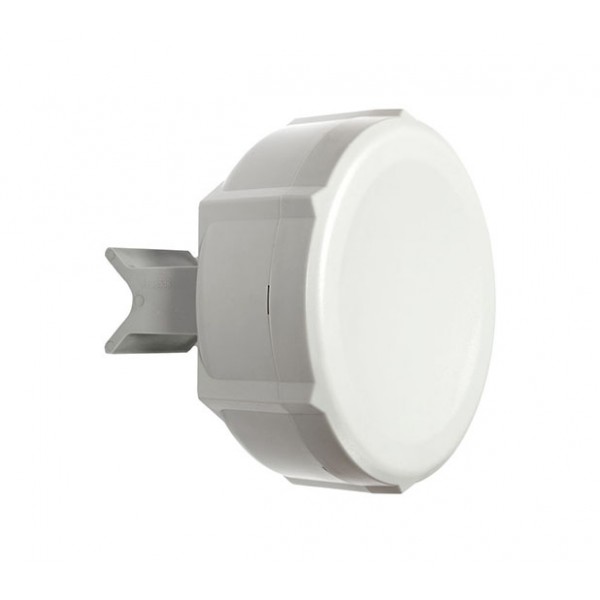
Have a look at the MikroTik SXT 2.
Uniterm direct (link above) sells them for a R1500 each.

Maybe someone with more knowledge will provide a cheaper alternative.
 
I'd check out the kits the WUGs use. They're pretty much going to be the cheapest yet decent available since those okes basically specialise on these type of links
 
Thanks again guys.

I also received a suggestion to use a Ubiquity Loco.

Would I be able to install a Loco at the Router with best signal. Point it to the second Loco where the secendary Router is located? I would purchase 2 Locos and 2 mounting adapters.

The actual software networking I'll do myself. I'd have to configure the secondary router to receive DNS and DHCP from the main router. Am I correct with this? (I'm a bit wasted, can't think straight :D)
 
2 x switch with sfp port , 2x sfp module, 500m of pre made fibre cables

Rb760iGS R1425
550m multi mode sfp r215

Need someone to make you the cable tho
Thanks. It will break the bank though in terms of labour costs.
I still think a point to point is a better solution. Cheaper too.
 
A fibre link will be the most stable and reliable choice, but the cost of trenching will make it a costly option.

Agree with Pnt2Pnt using the Ubiquiti Loco units. Good value for money, reliable and easy to set-up, configure and manage. Tend to use these when cabling costs become prohibitive for connecting devices.
 
Ubnt (Ubiquiti), as noted already - the management is far superior to most other solutions.

You haven't mentioned whats in between the locations - any tree's or other structures?
 
wifi, point to point, ubnt would be easiest, but more expensive. mikrotik would be cheaper, but more difficult.

fibre, you can buy 2x gigabit sfp media converters(around 500bux each), pre terminated fibre cables are available(outdoor as well) plug the cables in and have bob as an uncle.
 
wifi, point to point, ubnt would be easiest, but more expensive. mikrotik would be cheaper, but more difficult.

fibre, you can buy 2x gigabit sfp media converters(around 500bux each), pre terminated fibre cables are available(outdoor as well) plug the cables in and have bob as an uncle.

And you'd need to get the cabling, which should be in the low hundreds.
 
wifi, point to point, ubnt would be easiest, but more expensive. mikrotik would be cheaper, but more difficult.

fibre, you can buy 2x gigabit sfp media converters(around 500bux each), pre terminated fibre cables are available(outdoor as well) plug the cables in and have bob as an uncle.
Ubnt will be better than Mikrotik sadly. While I love my Mikrotik equipment I own, I have to admit that Ubnt is way more stable and easier to set up and gives better wireless performance
 
yeah i was just giving an idea, not the entire explanation. as for wireless ptp im not a big fan of mikrotik either, but some live/die by it. i would recommend ubnt over it as well.

you dont need a sfp switch on both ends just a media converter, but of course you will need a switch both sides anyway, so might as well get one with it already, like an edgerouterx. although, you can get a cheap switch for 300bux and a media converter for 500bux...

heres a vid that just uses the media converters...

 
Ubnt (Ubiquiti), as noted already - the management is far superior to most other solutions.

You haven't mentioned whats in between the locations - any tree's or other structures?
Hi everyone. Thank you for all the suggestions.
I requested pricing yesterday from a respected ISP in the province I live. They gave me 3 different solutions, including fibre.

It seems that we will be leaning towards the Loco units based on cost and ease of setup.
There are a few trees yes.
No structures or walls in place.
The point where I live where the connection would be linked to my router, is slightly elevated. So I look down on the secondary spot where the second Loco would be installed.
yeah i was just giving an idea, not the entire explanation. as for wireless ptp im not a big fan of mikrotik either, but some live/die by it. i would recommend ubnt over it as well.

you dont need a sfp switch on both ends just a media converter, but of course you will need a switch both sides anyway, so might as well get one with it already, like an edgerouterx. although, you can get a cheap switch for 300bux and a media converter for 500bux...

heres a vid that just uses the media converters...

Let's say we skip fibre, due to the property being used as cultivation and farming as well. It would cost a lot to do the trenching and make sure the cable is protected from external damage, which can't be guaranteed. Due to tractors and heavy equipment being used.

Please give me some guidance. We've got two Huawei routers. The first at my spot neeeds to share Internet access to the secondary location.
So, do I still need a router at the secondary location? Will the Loco be able to act as an access point at the second location, or do I need to connect it to the second Huawei?

I would prefer not investing further in switches if Routers are available.
Is this doable?
Edit: Are AC networks backward compatible with B/G/N?
 
Hi everyone. Thank you for all the suggestions.
I requested pricing yesterday from a respected ISP in the province I live. They gave me 3 different solutions, including fibre.

It seems that we will be leaning towards the Loco units based on cost and ease of setup.
There are a few trees yes.
No structures or walls in place.
The point where I live where the connection would be linked to my router, is slightly elevated. So I look down on the secondary spot where the second Loco would be installed.

Let's say we skip fibre, due to the property being used as cultivation and farming as well. It would cost a lot to do the trenching and make sure the cable is protected from external damage, which can't be guaranteed. Due to tractors and heavy equipment being used.

Please give me some guidance. We've got two Huawei routers. The first at my spot neeeds to share Internet access to the secondary location.
So, do I still need a router at the secondary location? Will the Loco be able to act as an access point at the second location, or do I need to connect it to the second Huawei?

I would prefer not investing further in switches if Routers are available.
Is this doable?
Edit: Are AC networks backward compatible with B/G/N?


just set the far end huawei to be a switch and plug what ever you want into or connect to its wifi..

you might need some flyleads to connect from the nanobeam to the huawei and mounting poles if you dont have.

if there are tractors and stuff in between, make sure its high enough.


just set the far end huawei to be a switch and plug what ever you want into or connect to its wifi..

you might need some flyleads to connect from the nanobeam to the huawei and mounting poles if you dont have.

if there are tractors and stuff in between, make sure its high enough.


Thank you access. I appreciate your help.
So to confirm from the Loco at point A, I connect it in Station mode. The second Loco would be access point.
Configure a WiFi network for both Locos.
Connect both via Ethernet to the Huawei Routers. Bobs my uncle. Are you Bob by any chance? :p
 
Thank you access. I appreciate your help.
So to confirm from the Loco at point A, I connect it in Station mode. The second Loco would be access point.
Configure a WiFi network for both Locos.
Connect both via Ethernet to the Huawei Routers. Bobs my uncle. Are you Bob by any chance? :p

the side with the internet would be the access point(like a home wifi router), stations connect to the access point(like a cellphone).

i are not bob, but hes popular
 
the side with the internet would be the access point(like a home wifi router), stations connect to the access point(like a cellphone).

i are not bob, but hes popular
Ok. The YT video seems to say the access point connects to the station though.
 
Top
Sign up to the MyBroadband newsletter
X