Smoothwall help please

biometrics

Honorary Master
Joined
Aug 7, 2003
Messages
71,856
Reaction score
2,239
I'm trying to setup Smoothwall. Installation was fine and web access works.

The setup: my laptop is connected to a switch which is connected to green on smoothwall and the red is connected to an ADSL router.

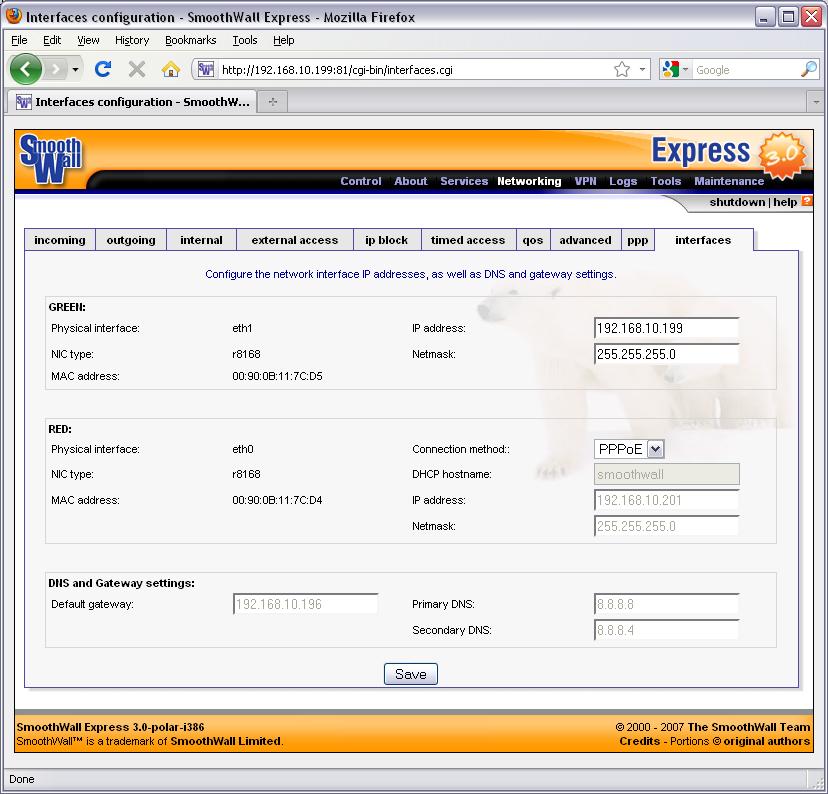
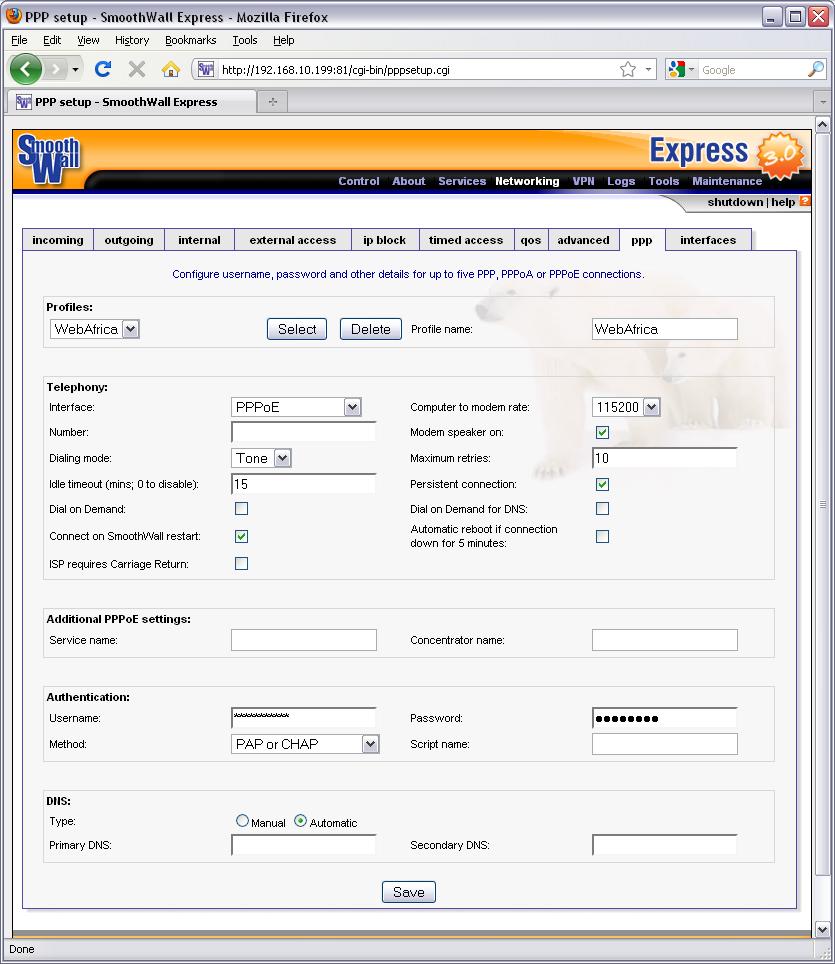
The networking: green has a fixed ip and red is set to PPPoE. PPP is set to PPPoE. The gateway on my laptop is set to green's IP.

From the Control/home page I can connect successfully.

Problem is there is no internet access on red. My laptop has no access and if I try Smoothwall Maintenance/"check for updates" it fails with "Could not download the available updates list."

So ... what am I doing wrong?
 
Clarify this bit please
From the Control/home page I can connect successfully.
From which machine can you connect?

Try enabling DHCP on the Smoothie and let your laptop fetch is own settings from the Smoothie.

Does the connect page on the Smoothy confirm that its connected?
 
Clarify this bit please From which machine can you connect?

I can connect to Smoothwall with a web browser from my laptop. On the home page I can click Connect to make a PPPoE connection, this succeeds.

Try enabling DHCP on the Smoothie and let your laptop fetch is own settings from the Smoothie.

Have changed the laptop to use DHCP but no change.

Does the connect page on the Smoothy confirm that its connected?

Yes.
 
I don't know that much about the SmoothWall interface, but it seems to me like you haven't enabled NAT on the RED (PPPoE) interface.
 
Aaargh, I wish I still had my Smoothwall up so that I could compare settings.

Your PPP screengrab looks fine to me. The only thing I think you could try there would be to set manual DNS settings - WebAfrica should be able to give you IP addresses of their DNS servers. Else connect with a windows PC and check the connection properties and use those DNS IP settings.

On the interface screengrab, the DNS entries of 8.8.8.8 and 8.8.8.6 look potentially problematic to me - unless WA use internal IP's like this.

What results to you get when you do a ping / traceroute from inside the Smoothie web interface (to www.microsoft.com and www.webafrica.co.za)?

Please upload a screengrab of the connection / control page.

Have you checked your PPP logs for any "funnies"?
 
Aaargh, I wish I still had my Smoothwall up so that I could compare settings.

Your PPP screengrab looks fine to me. The only thing I think you could try there would be to set manual DNS settings - WebAfrica should be able to give you IP addresses of their DNS servers. Else connect with a windows PC and check the connection properties and use those DNS IP settings.

On the interface screengrab, the DNS entries of 8.8.8.8 and 8.8.8.6 look potentially problematic to me - unless WA use internal IP's like this.

What results to you get when you do a ping / traceroute from inside the Smoothie web interface (to www.microsoft.com and www.webafrica.co.za)?

Please upload a screengrab of the connection / control page.

Have you checked your PPP logs for any "funnies"?

Sorted! In the process of taking screenshots I discovered that the ping from the web interface actually works ... so it turns out that my laptop is not getting a DNS address during DHCP. Manually setting it sorts it out. Thanks!
 
AH HA! And this is where the real confusion comes in ... if you change the red interface connection method from Static to PPPoE it only works after you reboot SW.

Btw, can I set up red to be a static IP? This I can't get to work.
 
Well done on getting it working. :)

If your ISP gives you a static IP, then you can do that. If not, you could try using a dynamic DNS.
 
Also, it seems you need to restart SW after various actions like installing Advanced Proxy or opening outgoing ports.
 
I installed Advanced Proxy and am allowing Firefox/Chrome/Safari/Windows Update/Google Earth under the allowed browsers section. But Google Earth fails to authenticate. Seems to be because I disallowed Internet Explorer. How did you get GE running?
 
Top
Sign up to the MyBroadband newsletter
X