Specific TV recommendations

See posts #6, #12 & my connection diagram in #13 above - there is NO need for the TV set to be used to send OUT a digital signal at all - be it optical or coaxial - the converter box does all the digital & analogue audio / video conversion & connection duties from the DSTV decoder to the hi-fi AND the TV set...

And the Android box audio to the Hi-Fi, forgot to mention this.

I know the new TV will be smart but a dedicated one is better

Current setup
1794749969197.png
 
And the Android box audio to the Hi-Fi, forgot to mention this.

I know the new TV will be smart but a dedicated one is better

Current setup
View attachment 1954283
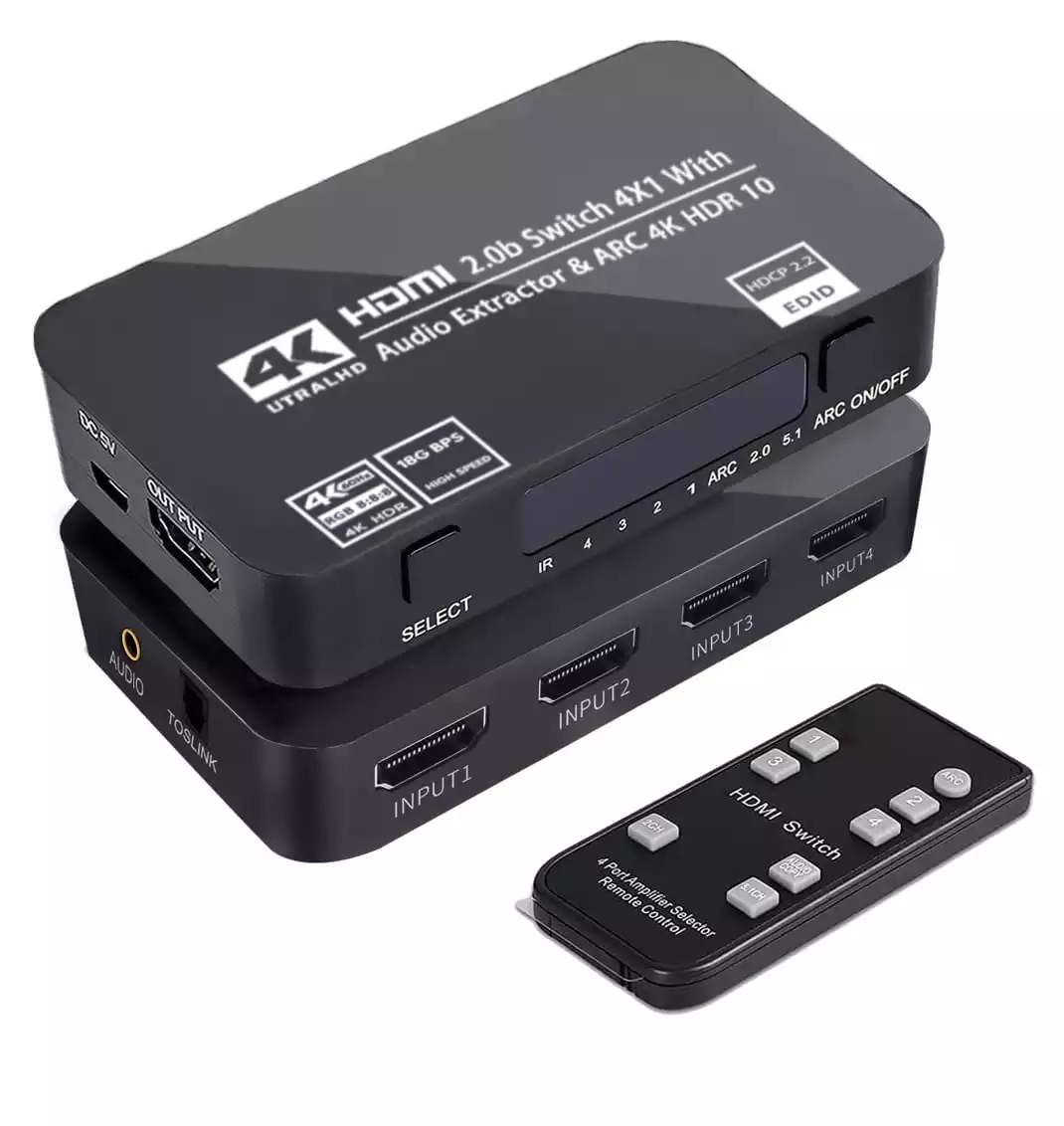
Then you can go for this converter box instead - it has 4 x HDMI inputs & a remote... so you can connect both the DSTV decoder & the Android Streaming Box to it - it does have a remote as well - all the other input & output connections remain as per my amended diagram below - with this unit you also have the option of either optical or coaxial digital outputs as an added bonus:

1794751324058.png


Another alternative - this converter box is the same type as the one originally posted by Mike in #6 above - but this model has 2 x HDMI input ports - it also comes with a remote - otherwise all other features are identical...
1794752327554.png


1794751405713.png

P.S.: If possible, post a picture of the rear of the Hi-Fi System, detailing its make & model, as well all of its various input & output connection ports as well...
 
Last edited:
Then you can go for this converter box instead - it has 4 x HDMI inputs & a remote... so you can connect both the DSTV decoder & the Android Streaming Box to it - it does have a remote as well - all the other input & output connections remain as per my amended diagram below:

View attachment 1954289


Another alternative - this converter box is the same type as the one originally posted by Mike in #6 above - but this model has 2 x HDMI input ports - it also comes with a remote - otherwise all other features are identical...
View attachment 1954294


View attachment 1954291

P.S.: If possible, post a picture of the rear of the Hi-Fi System, detailing its make & model, as well all of its various input & output connection ports as well...

Pioneer VSX-D512

1794753601116.png
 

Attachments

  • 1794753495958.png
    1794753495958.png
    221.8 KB · Views: 6
Then your best bet is the last one I posted - as it has 2 x HDMI inputs & all 3 audio out options you may need to connect to your AV receiver - (Analogue RCA & Optical / Coaxial Digital Out), as well as the separate 3.5mm stereo headphone output...

1794754050623.png

BTW - if you no longer have the Instruction Manual for your system, here is a link to download a PDF copy of it.
 
They got the Hisense 58-inch 58A6N.

What I found is that everything works as planned if the SPDIF cable is used on the DSTV or Android box, only thing now is to get a SPDIF switcher so we don't have to unplug and replug it in either the DSTV/Android box.
 
There's no need to use the SP/DIF ports on either the DSTV decoder or the Android Streaming Box - You should rather directly connect the DSTV Decoder's HDMI cable to the HDMI 1 input & the Android Streaming Box's HDMI cable to the HDMI 2 input of their Hisense TV, then connect the SP/DIF Optical Out port of the Hisense TV directly into the Pioneer's SP/DIF Optical Digital Input port - this will allow ALL content viewed on the TV via both of its HDMI inputs to have the digital audio signal fed to the Pioneer AV receiver.

If you can also select a settings menu option on the Hisense TV that allows you to have the Audio Out signal sent to both the TV speakers & the Optical Digital Out port, then your father can connect his headphones directly to the headphone port of the Hisense TV (and use its remote to adjust the volume level independently), whilst the 5.1 Dolby Digital optical audio signal can be simultaneously processed by the Pioneer AV Receiver for the full 5.1 surround sound experience (also with independent volume control using its remote control) for anyone else watching content from both the DSTV decoder & the Android Streaming Box on the Hisense TV.

If you don't want to use a wired headphone cable from the Hisense TV's headphone socket - it DOES have Bluetooth connectivity - so your father can simply use a wireless headphone set to listen to the TV sound (which usually automatically switches off the TV speakers) and anyone else can listen to the TV audio by using the Pioneer AV Receiver instead - for a WAY better 5.1 surround sound experience (instead of using the much lower fidelity TV speakers)... ;)

1794793754733.png


Link to Hisense 58A6N TV manual here.
 
Last edited:
There's no need to use the SP/DIF ports on either the DSTV decoder or the Android Streaming Box - You should rather directly connect the DSTV Decoder's HDMI cable to the HDMI 1 input & the Android Streaming Box's HDMI cable to the HDMI 2 input of their Hisense TV, then connect the SP/DIF Optical Out port of the Hisense TV directly into the Pioneer's SP/DIF Optical Digital Input port - this will allow ALL content viewed on the TV via both of its HDMI inputs to have the digital audio signal fed to the Pioneer AV receiver.

If you can also select a settings menu option on the Hisense TV that allows you to have the Audio Out signal sent to both the TV speakers & the Optical Digital Out port, then your father can connect his headphones directly to the headphone port of the Hisense TV (and use its remote to adjust the volume level independently), whilst the 5.1 Dolby Digital optical audio signal can be simultaneously processed by the Pioneer AV Receiver for the full 5.1 surround sound experience (also with independent volume control using its remote control) for anyone else watching content from both the DSTV decoder & the Android Streaming Box on the Hisense TV.

If you don't want to use a wired headphone cable from the Hisense TV's headphone socket - it DOES have Bluetooth connectivity - so your father can simply use a wireless headphone set to listen to the TV sound (which usually automatically switches off the TV speakers) and anyone else can listen to the TV audio by using the Pioneer AV Receiver instead - for a WAY better 5.1 surround sound experience (instead of using the much lower fidelity TV speakers)... ;)

View attachment 1954366


Link to Hisense 58A6N TV manual here.
Yup, that way both the decoder and the media box have sound, it would be 5.1 as well.
 
There's no need to use the SP/DIF ports on either the DSTV decoder or the Android Streaming Box - You should rather directly connect the DSTV Decoder's HDMI cable to the HDMI 1 input & the Android Streaming Box's HDMI cable to the HDMI 2 input of their Hisense TV, then connect the SP/DIF Optical Out port of the Hisense TV directly into the Pioneer's SP/DIF Optical Digital Input port - this will allow ALL content viewed on the TV via both of its HDMI inputs to have the digital audio signal fed to the Pioneer AV receiver.

If you can also select a settings menu option on the Hisense TV that allows you to have the Audio Out signal sent to both the TV speakers & the Optical Digital Out port, then your father can connect his headphones directly to the headphone port of the Hisense TV (and use its remote to adjust the volume level independently), whilst the 5.1 Dolby Digital optical audio signal can be simultaneously processed by the Pioneer AV Receiver for the full 5.1 surround sound experience (also with independent volume control using its remote control) for anyone else watching content from both the DSTV decoder & the Android Streaming Box on the Hisense TV.

If you don't want to use a wired headphone cable from the Hisense TV's headphone socket - it DOES have Bluetooth connectivity - so your father can simply use a wireless headphone set to listen to the TV sound (which usually automatically switches off the TV speakers) and anyone else can listen to the TV audio by using the Pioneer AV Receiver instead - for a WAY better 5.1 surround sound experience (instead of using the much lower fidelity TV speakers)... ;)

View attachment 1954366


Link to Hisense 58A6N TV manual here.

Unfortunately the TV settings only allow sound out the TV speakers OR SPDIF, not both.

Also the hearing people don't want to listen through the Hi-Fi as it's overkill, plugging headphones in the TV causes the speakers to turn off and no way to have the TV speakers and the headphones to give audio.
 
Unfortunately the TV settings only allow sound out the TV speakers OR SPDIF, not both.

Also the hearing people don't want to listen through the Hi-Fi as it's overkill, plugging headphones in the TV causes the speakers to turn off and no way to have the TV speakers and the headphones to give audio.
With the amount of admin required to watch TV in your house, I would just get everyone their own TV for their rooms and keep the best one in the lounge for myself...
 
Unfortunately the TV settings only allow sound out the TV speakers OR SPDIF, not both.

Also the hearing people don't want to listen through the Hi-Fi as it's overkill, plugging headphones in the TV causes the speakers to turn off and no way to have the TV speakers and the headphones to give audio.
Oh Well, if the other members of the family are 'quite happy' listening to crappy 2-channel audio via the TV speakers, rather than watching 4K movies on the nice new Hisense 58" TV whilst listening to a full 5.1 digital surround sound experience via the Pioneer AV receiver & speakers - and have your father utilise the Bluetooth connectivity from the TV for headphones at the same time - so be it - it's their choice after all... ;)

1794813637816.png
 
Top
Sign up to the MyBroadband newsletter
X