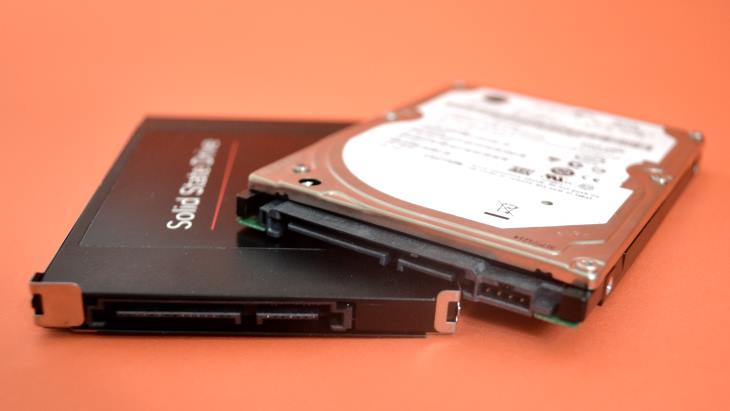
SSD Drive

matshelane

Well-Known Member
Joined
May 4, 2010
Messages
167
Reaction score
0
If I'm replacing my SATA II HDD with an SSD (also SATA II) will the cables all be the same? Can I just plug the cables from the old drive into the new SSD drive?
Lastly, can I transfer a disk image created on a standard HDD drive to a SSD drive or is the geometry different?

Thx in advance to anyone who replies.
 
Last edited:
Yes it will work.

Laptop-PC-Storage-HDD-SSD-HHDD-SSHD-eMMC.jpg


The interface is the same. Sata ii/iii
 
Enjoy that upgrade, it'll blow your mind. Did it 2 weeks ago on my Laptop. Should have done it sooner.

If you are going to clone from HDD to SSD, get the right software. Most SSD manufacturers have an application available. I purchased a Crucial drive and the software was able to clone from large HDD to small SSD with no issue what so ever.
 
the cloning software should come along with the SSD depending on the brand you are buying. what brand are you planning to buy ?
But I would strongly recommend a clean fresh install.
 
I have the same question, almost. I have a Lenovo T440s and would really like to do the SSD addition. It has a M. 2 form factor slot
Anyone in Pretoria area that can assist for s few beers? Also where to buy the ssd
 
Rather take it as a chance to start fresh...
Nope, why bother, Windows is such a pita to hack into shape not a fok am I flushing all that hard work down the drain to start all over again. Nevermind installing and setting up every program you install from scratch again.

No, if your system is running fine as it is I'd clone, 40 mins and you are booted up on the new ssd and ready to go.
 
Last edited:
I have the same question, almost. I have a Lenovo T440s and would really like to do the SSD addition. It has a M. 2 form factor slot
Anyone in Pretoria area that can assist for s few beers? Also where to buy the ssd

Does your T440s have built-in 3G/4G modem? If 'yes' then you can't use the m.2 slot.

https://www.laptopmag.com/articles/install-m2-ssd-lenovo-t440s

Look at wootware, rebeltech for an ssd, think the t440s take the smaller 2242 size profile devices. samsung evo would be the preferred choice.
 
Nope, why bother, Windows is such a pita to hack into shape not a fok am I flushing all that hard work down the drain to start all over again. Nevermind installing and setting up every program you install from scratch again.

No, if your system is running fine as it is I'd clone, 40 mins and you are booted up on the new ssd and ready to go.
Install choco, then just install most things using it. Takes me very little time at my PC to get a machine up and running to do what I want.
Create a package list like so: https://chocolatey.org/docs/commands-install and run choco install packages.config and it will all be automated.
All updates can easily be managed by running choco upgrade all, use -y so you don't have to keep accepting everything, and it will go through and check for all updates for you.
There is also a GUI, but I never bother with it.
 
Top
Sign up to the MyBroadband newsletter
X