TV cards

matshelane

Well-Known Member
Joined
May 4, 2010
Messages
167
Reaction score
0
Anyone able to tell me if its possible to install such a card sand get my DSTV signals on my PC?
And if so, how would one do it?
 
Yes. You can. I recommend the Hauppauge cards. They use hardware video encoders and therefore have very good video quality.

What I did previously was to install a Hauppauge HVR2200 in a PC, installed Windows Media Center and hooked it up to a DSTV decoder using the RCA connectors. You can get full PVR capability even if your are using a non-PVR decoder. However, that was in SD, not HD.

The only reason I stopped using it was because of HD. That was too much of a hassle and too expensive to by a HDCP stripper and a HD Colossus card etc.

Here's a link to a local site to get the Electronic Program Guide for Windows Media Center:
http://www.mcesa.tv/

Here's a link to a guide I wrote a while back on how to setup a Media Center:

http://forum.mceguide.co.za/viewtopic.php?f=16&t=635
 
You'll still need to go via a DSTV decoder - and it'll be SD only...no HD. You'll need complicated (illegal) methods to get HD.
 
You'll still need to go via a DSTV decoder - and it'll be SD only...no HD. You'll need complicated (illegal) methods to get HD.

IIRC the colossus doesn't need an HDCP splitter when using the WinTV application, and I don't think its illegal to record these shows, according to "fair use" :erm: but I'm not too sure about that law, however I know its against DSTV's and presumably Top TV's ToS, but that has never stopped anyone before :D
 
Can also recommend hauppauge HVR2200.

With winTV extend (ipad app) I even stream DSTV to my ipad across my wifi network. Now just to get an SD PvR to watch what I want when the young one hogs the TV...

Yeah, no HD, but SD fine on the PC 23" and TV 32".
However be prepared to "struggle" a bit to get the right software version installed and to get Windows Media Centre going.
 
Can also recommend hauppauge HVR2200.

With winTV extend (ipad app) I even stream DSTV to my ipad across my wifi network. Now just to get an SD PvR to watch what I want when the young one hogs the TV...

Yeah, no HD, but SD fine on the PC 23" and TV 32".
However be prepared to "struggle" a bit to get the right software version installed and to get Windows Media Centre going.

+1, the extend feature is awesome for days like this, lying in the bath watching TV :whistle:
Just wish winTV could change the decoder's channels aswell :cry:
 
+1, the extend feature is awesome for days like this, lying in the bath watching TV :whistle:
Just wish winTV could change the decoder's channels aswell :cry:

If you have the Microsoft IR receiver and IR emitter, you can then use a Media Center remote to control the PC and change channels on the decoder. That was one of the nice things about the media center. That combined with using an XBox as an extender gave you live TV, PVR capability and access to all your media via the XBox onto a TV in another room. Worked great.
 
If you have the Microsoft IR receiver and IR emitter, you can then use a Media Center remote to control the PC and change channels on the decoder. That was one of the nice things about the media center. That combined with using an XBox as an extender gave you live TV, PVR capability and access to all your media via the XBox onto a TV in another room. Worked great.

Yea that's the system I currently use, however there is no way to stream from windows media center with the EPG and channel list, what I would love to get working with the monochoice decoders is something like shown here

extend_ipad_medium.jpg
 
Last edited:
I use a cheap easycapture usb capture device in my old eeepc connected to my DSD1110 with RCA. I use vlc to do the streaming. Then I have 2x Infrared LEDs connected to the eeepc soundcard output and using lirc to remote control the decoder. Then I have a little script that scrapes the dstv guide every morning and added it to a little custom web app that is running on the eeepc that allows me to see what is currently showing on what channel and if I click it it changes the decoder to that channel.

The eeepc is suffering with the transcoding so the quality is not that great mabye this is a job better suited for a Raspberry Pi. ;)
 
Yea that's the system I currently use, however there is no way to stream from windows media center with the EPG and channel list, what I would love to get working with the monochoice decoders is something like shown here

View attachment 36064

Actually, when I had my Media Center working, I had the full DSTV EPG and it was available on the XBOX as well. I used to schedule recordings and browse the guide on the XBOX.

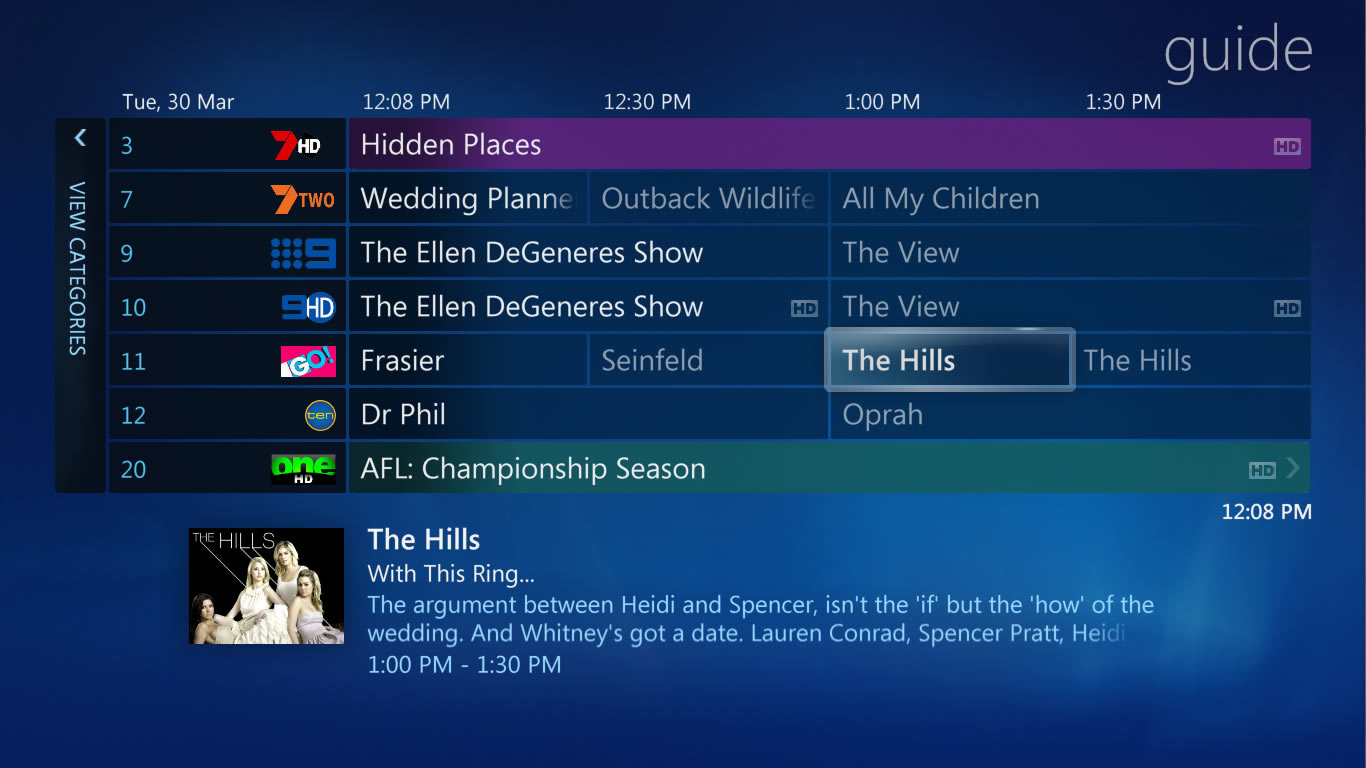
It looked exactly like this on the XBOX and on the Media Center:

mcepg.jpg
 
Last edited:
Actually, when I had my Media Center working, I had the full DSTV EPG and it was available on the XBOX as well. I used to schedule recordings and browse the guide on the XBOX.

It looked exactly like this on the XBOX and on the Media Center:

mcepg.jpg


Thank you guys. You've all been very helpful and I appreciate it.
 
Actually, when I had my Media Center working, I had the full DSTV EPG and it was available on the XBOX as well. I used to schedule recordings and browse the guide on the XBOX.

It looked exactly like this on the XBOX and on the Media Center:

mcepg.jpg

Yea I've got that working aswell, just not with WinTV extend (mainly its DRM free), you don't perhaps know of any apps for iOS that extend windows media center like the xbox does? :confused:
 
Yea I've got that working aswell, just not with WinTV extend (mainly its DRM free), you don't perhaps know of any apps for iOS that extend windows media center like the xbox does? :confused:

Remote Potato and DVBLink both claim to be able to stream live TV and also provide guide access. I haven't played with either of them so I can't tell you if they are worthwhile or not.
 
Actually, when I had my Media Center working, I had the full DSTV EPG and it was available on the XBOX as well. I used to schedule recordings and browse the guide on the XBOX.

It looked exactly like this on the XBOX and on the Media Center:

mcepg.jpg

Looks so much better than the dstv guide.
 
Actually, when I had my Media Center working, I had the full DSTV EPG and it was available on the XBOX as well. I used to schedule recordings and browse the guide on the XBOX.

It looked exactly like this on the XBOX and on the Media Center:

mcepg.jpg

:confused: what is that
 
:confused: what is that

It's the Electronic Program Guide that Windows Media Center uses. It's used to browse channels and programs as well as schedule recordings. The enhanced version even shows cover art for movies and synopsis info as well. This actually worked for DSTV.
 
It's the Electronic Program Guide that Windows Media Center uses. It's used to browse channels and programs as well as schedule recordings. The enhanced version even shows cover art for movies and synopsis info as well. This actually worked for DSTV.

So those are TV channels on the EPG? How do you get them?
 
Check one of my previous posts in this thread. There's a local website that provides the EPG.
 
Check one of my previous posts in this thread. There's a local website that provides the EPG.

Wait I'm confused. Are those your regular Dstv channels with different logos or are you viewing channels from abroad?
 
That was just a screenshot I found somewhere showing overseas channels. When I had my Media Center running, it looked exactly the same except it had DSTV channels displayed.

http://www.mcesa.tv/ is a South African website that provides an EPG service for Windows Media Center. Once it is installed and setup, then you will have all the DSTV channels displayed within Windows Media Center.
 
Top
Sign up to the MyBroadband newsletter
X