


ManMetDieBaard
New Member
- Joined
- Jan 17, 2016
- Messages
- 5
- Reaction score
- 0
Hello,
I have a 4mb capped account from Cybersmart. Ever since Tuesday (12 January 2016) my internet has been very unstable. It would have a stable ping and then suddenly spike to 500ms for a few seconds and then have a stable ping again. Since Saturday my ping has been very high during the day aswell, average of 200ms to a local server. Their also seems do be a lot of jitter on my line according to MyBroadband Speed Test.
I've been in contact with Cybersmart since Tuesday. So far they told to switch my router off/on, unplug all my cable and reconnect and bypass my port filter. They also say they tested everything on their end, recreated my port and also did a resync on the exchange. Doing all of this has however not solve the problem. They say the next step would be for Telkom to come and test my line. However if Telkom has to come out they will charge me if it is my hardware's fault.
Since I don't trust Telkom's honesty I want to make 100% the problem is not on my side before I start complaining again. So far I've done multiple ping test with different computers (switching off all other computers).
Using MyBroadband speed test I obtained the following results:
Test 1:
Download Speed: 2807 kbps (350.9 KB/sec transfer rate)
Upload Speed: 461 kbps (57.6 KB/sec transfer rate)
Latency: 165 ms
Jitter: 42 ms
1/18/2016, 3:26:17 PM
Test 2:
Download Speed: 2372 kbps (296.5 KB/sec transfer rate)
Upload Speed: 461 kbps (57.6 KB/sec transfer rate)
Latency: 165 ms
Jitter: 34 ms
1/18/2016, 3:27:27 PM
Test 3:
Download Speed: 2094 kbps (261.8 KB/sec transf
Upload Speed: 478 kbps (59.8 KB/sec transfer rate)
Latency: 17 ms
Jitter: 16 ms
1/18/2016, 3:28:29 PM
I also used Pingplotter to trace my connection to a local and international website.

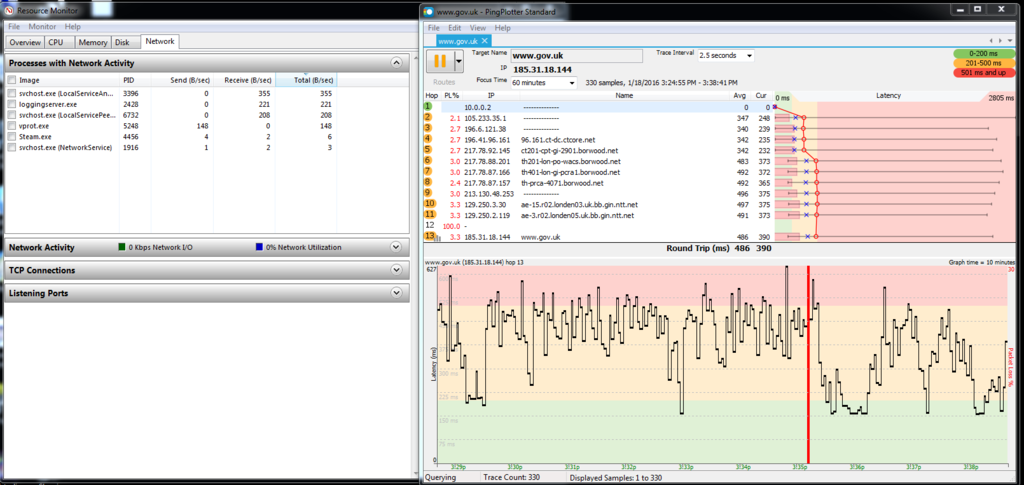
Both these traces where run for 10 minutes each. My resource monitor doesn't show anything out of the ordinary that can cause these high pings. According to the trace the problem seems to already start at IP: 105.233.35.1 But I'm unsure if that is caused by me, my ISP or Telkom.
Something I have noted is that after 11pm the internet becomes stable again and there are no problems. I am not sure at what time it becomes unstable again but I have tested till 3am and the ping stayed constant till then.
If anyone who has had this problem can tell me what they did to fix it or if someone can tell me what else I can do to make sure that the problem is not at my end I will appreciate it.
Thank you
I have a 4mb capped account from Cybersmart. Ever since Tuesday (12 January 2016) my internet has been very unstable. It would have a stable ping and then suddenly spike to 500ms for a few seconds and then have a stable ping again. Since Saturday my ping has been very high during the day aswell, average of 200ms to a local server. Their also seems do be a lot of jitter on my line according to MyBroadband Speed Test.
I've been in contact with Cybersmart since Tuesday. So far they told to switch my router off/on, unplug all my cable and reconnect and bypass my port filter. They also say they tested everything on their end, recreated my port and also did a resync on the exchange. Doing all of this has however not solve the problem. They say the next step would be for Telkom to come and test my line. However if Telkom has to come out they will charge me if it is my hardware's fault.
Since I don't trust Telkom's honesty I want to make 100% the problem is not on my side before I start complaining again. So far I've done multiple ping test with different computers (switching off all other computers).
Using MyBroadband speed test I obtained the following results:
Test 1:
Download Speed: 2807 kbps (350.9 KB/sec transfer rate)
Upload Speed: 461 kbps (57.6 KB/sec transfer rate)
Latency: 165 ms
Jitter: 42 ms
1/18/2016, 3:26:17 PM
Test 2:
Download Speed: 2372 kbps (296.5 KB/sec transfer rate)
Upload Speed: 461 kbps (57.6 KB/sec transfer rate)
Latency: 165 ms
Jitter: 34 ms
1/18/2016, 3:27:27 PM
Test 3:
Download Speed: 2094 kbps (261.8 KB/sec transf
er rate)Upload Speed: 478 kbps (59.8 KB/sec transfer rate)
Latency: 17 ms
Jitter: 16 ms
1/18/2016, 3:28:29 PM
I also used Pingplotter to trace my connection to a local and international website.
Both these traces where run for 10 minutes each. My resource monitor doesn't show anything out of the ordinary that can cause these high pings. According to the trace the problem seems to already start at IP: 105.233.35.1 But I'm unsure if that is caused by me, my ISP or Telkom.
Something I have noted is that after 11pm the internet becomes stable again and there are no problems. I am not sure at what time it becomes unstable again but I have tested till 3am and the ping stayed constant till then.
If anyone who has had this problem can tell me what they did to fix it or if someone can tell me what else I can do to make sure that the problem is not at my end I will appreciate it.
Thank you


