VGA over Wi-Fi?

elf_lord_ZC5

Honorary Master
Joined
Jan 3, 2010
Messages
19,901
Reaction score
8,403
Location
Bloemfontein
Okay, I am at church, and some bright spark has dropped a bench on the VGA cable from the computer to the projector. This is the second time in 6 months. The cable is kaput, will buy a new one tomorrow.

So as I see it, if we can replace the cable with Wi-Fi, we have hopefully one less item for idiots to break. It would also make it easier/simpler to accomodate visting speakers with their own laptop's.

So what are the options for VGA over Wi-Fi, tho Bluetooth might be an option as the distance ftom the computer desk to the projector is just under 15 meters, bandwidth might be an issue for video streaming tho.

So VGA over Wireless - possible, and what are my options?

Thanks.
 
Is it not possible to have the VGA cable setup as two separate cables / connectors - a shorter VGA cable from the laptop that then can be joined to the longer VGA cable that runs from the desk / podium to the data projector?

That way if the VGA cable from the laptop is disconnected, the remainder of the VGA cable going from the podium / desk to the data projector will not be damaged as it could be rolled up so that it is not lying loose on the floor, in the way of any 'dropped benches' or 'footfall traffic' anymore.

Laptop -> 1.8m to 5m M/F VGA cable - (or you can rather use a female to female VGA socket connector to join two separate M/M VGA cables together) -> 10m M/M VGA cable running up to the data projector (routed to avoid going over the floor when not in use)...

Problem Solved...

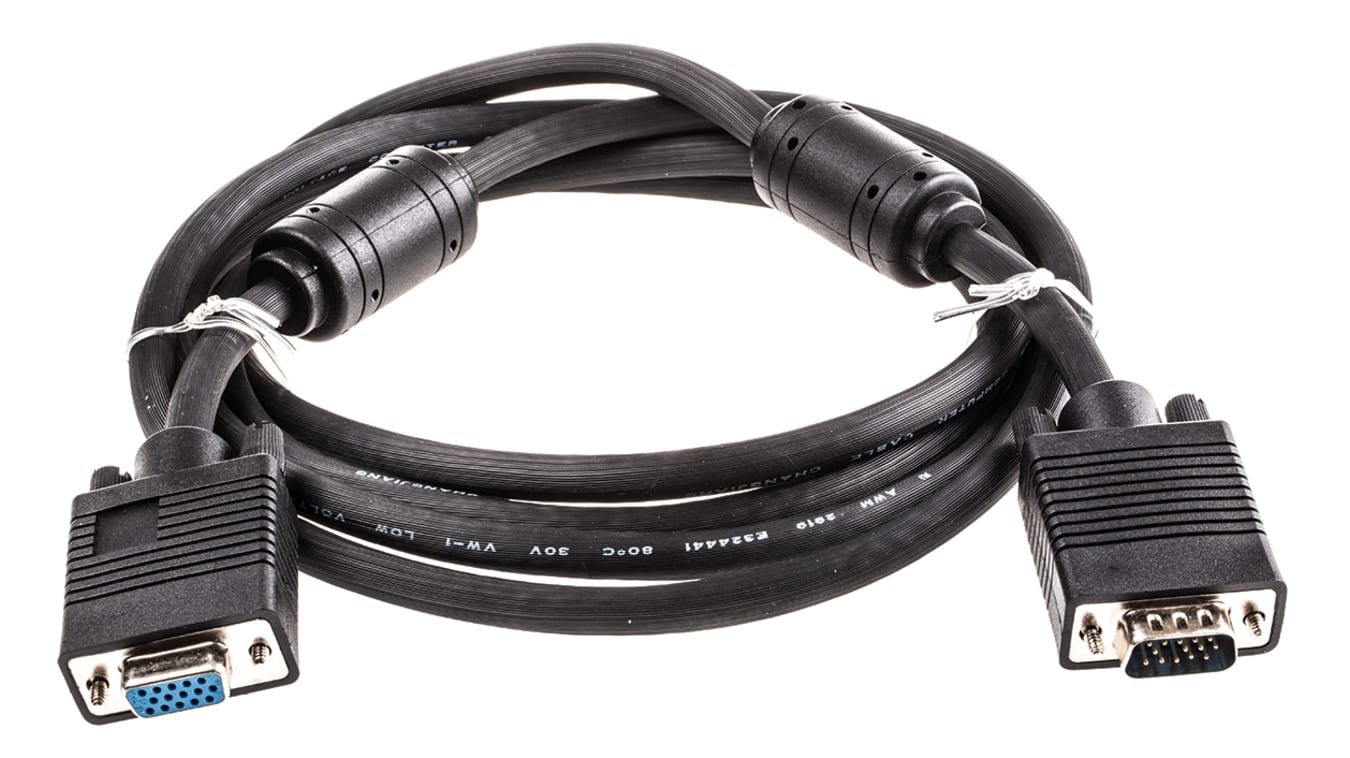
2m M/F VGA cable

F3944105-01


F/F VGA Coupler

54681_IMG1.jpg
 
Okay, I am at church, and some bright spark has dropped a bench on the VGA cable from the computer to the projector. This is the second time in 6 months. The cable is kaput, will buy a new one tomorrow.

So as I see it, if we can replace the cable with Wi-Fi, we have hopefully one less item for idiots to break. It would also make it easier/simpler to accomodate visting speakers with their own laptop's.

So what are the options for VGA over Wi-Fi, tho Bluetooth might be an option as the distance ftom the computer desk to the projector is just under 15 meters, bandwidth might be an issue for video streaming tho.

So VGA over Wireless - possible, and what are my options?

Thanks.
Dont think its possible. New cable. They are cheap

I think you get hdmi over wifi adapters but not vga
 
Wireless display adapters do exist, though mostly for hdmi connections and they are pretty pricey, 2k+ in most cases..

Cheap solution is to run the VGA cable inside of protective floor covering..
 
Dont think its possible. New cable. They are cheap

I think you get hdmi over wifi adapters but not vga

HDMI to VGA adapter works well, for the laptop's that do not have a VGA connector.

So it might work using HDMI WI-FI adapters to HDMI to VGA adapter connected to the projector.

I will look for something along those lines. Thanks.
 
Is it not possible to have the VGA cable setup as two separate cables / connectors - a shorter VGA cable from the laptop that then can be joined to the longer VGA cable that runs from the desk / podium to the data projector?

That way if the VGA cable from the laptop is disconnected, the remainder of the VGA cable going from the podium / desk to the data projector will not be damaged as it could be rolled up so that it is not lying loose on the floor, in the way of any 'dropped benches' or 'footfall traffic' anymore.

Laptop -> 1.8m to 5m M/F VGA cable - (or you can rather use a female to female VGA socket connector to join two separate M/M VGA cables together) -> 10m M/M VGA cable running up to the data projector (routed to avoid going over the floor when not in use)...

Problem Solved...

2m M/F VGA cable

F3944105-01


F/F VGA Coupler

54681_IMG1.jpg

What do you think, the chances are that the idiots, will actually go to any effort to use your sensible solution.?
 
Wireless display adapters do exist, though mostly for hdmi connections and they are pretty pricey, 2k+ in most cases..

Cheap solution is to run the VGA cable inside of protective floor covering..

There is no channel to use so it will have to be created from scratch. Also as we have a fair number of "elderly" folks, I'd rather not have a "ridge" under the carpet, that would create a possible stumbling hazard. Maybe I am being, shall we say to "carefull" , but I do not want to risk any broken bones. Thus why I would appreciate being able to go wireless.
 
There is no channel to use so it will have to be created from scratch. Also as we have a fair number of "elderly" folks, I'd rather not have a "ridge" under the carpet, that would create a possible stumbling hazard. Maybe I am being, shall we say to "carefull" , but I do not want to risk any broken bones. Thus why I would appreciate being able to go wireless.

Does the projector have HDMI?


This should work.
 
Wireless will fail you when the church full and some mother will say you ruined her baby's babtism service and thing will be awkward for years, stick to the old method , wired is just more reliable
 
A much better idea.

Plug a Raspberry Pi into the projector screen directly and then operate that remotely.
 
Wireless will fail you when the church full and some mother will say you ruined her baby's babtism service and thing will be awkward for years, stick to the old method , wired is just more reliable

I agree, wired is better, but the idiots are starting to annoy me. Because they, do things without thinking or caring, then I setup the projector Sunday morning and find it has aquired, a not so wonderful "shimmer" on the screen, or it does not work at all. Then we have to put the young lady who operates the computer and presentation, in front of the whole congregation. It does not look good, and she is not comfortable.
 
Is it not possible to have the VGA cable setup as two separate cables / connectors - a shorter VGA cable from the laptop that then can be joined to the longer VGA cable that runs from the desk / podium to the data projector?

That way if the VGA cable from the laptop is disconnected, the remainder of the VGA cable going from the podium / desk to the data projector will not be damaged as it could be rolled up so that it is not lying loose on the floor, in the way of any 'dropped benches' or 'footfall traffic' anymore.

Laptop -> 1.8m to 5m M/F VGA cable - (or you can rather use a female to female VGA socket connector to join two separate M/M VGA cables together) -> 10m M/M VGA cable running up to the data projector (routed to avoid going over the floor when not in use)...

Problem Solved...

2m M/F VGA cable

F3944105-01


F/F VGA Coupler

54681_IMG1.jpg
100% this.. if changing projector to wifi model or hdmi model is out of the question, as it were for me recently, i used a coupler and joined a 2m section as a "last mile" connection. Whenever someone now runs a pew or double bass over the cable, i replace the "last mile", which i bought a few extra. works like a charm.
 
A much better idea.

Plug a Raspberry Pi into the projector screen directly and then operate that remotely.

Have considered a RPi, but being the only one who knows how it works, is an issue, if something goes wrong, and I am not there to "fix" it ...
 
Hmmm ... , something that I have just tried, is to use "Chromecast" to cast to my old Telkom LIT TV box, but so far I have to manually load a driver, to make this work - maybe possible to stream line this.

This was prompted by the MS device recommended above as it is basically a Miracast device.

Also it needs a remote, and has a lot of "extra" functionality. May buying a 3rd Gen Chromecast might be worthwhile.
 
What about a Bluetooth projector?

That is the most expensive solution, and should the current projector "die" I will push for one that has some version of Wi-Fi connectivity build in.

In the mean time, I need to "hack" something together that is simple enough for every one, including the not so bright types to operate, with out having to have me present to sort things out when something unexpected happens.
 
Use HDMi over Ethernet, with HDMi to VGA converters at either end as necessary?

How long can that ethernet be?

It occurs to me that I could route an ethernet cable out of the way of just about everyone, just guessing distance to be around 45 + meters.
 
Last edited:
Top
Sign up to the MyBroadband newsletter
X