


Herr der Verboten
Honorary Master
Bravo on posting an actual project! Mark my words, in a year we’ll have the MyBB Vibecoding Olympics, to reward and profile the best vibecoded projects.

South Africa’s biggest forum. Discuss, discover, and connect with thousands of members.
Bravo on posting an actual project! Mark my words, in a year we’ll have the MyBB Vibecoding Olympics, to reward and profile the best vibecoded projects.

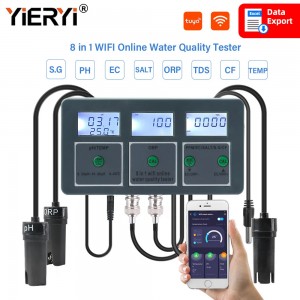
What sensor are you using for orp and ph plox I want to use that on my fish tankI still need to go through some of the original posts....
But, I thought I'd share what I've been able to "vibe code" in the last 2 or 3 days.
What started as just an experiment became a bit of an obsession.
It's a website for sensor data in our complex that I'm going to suggest as a hosted service/site so we can all see what's going on, instead of people having to constantly send whatsapp messages on the local group.
Architecture (some of it irrelevant now since we're just doing HA API calls):
View attachment 1888265
I'm no longer using Tuya Web, I switched to Tuya local for the main purpose of this project, the 8-in-1 water quality sensor, I had about 50 problems to solve doing that but it finally started working. Also.. I almost gave up just because of that. But finally figured it out. Also, the pH sensor values are f**ed, that's just calibration waiting to happen, will be doing that ASAP in the next few days when I get closer to the final sensor installation.
The municipal water sensor is currently just sitting in some dish water, even with "vibe coding" doing most of the heavy lifting, the boilerplating took me a long time to solve (I used to be a pretty isolated contractor douing mostly back-end DBMS systems so proper Github code managament & collaboration etc. has always been something I suck at).... that said, it's my first "real" modern app and the amount fof s**t I've learning doing this (as an old school SQL data engineer) is priceless.
Current prototype website design, the real-time sensor updates looks awesome, thanks god I don't have to code that s**t myself:
View attachment 1888264
I love how OpenAI (not using codex vscode integration, yet) could take screenshot designs I liked from Home Assistant using a pool-monitor-card that was just released a few days ago and translate that into HTML and CSS to look even better that the original HA design (once I tweaked it using some prompting)..
Just to put that in perspective, this the the orignial HA design I fed it, prompted correctly, it normalized the design, added sensor specific paraneters to dial in the range for each, then went ahead and created dynamic code that would give a "glow" to the sensor value bubble depending on its position:
View attachment 1888267
Now excuse me, I have a brand new ESP32 Dev board to hook up.... god I'm so going to get fired....
Err. I literally posted one a page or two agoBravo on posting an actual project! Mark my words, in a year we’ll have the MyBB Vibecoding Olympics, to reward and profile the best vibecoded projects.


What sensor are you using for orp and ph plox I want to use that on my fish tank
 www.geewiz.co.za


You didn’t describe your project in as much depth. Don’t be jelly.Err. I literally posted one a page or two ago

I did something similar. Since I work for a tiny company everything is manual. Sometimes I need to look up a serial number across a directory full of .xlsx files.I dont know much about that side but it makes sense.
I get it I have had to work with excel spreadsheets that had 1000s of lines and numerous pages. I can program somewhat - decent in most languages but learning all the syntax to pull stuff from excel and get it all working or going through all that data would take a long time.
I vibe coded it in an afternoon where I push a button and viola all the data is processed. For my personal use lekker, I am sure there are plenty of flaws but no harm, when the same thing is going into prod its a different story.

It’s pretty easy to infer from the screenshot, but doesn’t matter.You didn’t describe your project in as much depth. Don’t be jelly.
The irony of something saying “Get Sh*t Done returning a 404 is strong:

This sh*t is tied to a crypto coin so be careful when using it.
You have any actual evidence of this?This sh*t is tied to a crypto coin so be careful when using it.
You have any actual evidence of this?

 gsd.build

There seems to be a new governance/funding model for open source projects around creating a token and allowing token holders to vote on the project decisions. I was watching a video yesterday about Agent Zero that was discussing something similar.This sh*t is tied to a crypto coin so be careful when using it.


If the fekkers is online and working...
We can't even find any half decent juniors anyways.
Influx 2.0 soon at end of implosion?
