Web Services

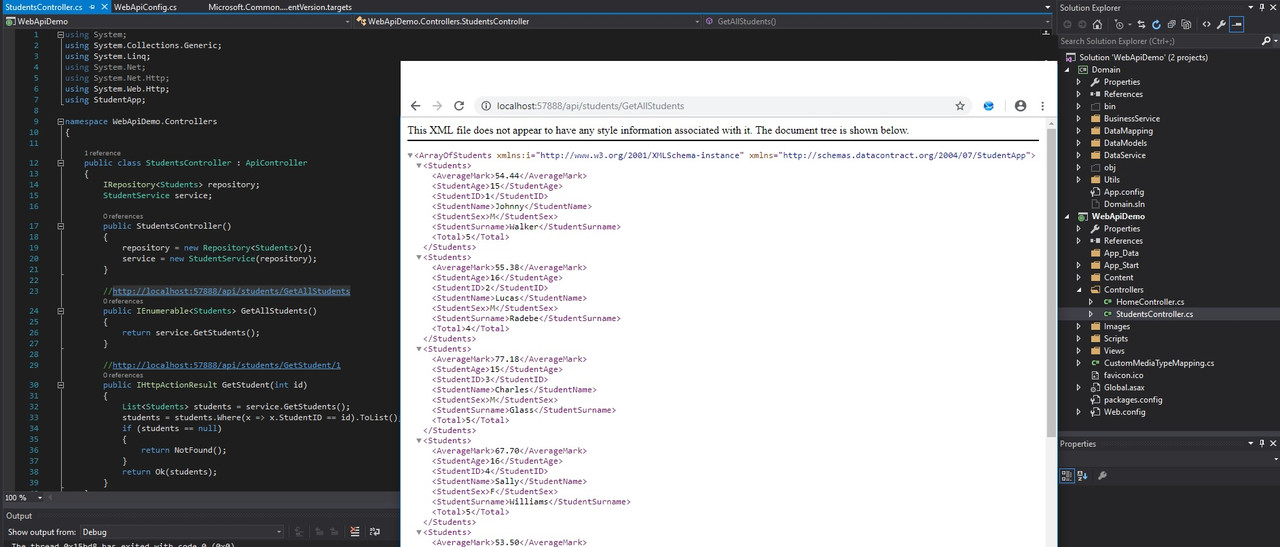
It's getting there I think, more feeling my way around at the moment with asp.net webapi. Haven't used any Wizard for the controllers.
webapi.jpg


Edit: returns JSON by adding
config.Formatters.JsonFormatter.SupportedMediaTypes.Add(new MediaTypeHeaderValue("text/html"));
to the WebApiConfig
 
Last edited:
It should also return json by adding the ContentType header application/json to the client request. What you have done there is force json content negotiation for the default ContentType, which happens to be text/html

Have a look at the [Route] attributes. They will let you declare nicer urls. Instead of calling /students/GetAllStudents and students/GetStudent/1, which is a bit unwieldy, you will be able to call /students and /students/1 to do the same thing

The nice thing is that your urls are then obvious.

GET /students - returns all students
GET /students/{id} - returns student with id X
POST /students/{id} - update student with id X
POST /students - create a new student
 
I don't know about routing. I've looked but not found a single clear example of how to use them.

Code:
        [AcceptVerbs("GET")]
        [Route("api/{students}/{id}")]
        public IEnumerable<Students> GetAllStudents()
        {
            return service.GetStudents();
        }

This is in place too
Code:
        public static void RegisterRoutes(RouteCollection routes)
        {
            routes.IgnoreRoute("{resource}.axd/{*pathInfo}");

            routes.MapRoute(
                name: "Default",
                url: "{controller}/{action}/{id}",
                defaults: new { controller = "Home", action = "Index", id = UrlParameter.Optional }
            );
        }

I've tried

[Route("api/{students}/")]

[Route("api/{students}")]

[Route("api/students/")]

[Route("api/getstudents/")]

etc etc anyway I'm missing something. Just not sure what.

dsfsdfsdf.jpg


EDIT: GOT IT

My uri register was configured incorrectly.

FFFFF.jpg
 
Last edited:
you need to add the following to WebApiConfig.cs

C#:
config.MapHttpAttributeRoutes();

Then you can define your controller like

C#:
    [RoutePrefix("api/students")]
    public class StudentsController : ApiController
    {
        private readonly StudentService _studentService;

        public StudentsController(StudentService studentService)
        {
            _studentService = studentService;
        }

        [Route("")] // /api/students
        [HttpGet]
        public List<Student> FindAll()
        {
            return _studentService.FindAll();
        }

        [Route("{id}")] // /api/students/{id}
        [HttpGet]
        public Student FindById(long id)
        {
            return _studentService.FindById(id);
        }

        [Route("")] // /api/students
        [HttpPost]
        public Student Save([FromBody] Student student)
        {
            return _studentService.Save(student);
        }
    }
 
Well....it works at least. Not perfect but it works.

Screenshot-2.jpg
 
Last edited:
Can anyone see the problem? I'm sure my class is malformed somehow but I can't see it. Been struggling this for about 3 days now.

Not production code, just using for testing atm.

Screenshot-2.jpg


Untitled.jpg
 
Last edited:
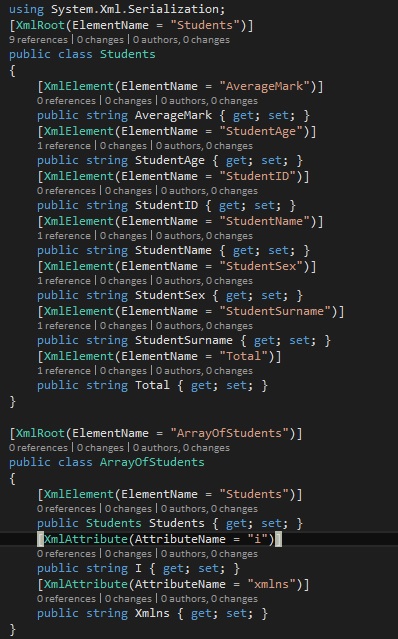
it's in the Exception, unexpected "ArrayOfStudents"

you are trying to deserialise into Students, which has a XmlRoot defined as "Students", not "ArrayOfStudents"

you should look at your naming conventions.

Your "Students" class really should be called "Student", it is a singular

Then on your ArrayOfStudents, that class is really just a private wrapper for that specific response. A better name is probably "GetStudentsResponse", and should look like (off the top of my head, not sure if these are the correct attribute names, but it should send you down the correct path)

C#:
class Student {
    public string Id { get; set; }
    public int Age { get; set; }
    public string FirstName { get; set; }
    public string LastName { get; set; }
}

class GetStudentsResponse {
    [XmlArray("ArrayOfStudents")]
    [XmlArrayItem("Student ")]  
    public List<Student> Students { get; set; }
}
 
Last edited:
why you fetching the XML twice?
Also, consider using JSON

Oops

With JSON the whole thing works beautifully. With XML it all goes Titanic Iceberg. Is it ok if I stick with JSON from now on? Don't know how you guys ever worked with XML is a nightmare.
 
Last edited:
The problem is with that, is doesn't know how to deal with this. I think it tries to put that into the Student class and it goes a bit crazy.

sdfsdfsdfsd.jpg
 
The problem is with that, is doesn't know how to deal with this. I think it tries to put that into the Student class and it goes a bit crazy.

sdfsdfsdfsd.jpg

That is just WebApi creating XML, because you are returning a list. XML must have a root element.


You need to deserialise that wrapper, that is why I said you need a private class specific to that webservice call.


I would just ditch the whole XML thing anyway.
 
For your XML issue :

XmlDocument xmldoc_All = new XmlDocument();
Xmldoc_All.LoadXml(your xml response goes here);


XmlNodeReader xmlread = new XmlNodeReader(xmlresponse.SelectSingleNode("Students"));

loop through xmlread to get values.
 
For your XML issue :

XmlDocument xmldoc_All = new XmlDocument();
Xmldoc_All.LoadXml(your xml response goes here);


XmlNodeReader xmlread = new XmlNodeReader(xmlresponse.SelectSingleNode("Students"));

loop through xmlread to get values.


Holy **** no...

All you need is:
List<Student> students = JsonConvert.Deserialize<List<Student>>(responseAsString);
 
I'm uh

....going to just not do anything XML for now. If I ever need to then I'll put that dress on when the time comes. For now just JSON
 
Please take a look at this mystery. How come calling all the records works however calling a parameter does not??

routingfuckyou.jpg
 
Last edited:
Top
Sign up to the MyBroadband newsletter
X