


howardb
Expert Member
As the title says, this happened since yesterday after installing the usual MS security updates - just wondering if there is a setting somewhere to change this back at all?
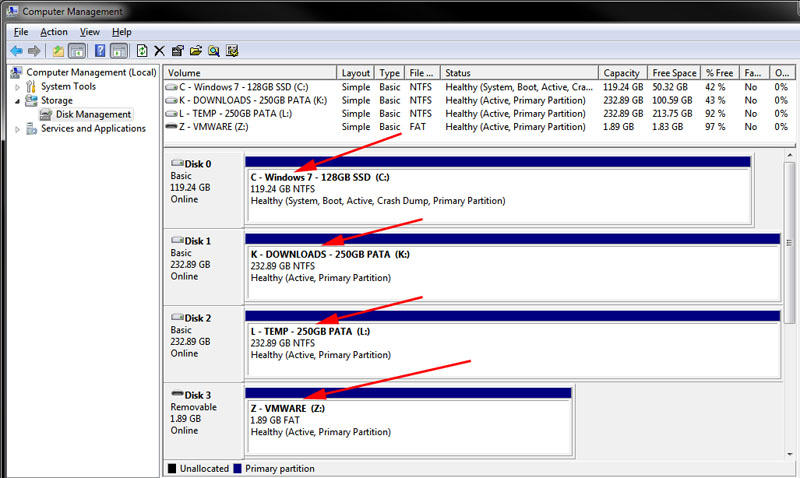
My Explorer now shows the below - all internal HDD Volume Names are now defaulted to "Local Disk" (previously had them all named per the contents of each HDD/volume, per the 2nd image below from Computer Management screen)

However, Computer Management still reports the HDD Volume Names as correct!
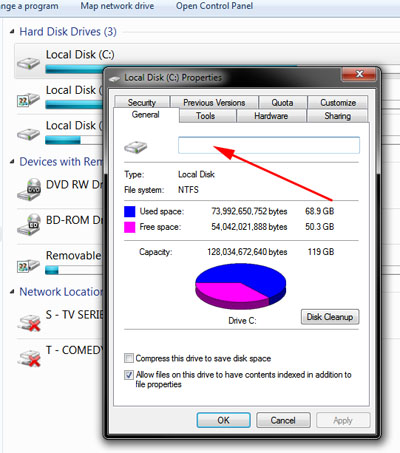
If I select Properties of the HDD Volume, it shows a blank name - if I rename it in this field and press OK, the name changes in Computer Management view, but not in Explorer - WTF???
Any ideas?
Tried uninstalling the security updates, but no change - like it's buggered something with a setting somewhere...
My Explorer now shows the below - all internal HDD Volume Names are now defaulted to "Local Disk" (previously had them all named per the contents of each HDD/volume, per the 2nd image below from Computer Management screen)
However, Computer Management still reports the HDD Volume Names as correct!
If I select Properties of the HDD Volume, it shows a blank name - if I rename it in this field and press OK, the name changes in Computer Management view, but not in Explorer - WTF???
Any ideas?
Tried uninstalling the security updates, but no change - like it's buggered something with a setting somewhere...

