Windows/Office issue

satanboy

Psychonaut seven
Joined
Sep 13, 2007
Messages
111,389
Reaction score
26,429
Location
Gods are Digital
I have this strange problem on my Lenovo work laptop (running XP).

The IT/Network/PC dept cannot fix it after having this problem for months. They re-imaged my PC, reloaded Office and have swapped the laptop 4 times (I am on my 4th laptop in so many weeks). They keep moving the hard drive to the new laptops (problem 1?). They had my one laptop in the lab for two weeks but couldn't recreate the issue. Trend Microscan and AVG could not find a virus. This problem is totally random and doesn't happen all the time.

The problem is this:
When I view files in Windows Explorer there are blank spaces where the name should be. Minimise and then Maximise the screen and the file name would be back.
In Excell certain cells would appear blank, but in the "formula bar" the figures can be seen. Minimise and then Maximise the screen or scroll down and up and the figures would be back.
Email subject lines do the same.

Any ideas?
 
ok, so you have a laptop, you have a problem. They simply move the hdd to another similar laptop & scan for virusses?

What version of office?
If it is hardware (i doubt) then it could be a faulty hdd.
What other software besides windows & office do you run?
 
I'm quite amazed by a few things. Why do they persist with the same HDD? They appear to be fixated on identifying the problem rather than trying to fix it? You need an upgraded system - that's for sure. XP and Office 2003 are rather old now.
 
I'm quite amazed by a few things. Why do they persist with the same HDD? They appear to be fixated on identifying the problem rather than trying to fix it? You need an upgraded system - that's for sure. XP and Office 2003 are rather old now.

I work for a large corporate (almost 3000 employees), what you are suggesting is like taking the mountain to Mohammed, in a small cup.
 
I work for a large corporate (almost 3000 employees), what you are suggesting is like taking the mountain to Mohammed, in a small cup.
There are lisences specially for the big corporates, so i don't agree with it not being affordable.

But yeah they should give you another hdd where windows & office are freshly installed on....
 
Yes, I know all about corporate software and hardware policies. They are a bit behind. Even UCT is upgrading to Win7. Time to kill that HDD?
 
Heya

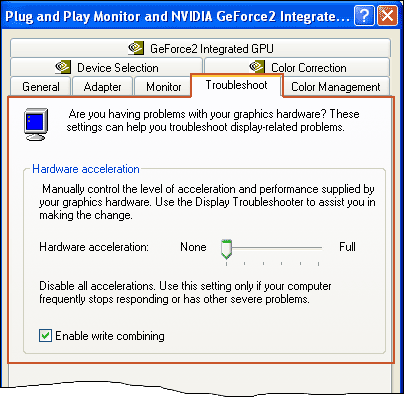
Had a similar issue... HP notebook and Xp with office 2007... set the "Hardware Acceleration " to 1 click away from "disabled" under the "Troubleshooting" tab in the Graphics settings... also un-ticked "write combine".

Had no further graphics anomalies in Office 2007 or explorer.

window_troubleshoot.gif
 
Heya

Had a similar issue... HP notebook and Xp with office 2007... set the "Hardware Acceleration " to 1 click away from "disabled" under the "Troubleshooting" tab in the Graphics settings... also un-ticked "write combine".

Had no further graphics anomalies in Office 2007 or explorer.

window_troubleshoot.gif

Gonna try this...

Update...the problem is being found on more and more laptops (all T510's)...the users are either blind or just too lazy to complain...
 
Last edited:
Maybe upgrade to office 2007 or 2010 to see if it makes a difference. The big problem with 2003 is that MS doesn't support it anymore so it's pointless to try and troubleshoot.
 
Seen this many times.
It's most noticeable when using Excel.
* when changing cell color and text color, text disappears and comes back when you minimize/maximize the worksheet or the window.

IMHO it's always graphics related. (memory, drivers, hardware)
 
Top
Sign up to the MyBroadband newsletter
X