Connect 2 iBurst 1mB/sec modems together for better speed?

RockRelic

New Member
Joined
Aug 15, 2011
Messages
7
Reaction score
0
Location
Cape Town
Hi there,

I have 2 iBurst 1mB/sec modems, although I only use one. Is there a way in which to connect 2 iBurst modems together to improve download speed. My download maximum speed has never been more than 120 kilobytes/sec.
 
cheapest would be to use an old pentium computer, a good flavour of linux, and some load balancing / routing foo.
 
Hi there,

I have 2 iBurst 1mB/sec modems, although I only use one. Is there a way in which to connect 2 iBurst modems together to improve download speed. My download maximum speed has never been more than 120 kilobytes/sec.
are they usb or desktop modems?
if its the desktop modems you can get a router that allows you to connect both at the same time (effectively giving you a speed of 2Mbps) the billion biguard 50 from iburst http://www.iburst.co.za/neuvo.aspx?link=get_hardware_routers and I am sure Ronald can mention a few others.
FYI 120kilobytes/sec (rough conversion 1Mbps =120KBps) is the fastest you can get from 1 iburst modem (excluding the silver surfer)

and welcome to MyBB
 
The best is the RB750

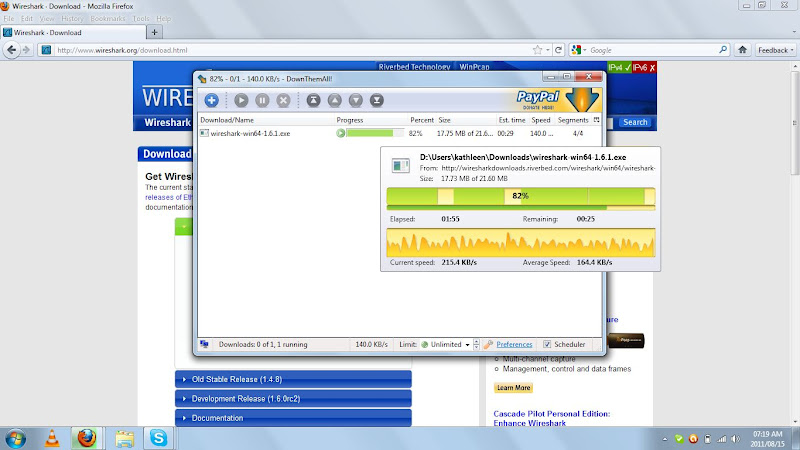
Here is more speed on the silver surfer using Firefox and Downthemall!

Wireshark.jpg
 
Thanks for the welcome! I should have found this site ages ago!

Firstly, Linux won't happen for me. When I can't get beyond setting a monitor refresh rate and screen size of my liking I quickly move on. :)

Mine are both the original desktop modems (2007 models) that can be connected directly via USB or via a router into the network port of the PC, the way it is currently connected. My router service 2 computers on my home network.

My router is the Totolink N300RG - It can be found here http://www.totolink.net/ You'll have to click on Products in the top menu and then go right down to the bottom of the page to see it. It's all flash driven so there is no direct url link.

I'm picking up lots of valuable info here!

Excuse my ignorance but what is the "silver surfer"?
 
Last edited:
It would be faster and more cost efficient to switch to cellular (coverage dependant).
2 x iBust contracts = $$$$
 
Thanks for the welcome! I should have found this site ages ago!

Firstly, Linux won't happen for me. When I can't get beyond setting a monitor refresh rate and screen size of my liking I quickly move on. :)

Mine are both the original desktop modems (2007 models) that can be connected directly via USB or via a router into the network port of the PC, the way it is currently connected. My router service 2 computers on my home network.

My router is the Totolink N300RG - It can be found here http://www.totolink.net/ You'll have to click on Products in the top menu and then go right down to the bottom of the page to see it. It's all flash driven so there is no direct url link.

I'm picking up lots of valuable info here!

Excuse my ignorance but what is the "silver surfer"?

Then the most cost effective would be to get a new router the the one is suggested or the RB750 Ronald advised (im sure there are others that will work but Ronalds the expert on that), unless your current router can connect 2 modems simultaneously?

The silver surfer is the new 2Mbps iburst modem, its cool but too expensive :(


It would be faster and more cost efficient to switch to cellular (coverage dependant).
2 x iBust contracts = $$$$

you don't have to have 2 contracts a,you can have up to 3 modems on 1 account and have them all running simultaneously
 
Then the most cost effective would be to get a new router the the one is suggested or the RB750 Ronald advised (im sure there are others that will work but Ronalds the expert on that), unless your current router can connect 2 modems simultaneously?

Just read up a bit on that RB750, are they suppose to be able to essentially combine the two modems speed or is it more just to purely load balance? ie. The difference between getting 2Mbps on 1 download or having two downloads going at 1Mbps each?
 
It is load balancing.

e.g.

big file 200mb
no download manager = one modem
use a download manager that downloads sections then you use both modems
 
It is load balancing.

e.g.

big file 200mb
no download manager = one modem
use a download manager that downloads sections then you use both modems

Thought so, so any download where you can make multiple connections will benefit but then applications like Steam or watching Youtube won't. Youtube you can get around by downloading the video first I suppose but looking at the price of that lil' device and definitely sounds worth it for what you get :)
 
Just read up a bit on that RB750, are they suppose to be able to essentially combine the two modems speed or is it more just to purely load balance? ie. The difference between getting 2Mbps on 1 download or having two downloads going at 1Mbps each?

Two downloads at 1 Mb/s each.

However, if you use a download manager that has multi-segmentation you should be able to do this easily.
 
It would be faster and more cost efficient to switch to cellular (coverage dependant).
2 x iBust contracts = $$$$

I'm in Cape Town and have coverage for everything. Cellular? Isn't this ALWAYS more expensive? Explain please!
 
It is load balancing.

e.g.

big file 200mb
no download manager = one modem
use a download manager that downloads sections then you use both modems

AH, I get it!

So if I were to have a router that could handle the inputs from 2 iBurst modems simultaneously I would effectively be doubling the download speed. However this would only be possible if I were to download files that are broken down into smaller packages, with each modem downloading separate bits, to eventually become one single larger file, say when downloading something from UseNext.

I don't have a problem with iBurst's regular speed on my modem. It works just fine, in 4 years with them I've probably lost signal 3 or 4 times for a few hours, so very reliable for me.

Can the Mikrotik RB750 handle 2 iBurst modem inputs simultaneously, and is it hard to set up?

Much appreciated!
 
Two downloads at 1 Mb/s each.

However, if you use a download manager that has multi-segmentation you should be able to do this easily.

Has anyone managed to get 2Mbps on one download using two load balanced modems to the same destination? My Mikrotik is configured to route all traffic to the same destination on one modem so multiple sections to same destination = 1Mbps. Helps prevent the webs from breaking....
 
Searched around, found this - http://www.scoopdistribution.co.za/product_info.php?products_id=1184

2 WAN ports = 2 modems - right?
Automatic load balancing - what I need right?
and be able to conect using PPPoE
which the one on the link looks like it can
- Supports TCP/IP, PPPoE, DHCP, ICMP, NAT, SNTP, DNS, TFTP, ARP
- Provides two 10/100M WAN ports and three 10/100M LAN ports
- Load Balancing and back-ups


I see this site has the RB750 and RB750GL as well , not sure which one is the right one for using 2 modems bt they cheaper then the other one
as well
 
Last edited:
and be able to conect using PPPoE
which the one on the link looks like it can


I see this site has the RB750 and RB750GL as well , not sure which one is the right one for using 2 modems bt they cheaper then the other one
as well

You're fine with pretty much anything running RouteOS (OS running on Mikrotik devices) even a PC with the OS. You can also plug it into a switch if it has limited ports. Check out the classifieds for anyone selling their old WUG boards for decent deals
 
and be able to conect using PPPoE
which the one on the link looks like it can
I see this site has the RB750 and RB750GL as well , not sure which one is the right one for using 2 modems bt they cheaper then the other one
as well

I actually prefer the mikrotik routers, that RB750 has 5 lan ports so you could actually setup 5x iburst routers on it and have the whole shebang load balance across all 5 (you would need 2 account, 3 modems per account :D )

there is difference in memory/cpu/port speed between the 750 and the 750GL,
following is the major difference.
750GL = gigabit , 64MB memory
750 = 10/100Mb, 32MB memory

memory depends on how much firewall/mangle rules you setup, i have a ton and still have a lot left.
the gigabit lan is nice to have faster transfers between server/desktop/laptop.
what I am really missing is a wireless connection, there is new models out like the 754GL with wireless, just haven't seen their prices yet.

these devices are actual routers very powerfull, the other stuff that I see I consider as toys.
 
Last edited:
Top
Sign up to the MyBroadband newsletter
X