


ichigo
Executive Member
Understanding How Adsl Works
http://www.kitz.co.uk/adsl/equip.htm
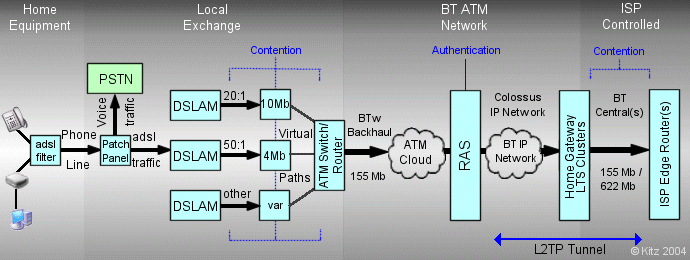
Depicting an oversee's model for adsl, which is similar to ours
G.Dmt (G.DMT full-rate ADSL expands the usable bandwidth of existing copper telephone lines, delivering high-speed data communications at rates up to 8 Mbit/s downstream and 1.3 Mbit/s upstream)
http://en.wikipedia.org/wiki/G.992.1
Adsl 2+ (The data rates can be as high as 24 Mbit/s downstream and up to 1.4 Mbit/s upstream depending on the distance from the DSLAM to the customer's premises)
http://en.wikipedia.org/wiki/G.992.5
VSDL 1&2(The data rates can exceed 100 Mbit's downstream and upstream depending on the infrastructure available at the exchanges and dslams and you have to be quite close to them to achieve those speeds and can get quite low speeds)
https://en.wikipedia.org/wiki/Very-high-bit-rate_digital_subscriber_line
Attenuation (is the distance from the exchange/dslam terminal to your house)
http://en.wikipedia.org/wiki/Attenuation
SNR (Signal To Noise Ratio)
The Further you are from the exchange the lower the SNR is by default and decreases/increases depending on your line sync speed, if your line is dropping the first thing you will notice is that your SNR is lower than 12.
http://en.wikipedia.org/wiki/Signal-to-noise_ratio
In Depth Description of what Attenuation/SNR is
http://mybroadband.co.za/vb/showthread.php/186156-Understanding-SNR-and-Attenuation-Rates
Yes Attenuation/SNR is the most important, it can still be improved by building a dslam/exchange near your house or your line can get moved to a closer dslam/exchange.
Attenuation & SNR are not always related to distance, there could be other factors at play.
Also changing to fibre optics will help when they add it to your residential area or business area
CRC Errors (is an error-detecting code commonly used in digital networks and to see if your ISP connection is dropping)
http://en.wikipedia.org/wiki/Cyclic_redundancy_check
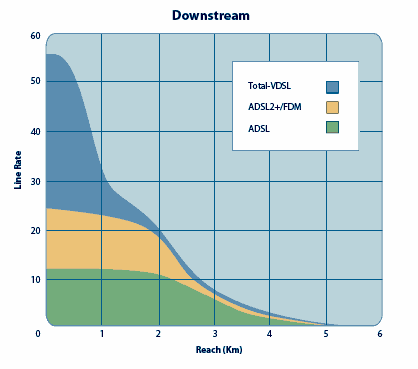
Graph to check your adsl potential according to your line attenuation/distance from the exchange, results may vary depending on your SNR
Tracert (Is a great diagonstic tool used to diagnose your adsl line for common exchange/DNS problems like congestion or slow connections to the DNS, also can be used to check international/local latency problems)
You can also use tracerts to check what latencies you may get to certain gaming servers
How to save a tracert on your drive
http://en.wikipedia.org/wiki/Traceroute
http://speedtest.mybroadband.co.za/, http://Speedtest.net and http://Speedtest-rba.isdsl.net: are great tools for diagnosing problems like congestion or throughput problems.
You can also use the speedtests to check what latencies you may get to certain gaming servers
Local:

International:

The best way to report a fault is to go into the Telkom Direct Store
Good info to know so you can improve your latency and adsl experience, so hope you find it useful.
DNS' in the router settings affects your adsl latency/speed so if you in Durban and you have Cape Town as your dns it will affect your adsl latency/speed since any data transfered(uploaded) or downloaded has to go through Cape Town first before going out Internationally or Locally
If you live in Cape Town use these DNS'
If you live in Durban/Pietermaritzburg use these DNS'
If you live in JHB/Pretoria use these DNS'
Which ever city you are nearest to you can use the DNS' settings assigned to it and also helps if one of the DNS' is faulty
Although Dialup and ISDN may not be obsolete yet and it's still in use today, ADSL and VDSL will continue to overpower them until both get finally discontinued, but the ADSL/VDSL coverage has a few downfalls in South Africa and also the infrastructure available to them and not to mention cable theft so people's only choice is to use Wireless, Cellphone Networks or the Old School Dialup and ISDN if they are outside of the coverage area for ADSL and VDSL.
Pricing is also quite influencial affecting peoples choices not just the infrastructure and what is available to them.
http://www.kitz.co.uk/adsl/equip.htm
Depicting an oversee's model for adsl, which is similar to ours
G.Dmt (G.DMT full-rate ADSL expands the usable bandwidth of existing copper telephone lines, delivering high-speed data communications at rates up to 8 Mbit/s downstream and 1.3 Mbit/s upstream)
http://en.wikipedia.org/wiki/G.992.1
Adsl 2+ (The data rates can be as high as 24 Mbit/s downstream and up to 1.4 Mbit/s upstream depending on the distance from the DSLAM to the customer's premises)
http://en.wikipedia.org/wiki/G.992.5
VSDL 1&2(The data rates can exceed 100 Mbit's downstream and upstream depending on the infrastructure available at the exchanges and dslams and you have to be quite close to them to achieve those speeds and can get quite low speeds)
https://en.wikipedia.org/wiki/Very-high-bit-rate_digital_subscriber_line
Attenuation (is the distance from the exchange/dslam terminal to your house)
http://en.wikipedia.org/wiki/Attenuation
SNR (Signal To Noise Ratio)
The Further you are from the exchange the lower the SNR is by default and decreases/increases depending on your line sync speed, if your line is dropping the first thing you will notice is that your SNR is lower than 12.
http://en.wikipedia.org/wiki/Signal-to-noise_ratio
In Depth Description of what Attenuation/SNR is
http://mybroadband.co.za/vb/showthread.php/186156-Understanding-SNR-and-Attenuation-Rates
Yes Attenuation/SNR is the most important, it can still be improved by building a dslam/exchange near your house or your line can get moved to a closer dslam/exchange.
Attenuation & SNR are not always related to distance, there could be other factors at play.
Also changing to fibre optics will help when they add it to your residential area or business area
CRC Errors (is an error-detecting code commonly used in digital networks and to see if your ISP connection is dropping)
http://en.wikipedia.org/wiki/Cyclic_redundancy_check
Graph to check your adsl potential according to your line attenuation/distance from the exchange, results may vary depending on your SNR
Tracert (Is a great diagonstic tool used to diagnose your adsl line for common exchange/DNS problems like congestion or slow connections to the DNS, also can be used to check international/local latency problems)
You can also use tracerts to check what latencies you may get to certain gaming servers
How to save a tracert on your drive
Code:
tracert [website] > Drive:\filename.txt
Code:
[B][U]Local:[/U][/B]

Tracing route to [url]www.telkom.co.za[/url] [196.43.22.222]
over a maximum of 30 hops:
  1    <1 ms    <1 ms    <1 ms  192.168.1.1
[B]Router[/B]
  2     9 ms     9 ms     9 ms  *.telkomadsl.co.za [*]
[B]RAS[/B]
  3    24 ms    24 ms    23 ms  196.43.39.166
[B]DNS[/B]
  4    25 ms    26 ms    25 ms  rrba-ip-bssr-1-ge-2-48.telkom-ipnet.co.za [196.43.23.6]
[B]DNS[/B]
  5    24 ms    24 ms    24 ms  nbsc-ip-bssr-1-atm-5-0-0-1.telkom-ipnet.co.za [196.43.23.30]
[B]DNS[/B]
  6    27 ms    27 ms    28 ms  nbsc-ip-rcache-1-vif2.telkom-ipnet.co.za [196.43.22.222]
[B]Telkoms Website[/B]
Trace complete.
Code:
[U][B]International:[/B][/U]

Tracing route to google-public-dns-a.google.com [8.8.8.8]
over a maximum of 30 hops:
  1    <1 ms    <1 ms    <1 ms  192.168.1.1
[B]Router[/B]

  2    10 ms     9 ms     9 ms  *.telkomadsl.co.za [*]
[B]RAS[/B]

  3     9 ms     9 ms    10 ms  196.43.21.226
[B]DNS[/B]

  4     *        *        *     Request timed out.

  5    28 ms    28 ms    27 ms  196.43.10.130
[B]DNS[/B]

  6    25 ms    25 ms    69 ms  rrba-ip-lir-1-gig-2-0-0-201.telkom-ipnet.co.za [196.43.33.5]
[B]Telkom Main Exchange[/B]

  7   222 ms   220 ms   220 ms  lon-ip-dir-telecity-gig-1-0-2.telkom-ipnet.co.za [196.43.9.217]
[B]London International Exchange[/B]

  8   222 ms   223 ms   221 ms  196.25.147.10

  9   278 ms   253 ms   252 ms  209.85.255.86

 10   259 ms   259 ms   258 ms  209.85.253.94

 11   265 ms   262 ms   262 ms  209.85.243.33

 12   266 ms   280 ms   289 ms  216.239.49.36

 13   280 ms   269 ms   270 ms  209.85.255.118

 14   266 ms   265 ms   241 ms  google-public-dns-a.google.com [8.8.8.8]
[B]Google's Website[/B]
Trace complete.http://speedtest.mybroadband.co.za/, http://Speedtest.net and http://Speedtest-rba.isdsl.net: are great tools for diagnosing problems like congestion or throughput problems.
You can also use the speedtests to check what latencies you may get to certain gaming servers
Code:
[B]Speedtest.mybroadband.co.za/[/B]

Your Latest Results [I](Local)[/I]
Test conducted on 26 March 2012 10:33:40 PM
Download Speed: 3463 kbps (432.9 KB/sec transfer rate)
Upload Speed: 418 kbps (52.3 KB/sec transfer rate)
Latency: 61 ms

Your Latest Results [I](International)[/I]
Test conducted on 26 March 2012 10:36:26 PM
Download Speed: 1858 kbps (232.3 KB/sec transfer rate)
Upload Speed: 376 kbps (47 KB/sec transfer rate)
Latency: 429 msInternational:
Code:
[B]Speedtest-rba.isdsl.net[/B]

Start Time: 22:22:05
End time: 22:22:06
IP Address: 41.146.11.120
Download Size: 409600 bytes
Time Delta: 1.1366279125214 seconds
Download Speed: 352 KBytes/s
Line Speed: 2816 kbits/s
The best way to report a fault is to go into the Telkom Direct Store
Good info to know so you can improve your latency and adsl experience, so hope you find it useful.
DNS' in the router settings affects your adsl latency/speed so if you in Durban and you have Cape Town as your dns it will affect your adsl latency/speed since any data transfered(uploaded) or downloaded has to go through Cape Town first before going out Internationally or Locally
If you live in Cape Town use these DNS'
Code:
196.43.46.190(Cape Town)
196.43.50.190(Pretoria)
If you live in Durban/Pietermaritzburg use these DNS'
Code:
196.43.50.190(Pretoria)
196.43.53.190(Durban)
If you live in JHB/Pretoria use these DNS'
Code:
196.43.42.190(JHB)
196.43.45.190(Pretoria)
Which ever city you are nearest to you can use the DNS' settings assigned to it and also helps if one of the DNS' is faulty
Although Dialup and ISDN may not be obsolete yet and it's still in use today, ADSL and VDSL will continue to overpower them until both get finally discontinued, but the ADSL/VDSL coverage has a few downfalls in South Africa and also the infrastructure available to them and not to mention cable theft so people's only choice is to use Wireless, Cellphone Networks or the Old School Dialup and ISDN if they are outside of the coverage area for ADSL and VDSL.
Pricing is also quite influencial affecting peoples choices not just the infrastructure and what is available to them.
Last edited:


