-
- News
-
Categories
- 5G
- ADSL
- AI
- Banking
- Black Friday
- Broadband
- Broadcasting
- Business
- Business Telecoms
- Cellular
- Cloud and Hosting
- Columns
- Cryptocurrency
- Energy
- Enterprise
- Fibre
- Gadgets
- Gaming
- Government
- Hardware
- Industry News
- Internet
- Internet of Things
- Investing
- IT Services
- Motoring
- Reviews
- Science
- Security
- Smartphones
- Software
- Technology
- Telecoms
- Trending
- Wireless
- Press Office
- Forum
- Industry News
- What's Next
- Company hub
- Speed Test
- About us
- Advertise with us
- Contact
- Careers


-
Join the MyBroadband community
South Africa’s biggest forum. Discuss, discover, and connect with thousands of members.
-
Question of the Day: Have you registered your home solar with Eskom?

You are using an out of date browser. It may not display this or other websites correctly.
You should upgrade or use an alternative browser.
You should upgrade or use an alternative browser.
dvd ripper
- Thread starter rooster
- Start date

LazyLion
King of de Jungle
Hey does any one know of a totally free dvd ripper that can convert to xvid avi?
Dude... seriously?
you couldn't just do a search?
There are like ten million threads about this... new one every week.
LazyLion
King of de Jungle
ive tried like everyting... auto gk doesn't work, the wizard thing isn't a full version, and other things on the forum don't work either like dvd shrink etc. I just want a totally free easy converter that will get from the disk to avi.
LazyLion
King of de Jungle
ive tried like everyting... auto gk doesn't work, the wizard thing isn't a full version, and other things on the forum don't work either like dvd shrink etc. I just want a totally free easy converter that will get from the disk to avi.
The Free version of Fair Use Wizard will rip any DVD to a maximum of 700 Mb AVI file with one click.
What else do you need?
LazyLion
King of de Jungle
DVD Ripping and Back-up...
Check out this all in one solution...
http://www.dvdvideosoft.com/free-dvd-video-software.htm
Free DVD Backup Software...
1) To make a backup of a DVD to another DVD...
Install this program first... it will remove the copy protection and macrovision while you decrypt... (and will also allow you to watch region protected discs in the future)...
http://www.dvd43.com/
When you have that installed, then use DVD Decrypter to rip the DVD to your hard drive...
http://www.mrbass.org/dvdrip/
Once you have it ripped to your hard drive, use DVD shrink to make the image smaller and turn it into an ISO file that I can fit onto one DVD... Note: you have to select ISO image as the target file from the drop down menu.
http://www.mrbass.org/dvdshrink/
Once you have the ISO image you can use this program to burn it back to a DVD...
http://www.imgburn.com/
2) To Rip a DVD to an AVI file...
The free version of this program Fair Use Wizard can rip any DVD to a 700 Mb AVI (XVid) File... with just one click...
http://www.fairusewizard.com/
but.... I find I get a much better quality rip, when I follow these steps...
i) Use DVD Decrupter to rip the DVD to your Hard Drive.
ii) Use DVD Shrink to make an ISO image of the DVD, but turn the compression off completely, in other words, the ISO image will be an exact image of the DVD. Also enable the two extra read options in DVD Shrink to get a better quality image, it is slower, but it pays off. Put that image on a different drive to the one you are going to rip to.
iii) Now use Fair Use Wizard to rip from that unencrypted image in your hard disk. You will get a very high quality rip with no artifacts and no "streaking".
Compare that to a rip straight from the DVD and you will see what I mean. Of course the quality of your DVD drive and speed of your processor is also a factor. 3.0 Ghz strongly recommended!
Here is a guide for Fair Use Wizard... if you need one...
http://www.mediafire.com/?uluiwhkxetc
3) To turn video files back into a DVD...
http://www.dvdflick.net/ or here http://sourceforge.net/projects/dvdflick/
Tutorial here...
http://lifehacker.com/software/dvds...t-any-video-file-to-a-playable-dvd-232322.php
Here is a Tutorial on how to Back-up a DVD using DVD Shrink...
http://www.zeropaid.com/news/9425/How+to+Use+DVD+Shrink
...and a tutorial on backing-up using Auto-GK...
http://dailyapps.net/2008/08/hack-attack-how-to-create-axxo-quality-dvd-rips/
Check out this all in one solution...
http://www.dvdvideosoft.com/free-dvd-video-software.htm
Free DVD Backup Software...
1) To make a backup of a DVD to another DVD...
Install this program first... it will remove the copy protection and macrovision while you decrypt... (and will also allow you to watch region protected discs in the future)...
http://www.dvd43.com/
When you have that installed, then use DVD Decrypter to rip the DVD to your hard drive...
http://www.mrbass.org/dvdrip/
Once you have it ripped to your hard drive, use DVD shrink to make the image smaller and turn it into an ISO file that I can fit onto one DVD... Note: you have to select ISO image as the target file from the drop down menu.
http://www.mrbass.org/dvdshrink/
Once you have the ISO image you can use this program to burn it back to a DVD...
http://www.imgburn.com/
2) To Rip a DVD to an AVI file...
The free version of this program Fair Use Wizard can rip any DVD to a 700 Mb AVI (XVid) File... with just one click...
http://www.fairusewizard.com/
but.... I find I get a much better quality rip, when I follow these steps...
i) Use DVD Decrupter to rip the DVD to your Hard Drive.
ii) Use DVD Shrink to make an ISO image of the DVD, but turn the compression off completely, in other words, the ISO image will be an exact image of the DVD. Also enable the two extra read options in DVD Shrink to get a better quality image, it is slower, but it pays off. Put that image on a different drive to the one you are going to rip to.
iii) Now use Fair Use Wizard to rip from that unencrypted image in your hard disk. You will get a very high quality rip with no artifacts and no "streaking".
Compare that to a rip straight from the DVD and you will see what I mean. Of course the quality of your DVD drive and speed of your processor is also a factor. 3.0 Ghz strongly recommended!
Here is a guide for Fair Use Wizard... if you need one...
http://www.mediafire.com/?uluiwhkxetc
3) To turn video files back into a DVD...
http://www.dvdflick.net/ or here http://sourceforge.net/projects/dvdflick/
Tutorial here...
http://lifehacker.com/software/dvds...t-any-video-file-to-a-playable-dvd-232322.php
Here is a Tutorial on how to Back-up a DVD using DVD Shrink...
http://www.zeropaid.com/news/9425/How+to+Use+DVD+Shrink
...and a tutorial on backing-up using Auto-GK...
http://dailyapps.net/2008/08/hack-attack-how-to-create-axxo-quality-dvd-rips/
Last edited:

AirWolf
Honorary Master
Time for a mod super-merge

LazyLion
King of de Jungle
Time for a mod super-merge
Those are just the first four I found... there are tons more.
If the mods want I will list all of them.
do i have to use dvd decrypter first? ive tried that and it didn't work. in fairuse wizard i click on E drive, under create new project, where it says "folder" and i have it on slow avi. I hit next and it says i needs the full version
Tarzan
Well-Known Member
I use FabDVD HD decrypter to rip it to the my harddrive and then I use Handbrake to convert it to divx or .mkv format. Works great.
LazyLion
King of de Jungle
do i have to use dvd decrypter first? ive tried that and it didn't work. in fairuse wizard i click on E drive, under create new project, where it says "folder" and i have it on slow avi. I hit next and it says i needs the full version
no, you don't have to use DVD decrypter first.
Just put the DVD in the drive.
select "standalone MPEG-4 Player" and check "Full Auto Mode" in Fair Use Wizard and let it go...
atomcrusher
Expert Member
Anyone know where to download DVDflick? (As mentioned up this page)
The dvdflick.net page just returns a page error. I've searched for alternative download sites but no luck
The dvdflick.net page just returns a page error. I've searched for alternative download sites but no luck
LazyLion
King of de Jungle
Anyone know where to download DVDflick? (As mentioned up this page)
The dvdflick.net page just returns a page error. I've searched for alternative download sites but no luck
http://sourceforge.net/projects/dvdflick/
or...
http://findfiles.com/list.php?string=dvd+flick&db=Both
wizdumb
Expert Member
dvdx along with smartripper
Hey does any one know of a totally free dvd ripper that can convert to xvid avi?
Handbrake does all that, in one friendly app.
i tried fairusewizard, and the final file is just sound  it took like all morning. i had it on xvid but other than that nothing else was different than the guide. Oh, i forgot, the whole step where you choose which files to do (step 4 i think) was gone. after options and the main page part it went right into doing it.
it took like all morning. i had it on xvid but other than that nothing else was different than the guide. Oh, i forgot, the whole step where you choose which files to do (step 4 i think) was gone. after options and the main page part it went right into doing it.i tried fairusewizard, and the final file is just sound
Try Handbrake. Google for it, its on sourceforge I think.
It allows u to select which chapters you want or time intervals, and encode
either as DivX, XviD or H264. Includes multiple soundtrack and subtitle ripping.
LazyLion
King of de Jungle
i tried fairusewizard, and the final file is just sound
Dude... just put it on automatic like I told you. Don't worry with all that other crap. It's the easiest thing in the world. Are you able to press a button?

Mephisto_Helix
Resident Postwhore
I also d/loaded it earlier .......... mebbe put some screenies Gary because it just gave me the run around too 
LazyLion
King of de Jungle
I also d/loaded it earlier .......... mebbe put some screenies Gary because it just gave me the run around too
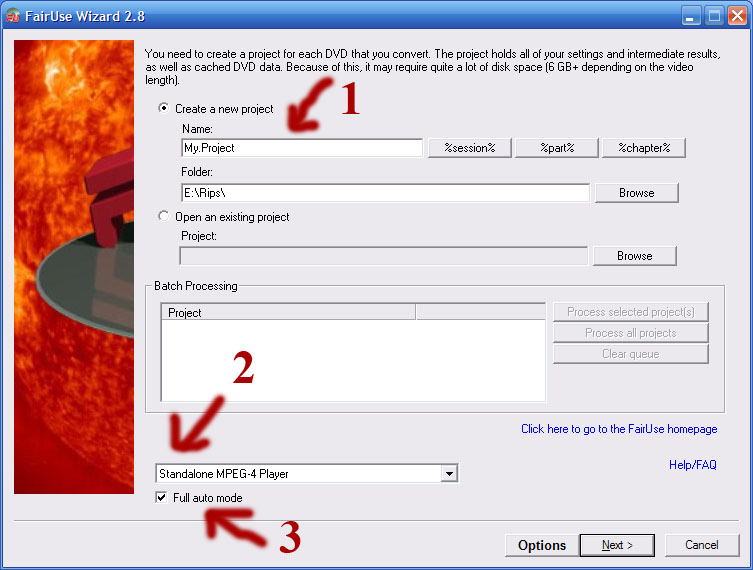
1. Give it a name
2. Choose Standalone MPEG-4 Player\
3. Full Auto Mode
Then click next and let it run.
That should give you a 700 Mb AVI file encoded in XviD and MP3 Audio.