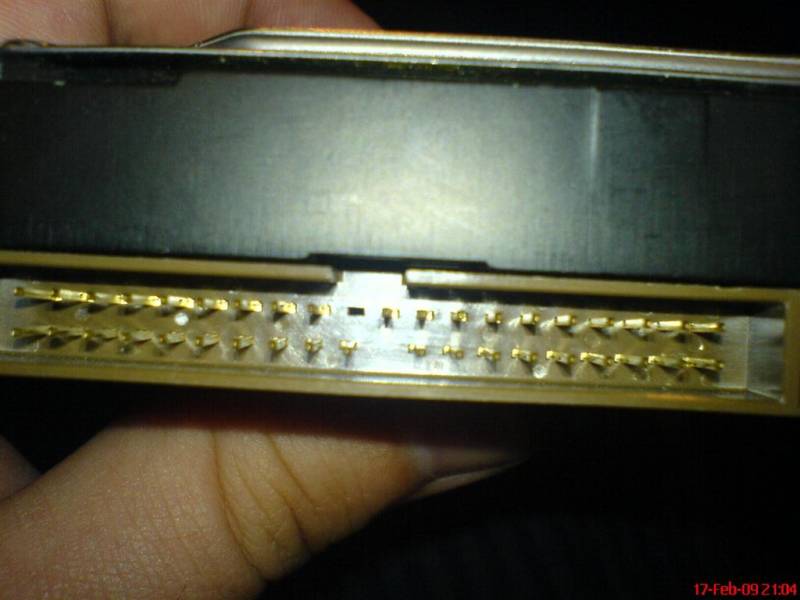
Pulled out IDE HDD pin

PostmanPot

Honorary Master
Joined
Jul 16, 2005
Messages
35,014
Reaction score
81
Location
Cape Town
Damnit, been having problems adding my two old IDE drives to my new PC. Somehow managed to remove one of the 40-pin connector pins. :(

Possible to replace? Easy?
 
:(

DSC00172_Large_.JPG
 
Let's have a shufty :

561px-ATA_Plug.svg.png


The pins' function :

Pin 1 Reset
Pin 2 Ground
Pin 3 Data 7
Pin 4 Data 8
Pin 5 Data 6
Pin 6 Data 9
Pin 7 Data 5
Pin 8 Data 10
Pin 9 Data 4
Pin 10 Data 11
Pin 11 Data 3
Pin 12 Data 12
Pin 13 Data 2
Pin 14 Data 13
Pin 15 Data 1
Pin 16 Data 14
Pin 17 Data 0
Pin 18 Data 15
Pin 19 Ground
Pin 20 Key or VCC_in
Pin 21 DDRQ
Pin 22 Ground
Pin 23 I/O write
Pin 24 Ground
Pin 25 I/O read
Pin 26 Ground
Pin 27 IOCHRDY
Pin 28 Cable select
Pin 29 DDACK
Pin 30 Ground
Pin 31 IRQ
Pin 32 No connect
Pin 33 Addr 1
Pin 34 GPIO_DMA66_Detect
Pin 35 Addr 0
Pin 36 Addr 2
Pin 37 Chip select 1P
Pin 38 Chip select 3P
Pin 39 Activity
Pin 40 Ground
 
Pin 19 seems to be MIA.

Did you try to start the HDD up? You might be lucky ;)

You'll see that pin 22 is also not there - and it's also ground.
 
Pin 19 seems to be MIA.

Did you try to start the HDD up? You might be lucky ;)

You'll see that pin 22 is also not there - and it's also ground.

Yes I've tried booting up several times but nothing.

Is it possible that this drive has 39 pins? There is only one that is missing, got 38 and there are 39 in total.

I.e. the clear black hole in the pic is the only one that's missing.
 
Damnit, been having problems adding my two old IDE drives to my new PC. Somehow managed to remove one of the 40-pin connector pins. :(

Possible to replace? Easy?

Yes. Its easy enough. Take it to a electonics repair shop. Let them Remove a pin from a old defunct drive and install solder in the missing pin position. Or get a complete new/recovered IDE male connector same as the one on drive and let them replace it. Make sure they have proper solder removing equipment and they do not use hand jobs.
 
Try pulling a pin out an old drive sticking it in the cable in the correct position and hope plug the drive in and hope for contact. I can recall some idea drives having 1 pin missing if i remember correctly. Could just be a dead drive hey.
 
@The_Librarian

Lucky ita not ours....

and @PostmanPot

its old anyways

btw how big is it?
 
Yes. Its easy enough. Take it to a electonics repair shop. Let them Remove a pin from a old defunct drive and install solder in the missing pin position. Or get a complete new/recovered IDE male connector same as the one on drive and let them replace it. Make sure they have proper solder removing equipment and they do not use hand jobs.

Thanks for this.

Any idea of costs?

I'm wondering if I should speak to dablkmark8, IIRC he repairs HDDs? Hmmm.
 
@ Postman - you can always look for another similar-specced HDD, swap the PC boards out and copy your data over.

Soldering work is tricky and delicate work...
 
Try pulling a pin out an old drive sticking it in the cable in the correct position and hope plug the drive in and hope for contact. I can recall some idea drives having 1 pin missing if i remember correctly. Could just be a dead drive hey.

Will try.

Can't be dead, was working earlier. :D
 
@ Postman - you can always look for another similar-specced HDD, swap the PC boards out and copy your data over.

Soldering work is tricky and delicate work...

How similar would it need to be?

I have another 160GB Western Digital IDE. This one is a Seagate.

Thanks for your help all.
 
Only 80GB. ;)

The stuff isn't too important thankfully.

80gig... thats peanuts.... 10gig must be windows
10gig must be free

so 60gig is left off data

peanuts

can recover with bitfarm 60 * R7 = R420 >>>> I assume that R69 for 10gig

I lost 460gig..... Luckily there were all movies by MR Video which my friend rented.:p
 
Top
Sign up to the MyBroadband newsletter
X