3d Printers South Africa

There's something off about your model though, like the walls are too far apart.

Have you tried a calibration cube? Looks a little high too. Remember , petg uses a higher z, pla likes to be more squished, you need to alter the setting for the new material. And check temps as per the filament you purchase . Even same type can be different per manufacturer and colour.

For example, cctree can go like 185 for low and 205 high, sunlu likes 200/205 to start. That's why temp towers are important.
And these temps they give. Like 185-205. Is it best to start in the middle of that temp or more toward high or low
 
Ok his second print, this time with PLA looks a bit better, ok probably not very demanding, just a xmas cookie cutter for his sister. Tiny bit of stringing but most wiped away with a finger. Are you supposed to get no stringing or do you get the odd one here and there?
View attachment 1429901
View attachment 1429903
Your stringing is nearly non-existent, it is close to as good as you will get it. You can get rid of it using a hot air gun. Meaning blow a hot air gun at 300c over the model and the little wisps will disappear.
 
And these temps they give. Like 185-205. Is it best to start in the middle of that temp or more toward high or low
There is no "perfect" settings other than what works for you.
Higher temps = stronger layer bonding but more stringing, more drooping (ie. overhangs).
If you set your temperatures too low two things can happen
1) Your extruder can't push plastic quick enough, so you get under extrusion
2) You have layers that don't adhere to each other.

I used to print the PLA brand I bought at 195. Just find a temperature that works for you
 
Thanks. LOL I know nothing, the boy google and do settings etc. What does higher Z mean? I asked him and he also don't know. The temps he says he did change for the pla.

So, you have a bltouch. A bltouch sensor cannot match the exact head of the nozzle so there is normally a offset. There are three mainly obviously ( x,y,z ) . x and y, are on the flat plane where in relation the "tottie" is to the nozzle head. This is differant per printer and needs to be self checked but is not often changed as its a physical limitation. The CR10 may have it hard set as the BLTouch is part of that printers head unit. However the Z offset is a differant story. When we talk about "squish" , its basically how close the nozzle head is to the bed and the filament is "squished" to adhere to the bed. Now for PETG , we normally use whats called moderate or light squish. due to the high temp bonding to the bed. For PLA, we squish a lot more agressively to get it to stick to the bed.

What this means is that you normally raise your z-offset slightly for PETG and lower it back down for PLA. If the chap you bought it from was printing predominantly PETG on that printer, good chance that z-offset is a bit high for PLA , which is why to me it looks like not enough squish. If you print a calibration cube or bed level square, that will indicate the correct z for you.

And these temps they give. Like 185-205. Is it best to start in the middle of that temp or more toward high or low

Depends how well you know that filament brand. Middle is safe but if its a new brand, do a quick temp tower and check. I've learnt to judge mine by eye now days and I tend to print non-geometric prints on the low side, even 5-10 lower than specified but for geometric/structural, more to the middle. It really depends on your printer and filament.
 
This is a recent calibration cube when I was playing with linear advance. I think I upped it a bit more after as you can see it just barely doesn't touch the wall but it's very very fine

20221126_213126.jpg

My Z axis which is top of the print, you can see how tight my lines are in comparison to yours

20221126_213459.jpg

This is the inverse of my Z ie the face that is actually against my build plate. You can see small gaps near the wall which is part of what I was tuning but my actual lines are squished nice and tight.

20221126_213554.jpg

My Y axis on the cube, tests that plane for accuracy and I got mybedges a bit sharper on the definition.

20221126_213620.jpg

Same for my X

20221126_213651.jpg

This is just on ofbthe clear sides but you can see I have no blobs or zits ( which points to over extrusion ) and no gaps or lamination splits which point to bad flow.

20221126_214309.jpg


Excuse the camera it's not great but that's at .4 nozzle and .2 layer. Did your son check the nozzle and layer height he set? I wonder if he has the nozzle wrong in the slicer but the print looked decent otherwise.
 
I have had this cabinet project I am building for my 3d printer so far taking....well many months.

One thing that have annoyed me, is that at night I can't monitor my prints over the webcam. So I installed some led strips I had lying in a box, from when we moved house.

What a major difference this has made. Loving it that I can now clearly see whats going on, on the printer any time of the day or night!

Before:
Screenshot 2022-11-27 at 10.57.35.png

After:
Screenshot 2022-11-27 at 10.57.46.png

The work in progress cabinet:

1b85dc2e-1889-4ed6-8aee-1e7b574afc4a.jpeg
 
This may sound arb but does anyone know a link or guide for stls and theory around gears? ie: cogs and mechanical movement, ratio conversion etc.
 
I have had this cabinet project I am building for my 3d printer so far taking....well many months.

One thing that have annoyed me, is that at night I can't monitor my prints over the webcam. So I installed some led strips I had lying in a box, from when we moved house.

What a major difference this has made. Loving it that I can now clearly see whats going on, on the printer any time of the day or night!

Before:
View attachment 1430131

After:
View attachment 1430133

The work in progress cabinet:

View attachment 1430135
Yep. I made some of these:
1669568665889.png
Called "Daylight on a stick"

This is my printer printing with them on
1669568743455.png

This is how the printer looks form the outside:
1669568850053.png

It is nearly pitch black in there without the lights on.
It really makes life a LOT better.
I ordered 5x of the PCBs from PCBWay and the LED lights from the recommended LED chip supplier.
Not for the faint of heart, the soldering was a mission and I'd say I'm VERY good at soldering.
There are seller that sell them.

Point is lights make a huge difference
 
She study at wits? I wanted to when I left school but they were the only place that did it back then and we just couldn't afford it.
No, University of Pretoria, they have an underground wind tunnel where she did her masters. Pre-grad was obv. mechanical eng. because that is pretty much where you need to start. Then post grad for aeronautical while working for Airbus and other drone type companies (mostly making and testing wings and stuff at those companies)
 
If anyone was eying the Sunly Filadryer S1.

You get a free roll PLA in black with this deal: https://www.diyelectronics.co.za/store/week-2/4229-filadryer-cctree-filament-bundle.html (6 left at this time of posting)

Normal item and price @ https://www.diyelectronics.co.za/st...filadryer-s1-filament-storage-drying-box.html
So I just bought the last combo tonight. It is basically 30% off the dryer. And our humidity is so high that you start picking up problems if the filament has been out for 2 or 3 days. Also ordered a wham bam build plate with PEX.

I printed a Fallout bobblehead for my nephew at 0,12mm layers and it looks amazing. Almost can't see the layer lines. I am considering finishing and painting this before I give it to him, what is a good primer and paint to use? Recommendations I have seen is for Rust-oleum spray paint primer? So after prepping and sanding just do a coat with the primer? And then what finishing paint do you use?

1669574943093.png
 
He printed this:

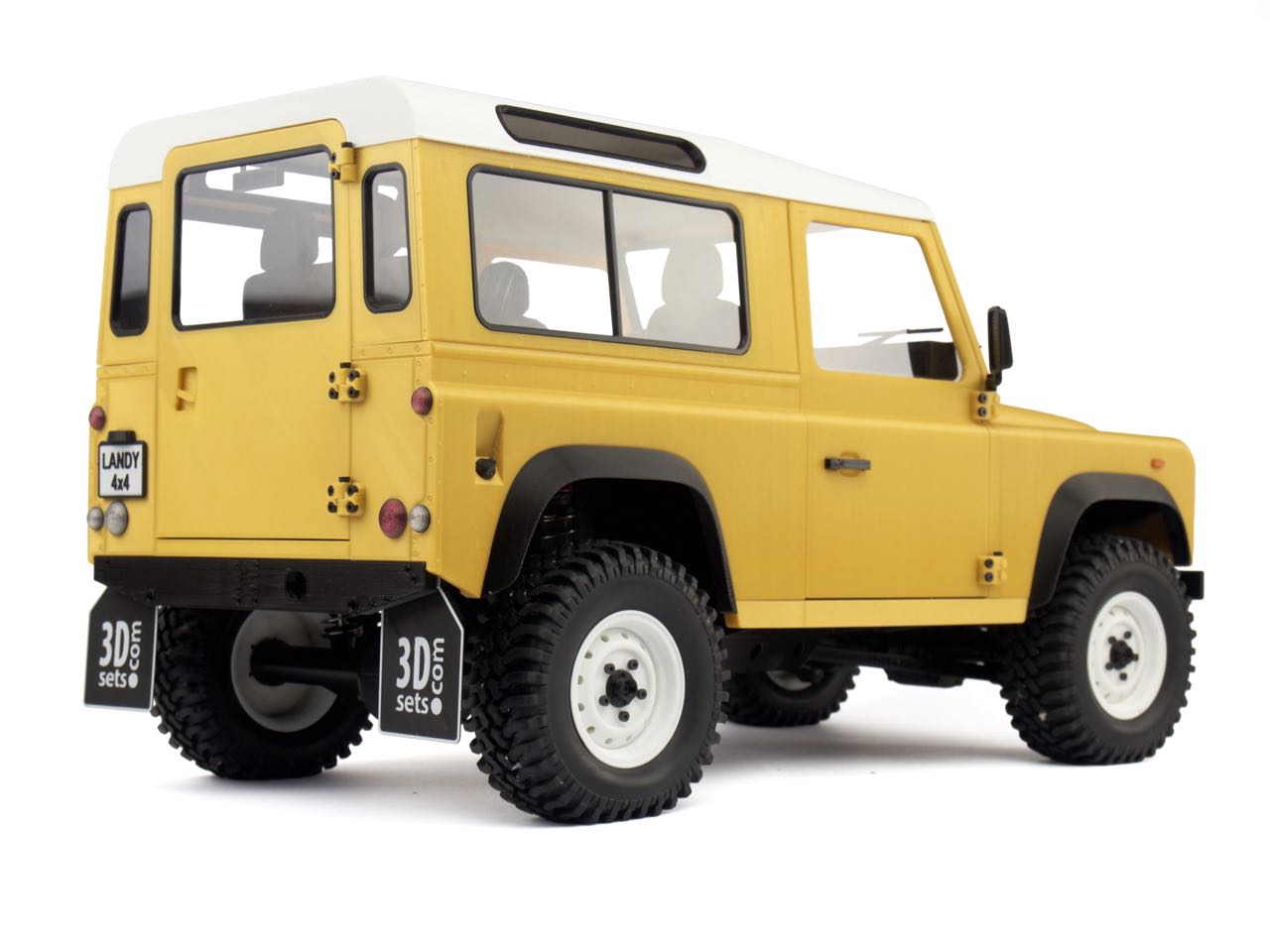
All parts you see there are printed, no paint. You're gonna print this too, aren't you :D
Seeing that I have a real Defender 90. I was going to say yes. But at $40 for the plans I may think twice
 
There's something off about your model though, like the walls are too far apart.

Have you tried a calibration cube? Looks a little high too. Remember , petg uses a higher z, pla likes to be more squished, you need to alter the setting for the new material. And check temps as per the filament you purchase . Even same type can be different per manufacturer and colour.

For example, cctree can go like 185 for low and 205 high, sunlu likes 200/205 to start. That's why temp towers are important.
Well you know kids, calibration is not high on his list, He had other ideas and first printed this yesterday. Came out pretty good and everything moved straight of the print bed.
IMG_3399.JPG

Got him to print a calibration cube this morning. Don't know what to look for.
IMG_3407.JPG
IMG_3409.JPG
IMG_3408.JPG
 
Well you know kids, calibration is not high on his list, He had other ideas and first printed this yesterday. Came out pretty good and everything moved straight of the print bed.
View attachment 1430783

Looks good but I'm more certain your squish is off. Those lines are normal as its part of FDM and theres many way to work around but not on that type of model. Flexi prints are cool.

Got him to print a calibration cube this morning. Don't know what to look for.
View attachment 1430801
Right so that looks like your layer lines are not bonded enough, again squish

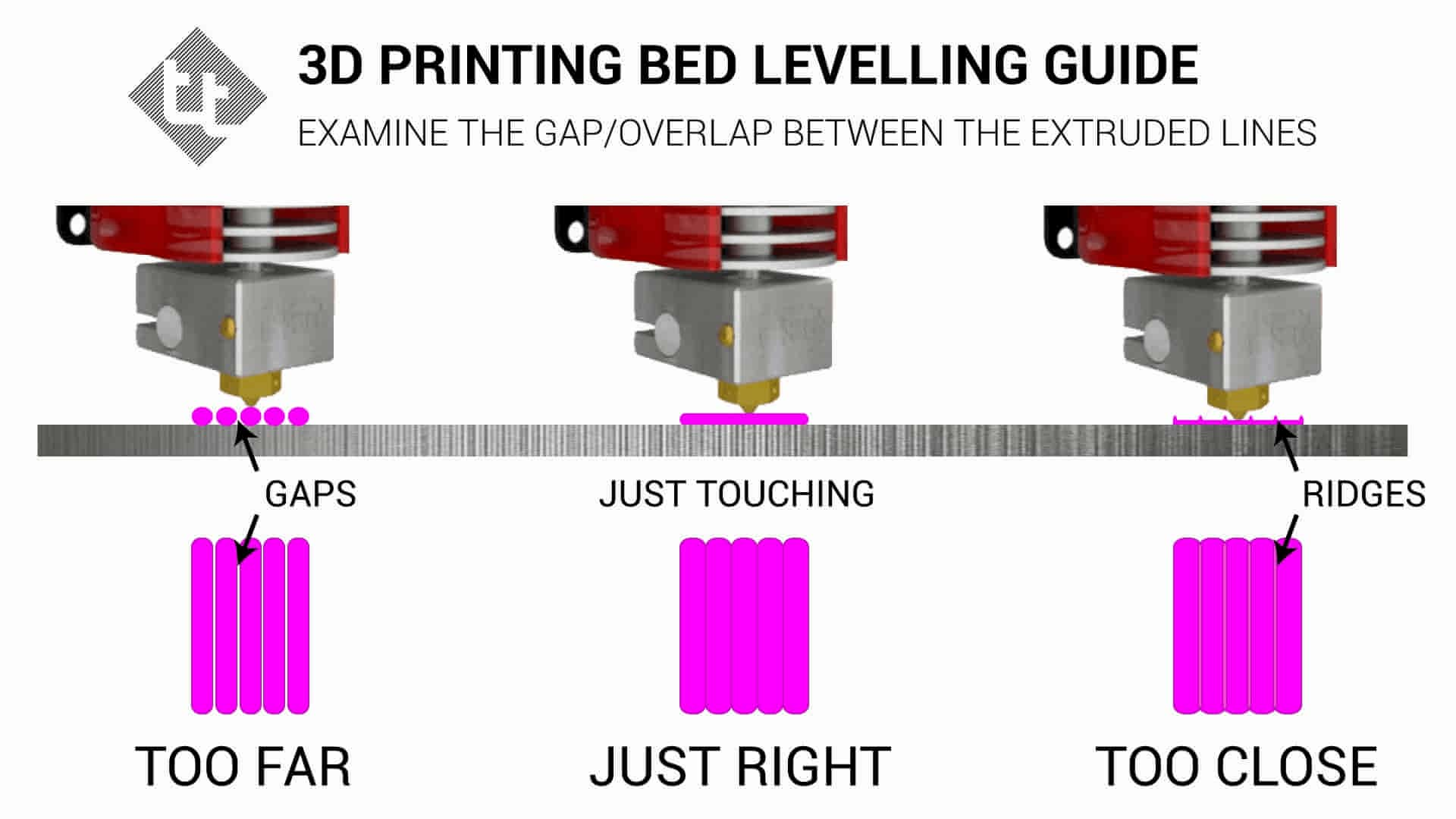
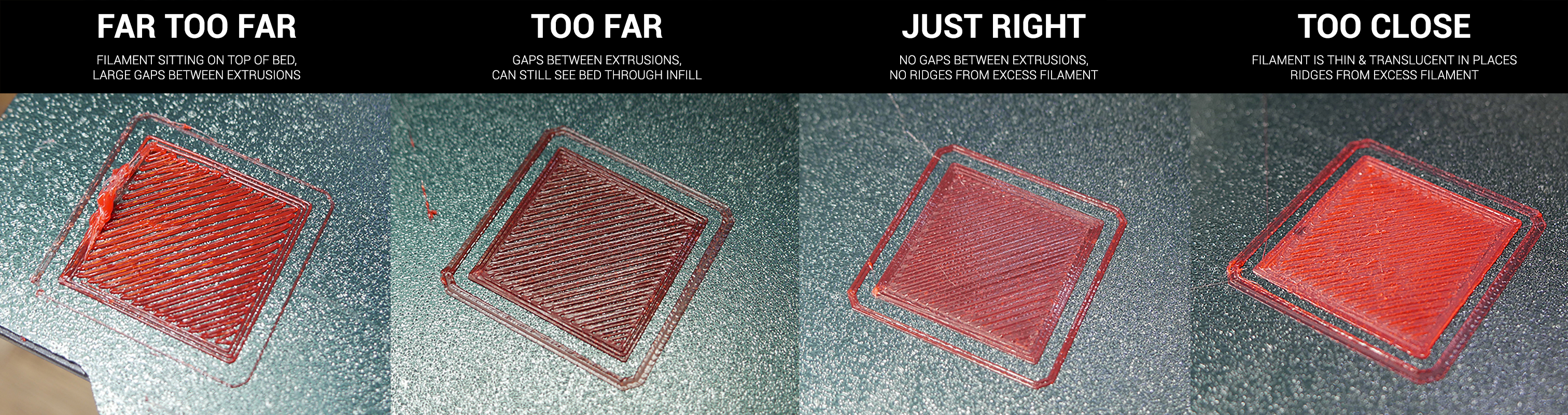
Now this one is telling. That is the side that is directly on the bed ie: your first layer. Compare his to mine, there are gaps between the lines. That indicates to me that the nozzle is high enough to simply lay the filament down vs squish.

Like this from teaching tech


This Z is interesting but I think its because ironing or some such is turned on but still looks very liquid to me vs a solid.

Has he done the paper test on the nozzle?

This step


But he should really work his way through that guide.
 
Theres a meme for this. And I consider Z-offset part of bed leveling :D

1669638347377.png


1669638357923.png


1669638372815.png


Honarary Mention

1669638524066.png


.........


1669638547587.png

And its a problem.....I got three printers now..... :eek:
 
Top
Sign up to the MyBroadband newsletter
X