A little case modding advice please

stevovo

Expert Member
Joined
Apr 24, 2008
Messages
1,496
Reaction score
2
Location
Pretoria
Hey all!

I currently have the following case:

zalman-z7-3.jpg


I would like to make a hole roughly where the red circle is on the image.

At the moment I have the following tools available:
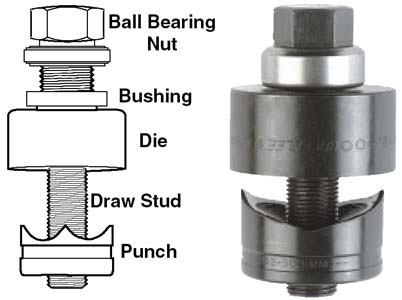
KnockoutPunch.jpg


Dremel-407-rw-64419-18781.jpg


I'm planning on using the knockout punch to make the hole and then use the dremel 'sander thingy' :p to smooth the edges of the hole so as not to cut the wires that will be going through there.

My main concern is that the place where I want to punch the hole is not perfectly flat ie. it's overlapping the beveled (right word?) part of the metal. So will the knockout punch still work?

I'm also thinking of buying a small bit of sheet metal and fitting it just behind the 5" bays on top so I can hide most of the PSU cables :p

I have never done anything like this before, besides drilling normal holes in walls :p

Any constructive (or destructive? :p) advice appreciated. Thanx
 
Rather go buy yourself a holesaw from a hardware shop to cut the hole. Easy to use with a good finish, you can use normal sandpaper to finish the edges with.

http://en.wikipedia.org/wiki/Hole_saw


Dammit. I was going to buy something like that from builders warehouse when the salesman suggested that I get the punch instead. The worst part is that the punch was triple the price of the holesaw.

Damn sales people...

To be fair, I wasn't sure what I needed :p
 
@ponder Do you have any experience in using sheet metal to make a 'door' behind the cd-rom drive bays to hide cables inside so they don't lie all over the place?

I've seen pics of peoples cases with it done but not how they've done it.
 
You basically just take a big sheet, bend it on the two sides, and then screw it onto the existing 5.25 bays holders. Think thats what you are getting at.
As for the hole you want, hole saw, or a jigsaw (with drill holes to get you started) would have been the easiest. Plus you would have been able to cut other stuff with it too. Hope you can still return it!
 
Dammit. I was going to buy something like that from builders warehouse when the salesman suggested that I get the punch instead. The worst part is that the punch was triple the price of the holesaw.

Damn sales people...

To be fair, I wasn't sure what I needed :p

This is one of those rare instances where you should have listened to the sales person :D

Can't you exchange the punch?


@ponder Do you have any experience in using sheet metal to make a 'door' behind the cd-rom drive bays to hide cables inside so they don't lie all over the place?

Nah, sorry. Never done that.

I usually just cable tie and fold my cables neatly out of the way.
 
Last edited:
Cool thanks will get a holesaw then I should be able to use that for the 'door' as well so that the extra cables can run through.

I would also like to know whether I can remove the thick plastic from the ends of the psu cables, I think it's called heat shrink? It's really in the way as it's very stiff and not manageable at all. Very hard to bend the way I want.

My previous psu didn't have that stuff on, but I thought I would ask first.
 
I would also like to know whether I can remove the thick plastic from the ends of the psu cables, I think it's called heat shrink? It's really in the way as it's very stiff and not manageable at all. Very hard to bend the way I want.

My previous psu didn't have that stuff on, but I thought I would ask first.

Post a picture of it before we comment.
 
No, he suggested that I get the punch when I was asking about the holesaw :)

Ok, go back and kick him in the nuts then :D

I reckon that puch is gonna bend/warp the metal in the area of the hole.

When using the holesaw remeber to first drill a small pilot hole in the metal as a guide for the holesaw's central bit. Place a piece of wood plank behind the metal for support & safety.
 
You have a drill right? The hole punch thing should work, any mistakes can be ground away, in the end you should have the same result.
 
Post a picture of it before we comment.

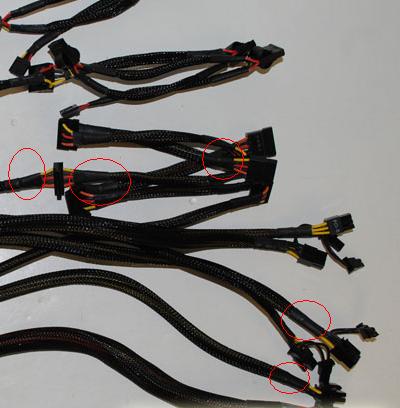
cables1.JPG


I'm referring to that black plastic encircled in red. It's very stiff and that makes it problematic as I can't bend it to my will :)

This means that I have to allow a few cm gaps behind any place that needs a power connector. This makes a huge difference when you have 2 or 3 hdds right underneath each other.

I will try to post the actual picture of my case when I get home. You'll quickly see that the 2 sata connectors between the 2 hdd's are in the way of the 24 pin power on the motherboard because this stupid plastic is sticking out like a.. stick.
 
Last edited:
I'm referring to that black plastic encircled in red. It's very stiff and that makes it problematic as I can't bend it to my will :)

If the nylon stuff underneath it does not have smoothed/melted edges it will fray and can also pull back/shrink so it becomes wider & loose on the cables.
 
If the nylon stuff underneath it does not have smoothed/melted edges it will fray and can also pull back/shrink so it becomes wider & loose on the cables.

Is it possible to cut that plastic off, then shorten the nylon a bit and then reseal it with heat shrink or something so that I have a bit more 'loose' cable between the plastic thing and the connector?

Or remove the nylon altogether and just use cable ties to neaten it where I want to like with my old psu? But then I guess that defeats the purpose of making the case 'nice' :p
 
Last edited:
Is it possible to cut that plastic off, then shorten the nylon a bit and then reseal it with heat shrink or something so that I have a bit more 'loose' cable between the plastic thing and the connector?

How are you going to get the heat shrink back on without removing the connectors?


Or remove the nylon altogether and just use cable ties to neaten it where I want to like with my old psu? But then I guess that defeats the purpose of making the case 'nice' :p[/QUOTE]

That's possible but it's not going to look as nice without the nylon sleeving. Do a bit of research and see what the id is of the nylon sleeving when not stretch out. Maybe you can make a plan.
 
You're getting very close to the territory of sleeving each wire individually if you want to take everything off it.
 
How are you going to get the heat shrink back on without removing the connectors?

Hmmm, damn I never thought of that, maybe cable ties?

You're getting very close to the territory of sleeving each wire individually if you want to take everything off it.

I seriously doubt I'll go that far, but if I do happen to be very bored and ambitious, how difficult is that?

I'll take pics of the wiring 'problem' I have with my pc then maybe you can point me to an easier solution :)
 
I seriously doubt I'll go that far, but if I do happen to be very bored and ambitious, how difficult is that?

Its not very difficult but its mega time consuming. Two full days for a whole PSU is the time frame I generally hear it takes. Plus the stuff to do it with is not available locally afaik.
 
Its not very difficult but its mega time consuming. Two full days for a whole PSU is the time frame I generally hear it takes. Plus the stuff to do it with is not available locally afaik.

I don't know why but I love sitting down, relaxed, and putting/fitting/glueing/crimping/soldering small things together.

When I helped my dad put in his gate motor, he kept asking me what was taking so long because I kept going to the shop until I found the best connecting block that will secure all the wires and look the neatest and I sat at the gate making sure that everything is as neat and 'robust' as possible. :D

I think there's something wrong with me :p
 
When I helped my dad put in his gate motor, he kept asking me what was taking so long because I kept going to the shop until I found the best connecting block that will secure all the wires and look the neatest and I sat at the gate making sure that everything is as neat and 'robust' as possible. :D

I think there's something wrong with me :p

In that case I probably also have a problem :D
 
Top
Sign up to the MyBroadband newsletter
X