ADSL Wireless router - linking to another wireless router.

xrapidx

Honorary Master
Joined
Feb 16, 2007
Messages
42,209
Reaction score
4,056
Location
Cape Town
I'll try explain this as simply as possible.

1. I have my house wired in a 1GB network.
2. I have an ADSL Wireless Router in the kitchen - it cannot be connected via UTP to the rest of the house - so the internet can only be accessed using wireless.

Now - I have another wireless router in my office. This is connected via UTP.

On my desktop PC
1. I connect to the ADSL Router's wireless network
2. I connect to the other Wireless router via cable.
3. I have shared the internet connection using internet connection sharing.

So - now all my wired network devices have internet connectivity. But I'm running two wireless networks, each with their own IP address ranges, etc - one on the ADSL router and one on the other router...

Its messy, the routing is a bitch - and if I'm connected to the ADSL wireless network with my laptop - I can't get to the wired PCs, etc, etc. and vice versa.

What's the easiest way to neaten this up? I'd ideally like one wireless network with additional hotspots/access points that connects to my wired network.

Can't recall the model of the ADSL Router - think its a Linksys - but it doesn't support the joining of wireless networks (can't recall what its called). The old gigabye does
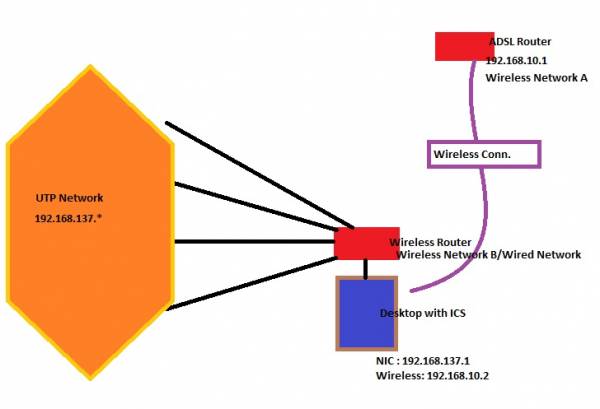
 
It seems to me like your ADSL modem doesn't know what to do with the LAN IP addresses that isn't on its own subnet. My guess is that you'll just have to add a static route for your other IP address range on your ADSL modem so that it goes through your other router, which has to have an IP address on the ADSL's subnet.

It would be helpful if you can draw a sketch with the network devices and their IP ranges that they're using on their individual interfaces.
 
Thats the thing - because of ICS - they're both on their own subnets. And I need at least two wireless points as the house is quite big - and I can't see the wireless network from one side of the house.

(I'll draw a quick MS Paint sketch.)
 
Thats the thing - because of ICS - they're both on their own subnets. And I need at least two wireless points as the house is quite big - and I can't see the wireless network from one side of the house.

(I'll draw a quick MS Paint sketch.)

buy a bigger antanne
 
Network5.jpg
 
Change the wireless hardware.

Put all the routers and devices on the same IP range, turn wireless off on the adsl router and the other router. and use one nice wireless device. something like PowerAP N Ultra-Long Range 300Mbps http://www.scoopdistribution.co.za/product_info.php?cPath=101_75&products_id=1093

or try a 200M Powerline Ethernet Bridge Kit
To link your ADSL and upstairs routers, and leave wireless on both but dhcp only on one. http://www.scoopdistribution.co.za/product_info.php?cPath=29&products_id=1047
 
Change the wireless hardware.

Put all the routers and devices on the same IP range, turn wireless off on the adsl router and the other router. and use one nice wireless device. something like PowerAP N Ultra-Long Range 300Mbps http://www.scoopdistribution.co.za/product_info.php?cPath=101_75&products_id=1093

If you turn wireless off on the ADSL router - how do you connect to the internet? I cannot run a cable to where the phone line is.

I don't mine replacing the ADSL wireless router -but I need something that allows 'bridging' of wireless networks


or try a 200M Powerline Ethernet Bridge Kit
To link your ADSL and upstairs routers, and leave wireless on both but dhcp only on one. http://www.scoopdistribution.co.za/product_info.php?cPath=29&products_id=1047


I thought of this approach - but the damn kitchen is one a different circuit.
 
xrapidx, Just add a static route on your ADSL modem for:
IP address = 192.168.137.0
Subnet mask = 255.255.255.0
Gateway = 192.168.10.2

This will hopefully solve all your issues.

Make sure that your Wireless Router is in bridge mode and not doing NAT.

You'd actually want to disable NAT on the PC which is doing the ICS, but I'm not sure if that is even possible.
 
Last edited:
Simplest is going to be to get it all onto one network range and wired. What's stopping you from getting UTP into the kitchen?
 
Simplest is going to be to get it all onto one network range and wired. What's stopping you from getting UTP into the kitchen?

My other half and running another network cable down the corner of a wall :p

I'm actually considering getting in the roof and moving the phone line (assuming its in the roof).
 
I'll try explain this as simply as possible.

Can't recall the model of the ADSL Router - think its a Linksys - but it doesn't support the joining of wireless networks (can't recall what its called). The old gigabye does

buy a bigger antanne

Change the wireless hardware.

Put all the routers and devices on the same IP range, turn wireless off on the adsl router and the other router. and use one nice wireless device. something like PowerAP N Ultra-Long Range 300Mbps http://www.scoopdistribution.co.za/product_info.php?cPath=101_75&products_id=1093

or try a 200M Powerline Ethernet Bridge Kit
To link your ADSL and upstairs routers, and leave wireless on both but dhcp only on one. http://www.scoopdistribution.co.za/product_info.php?cPath=29&products_id=1047

I agree - get new equipment, 802.11n based. I have heard some amazing improvements in range with n devices, so might not need a second AP. But, if you need to run 802.11g in the other area of your house, then get a seconf 802.11n/g/a device, set it in repeater mode and if you make sure it has routing functionality you can add a second SSID in 802.11g for the other devices. Just remember to setup the routing so you can get internet access from the g network.

If you want to have even more fun get devices that can take the DD-WRT software:) I know there are some Linksys n devices that work great.

Oh, and antennaes make a huge difference.
 
xrapidx, Just add a static route on your ADSL modem for:
IP address = 192.168.137.0
Subnet mask = 255.255.255.0
Gateway = 192.168.10.2

This will hopefully solve all your issues.

Make sure that your Wireless Router is in bridge mode and not doing NAT.

You'd actually want to disable NAT on the PC which is doing the ICS, but I'm not sure if that is even possible.

No luck - but I'll try again more thoroughly on the weekend.
 
No luck - but I'll try again more thoroughly on the weekend.

You probably will need an access point to connect both routers together with wireless unless the routers support the access point function on it.

It will be way easier than sharing the connection with your pc

I do the same with my 2 routers but instead they are connected via a lan cable and the one router automatically shares the internet from the other router.

If your routers support WDS it is possible to set it up. It is also called wireless bridging.
 
Last edited:
What you can do is to run a few trace routes from all the respective subnets, and then you should be able to identify where the problem lies.

Run just like 'tracert -d -h 5 41.185.60.1' within Command Prompt on a few PC's, and then post the results here if you don't know how to interpret it.
 
What sort of antenna would I have to get to boost my wireless in the house on my ADSL router? I might have a workable solution if I can do this.
 
Hi, I have a similar setup in a house with 3 stories. The floors are reinforced concrete so the wire less signal cannot pass through.

On the top story I have an ADSL wireless router connected to the phone line. Wired access to one story goes by conduit and connects one PC and a wireless modem/router. The other rooms on this level can also connect by wire. In order to get wireless at this level (2 Laptops and BB) I have connected the other router by wire to the upstairs router and turned off its DHCP ability. It gets its IP address from the router upstairs and all it really does is distribute the wireless at floor level two. It is basically just a wireless switch.

Sketch :

Modem---------Telkom (adsl) (Top Floor)
I
I------------Wire:-----(conduit Cat 5) to Floor 2

I------------Wire:---- (conduit Cat 5) to Floor 2

Floor 2

Network Plug in all Rooms

wire ------- PC
Wire ------PC
Wire ------Router (with dhcp disabled and wireless on) Signal good in all rooms in floor 2

So I have wireless on both Floor 2 and Top Floor as well as wire access points on both floors. Conduits were inserted when house was built. Both routers have 4 four lan connections available as well as wireless .
 
Top
Sign up to the MyBroadband newsletter
X