Afrihost Hell!!! Any suggestions?

ponder

Honorary Master
Joined
Jan 22, 2005
Messages
98,642
Reaction score
31,305
Location
Niflheimr
Ok I've logged a fault, I've done the WhatsApp chat thing longer than the new testament, I'm three pages into MyBB PMs with an Afrihost rep and not getting anywhere just going in circles and I simply can't anymore.

Some history, around about beginning of April started experiencing packet loss, PM'ed all the reps and not one bothered to reply (one was on leave fair enough). Did the Whatsapp support thing and outcome was no problem their side. Cables were changed, router reset to factory default during all this. Next step try to RMA router with tplink, they do their thing, request remote access and flash a custom debug firmware onto the router, nothing changes and no fault is found with the router. Next step buy a new router and patch lead to ONT, router runs openwrt so you can get graphs directly from router.

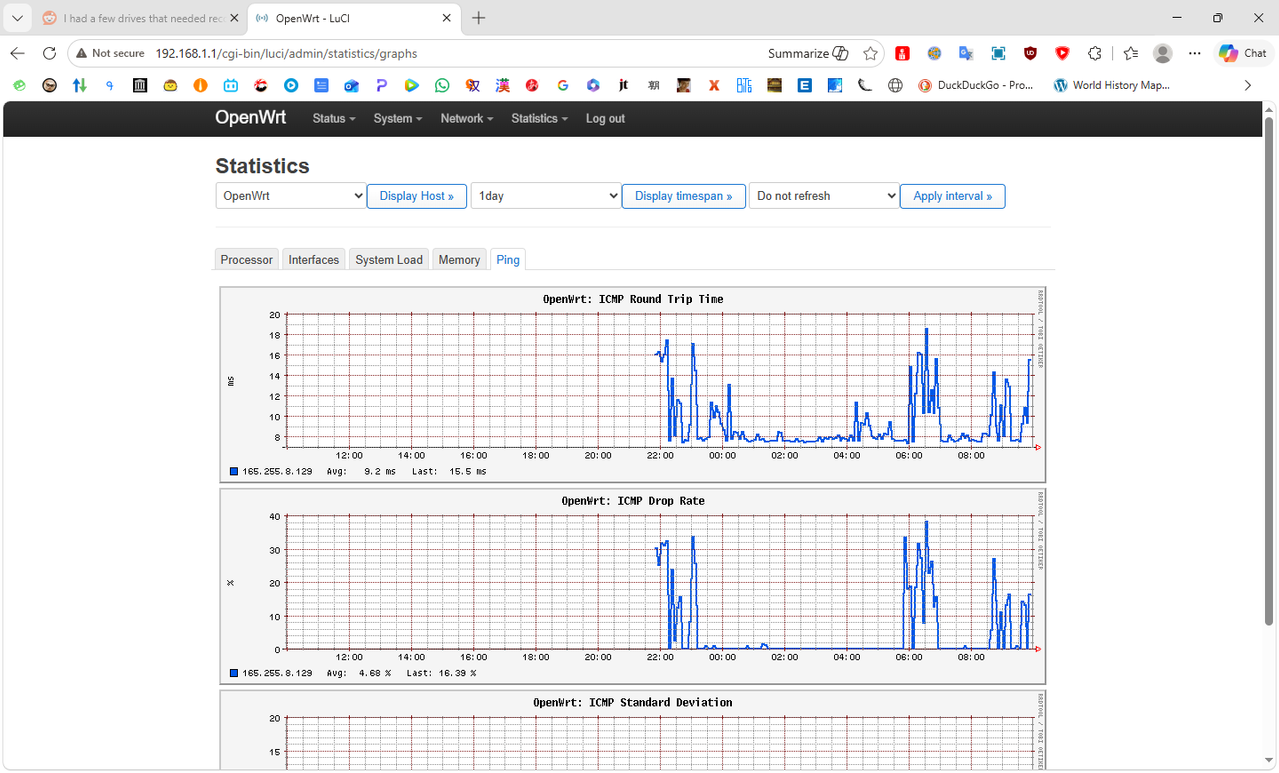
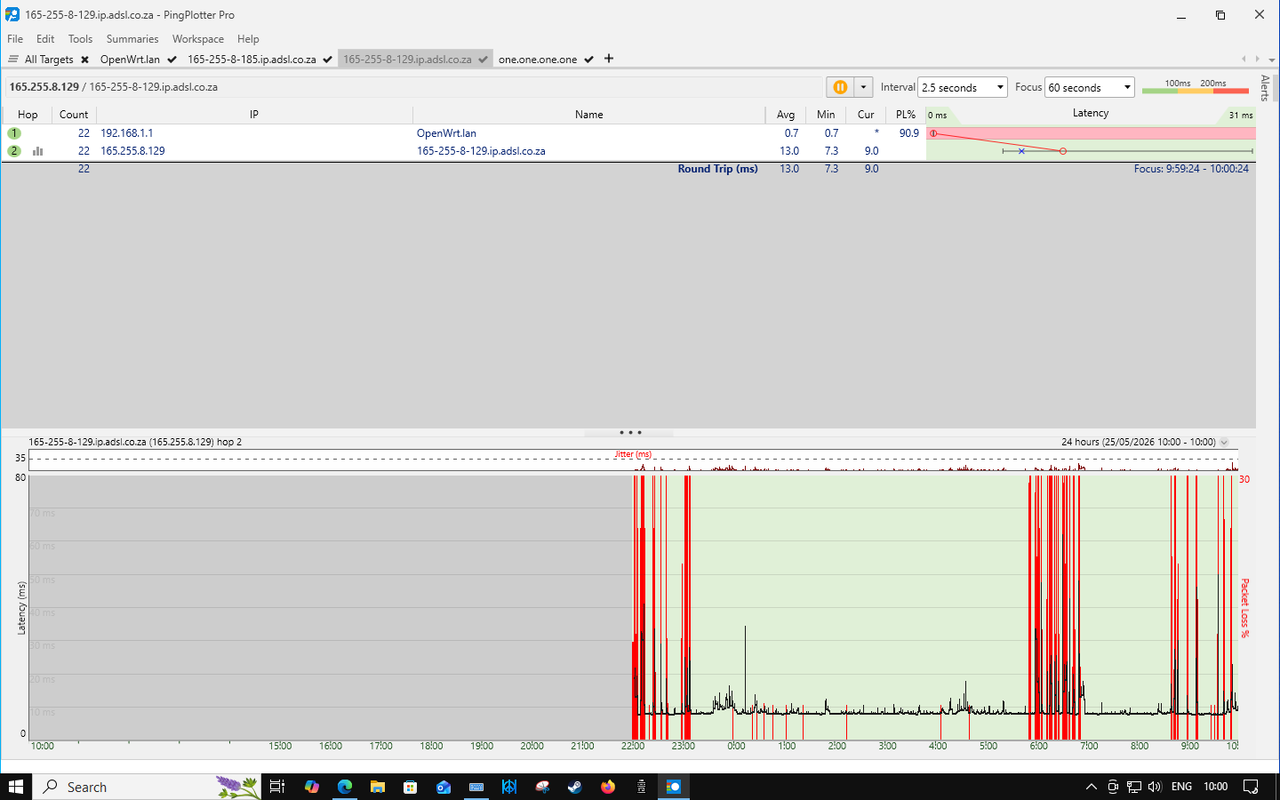
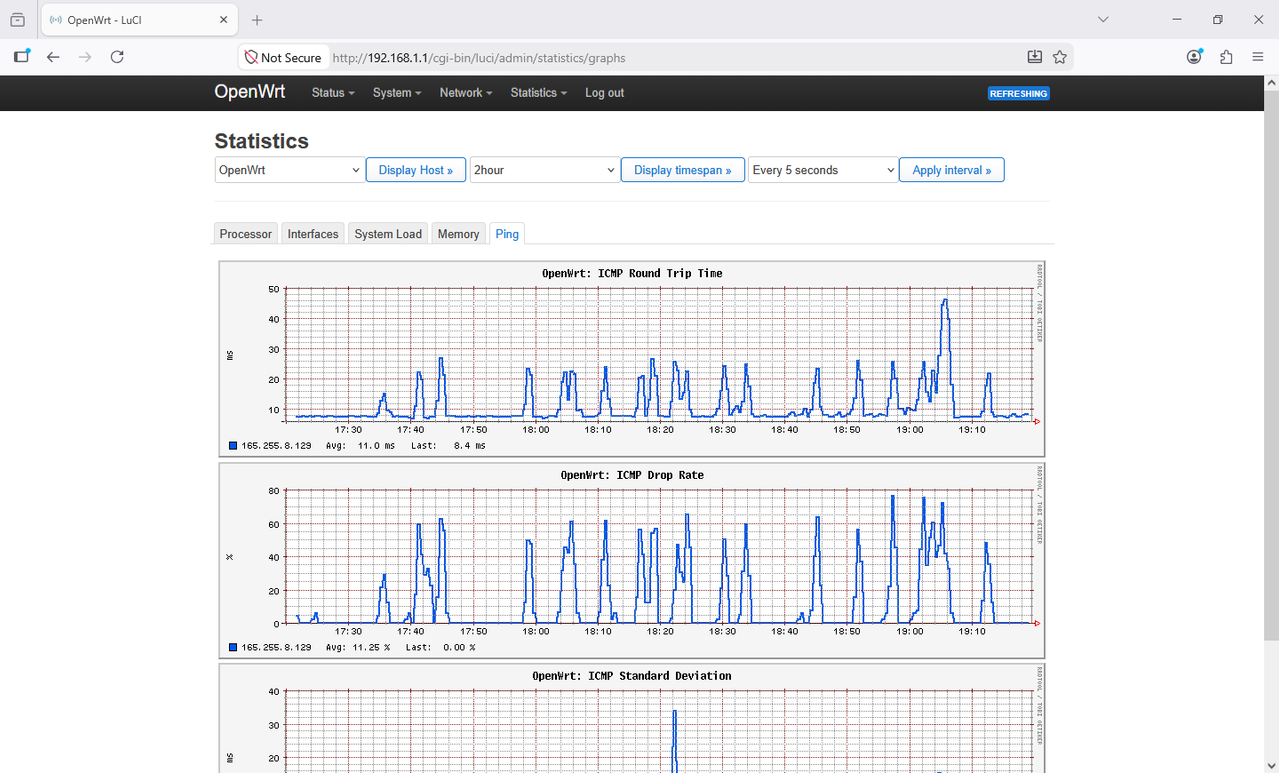
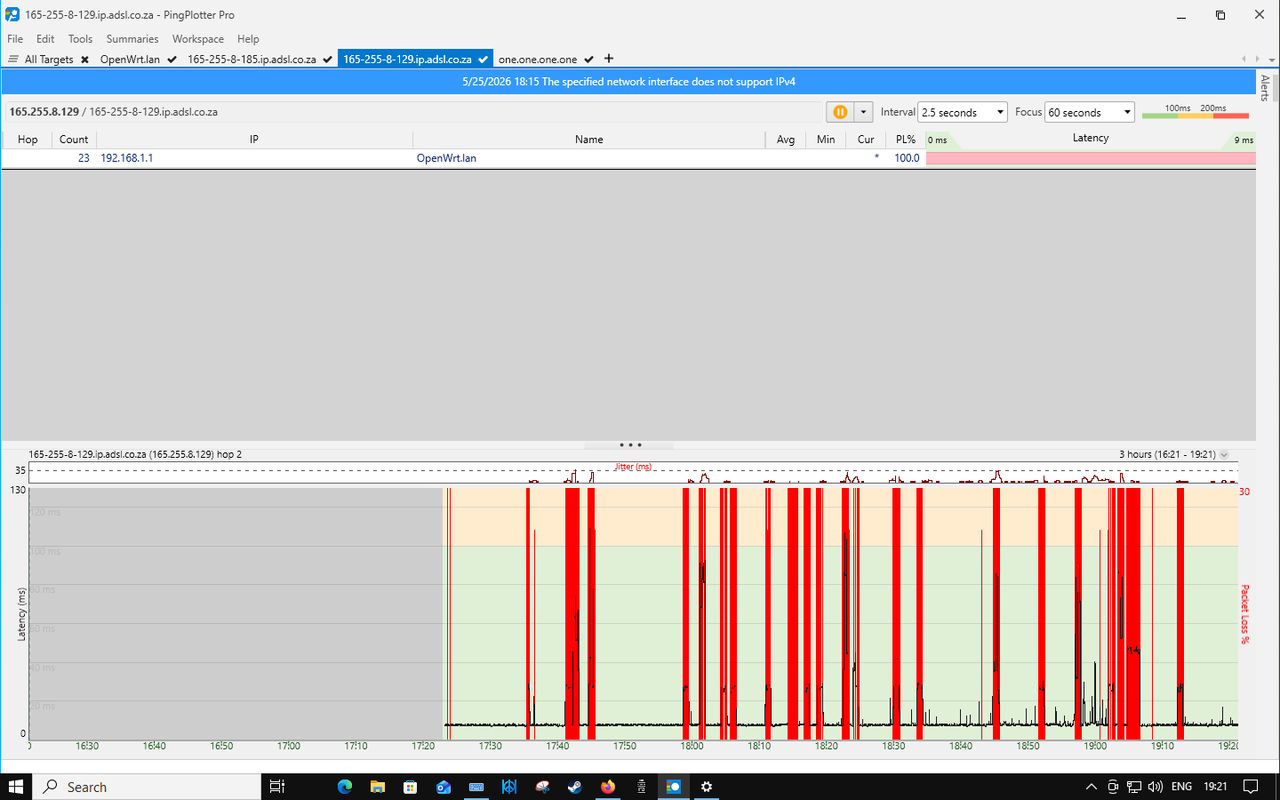
You can ping the routers lan & wan interfaces and it runs clear, the second you hit the next hop gateway (165.255.8.129) and beyond the packet loss starts, it's intermittent and internet is unusable when it occurs.

diag.png

openwrt1720-1920.png


pingplotter1720-1920.png


openwrt2200-1000.png


pingplotter2200-1000.png


Does anybody out there have any ideas?
 
Ok I've logged a fault, I've done the WhatsApp chat thing longer than the new testament, I'm three pages into MyBB PMs with an Afrihost rep and not getting anywhere just going in circles and I simply can't anymore.

Some history, around about beginning of April started experiencing packet loss, PM'ed all the reps and not one bothered to reply (one was on leave fair enough). Did the Whatsapp support thing and outcome was no problem their side. Cables were changed, router reset to factory default during all this. Next step try to RMA router with tplink, they do their thing, request remote access and flash a custom debug firmware onto the router, nothing changes and no fault is found with the router. Next step buy a new router and patch lead to ONT, router runs openwrt so you can get graphs directly from router.

You can ping the routers lan & wan interfaces and it runs clear, the second you hit the next hop gateway (165.255.8.129) and beyond the packet loss starts, it's intermittent and internet is unusable when it occurs.
View attachment 1912025

openwrt1720-1920.png


pingplotter1720-1920.png


openwrt2200-1000.png


pingplotter2200-1000.png


Does anybody out there have any ideas?
Can you post a full MTR? IE to 8.8.8.8?

The ones you posted look like just the 2nd hop.
 
Can you post a full MTR? IE to 8.8.8.8?

The ones you posted look like just the 2nd hop.

From PC,
Screenshot_2026-06-01_16-41-50.png

From routers web interface:
078bca85-e2c8-4178-8856-7ee6b965b6cb.png


Edit: Installed mtr on the router, this is a bit later (17:34) from the router via ssh/terminal:
Screenshot_2026-06-01_17-34-30.png
 
Last edited:
I am not seeing the packet loss you are seeing. But AH needs to get their act together. @Afrigirl what is hops 2,3 & 4 on this? Still getting massive ping spikes. Been going on since mid April. They are specifically labeled Afrihost...


Screenshot 2026-05-29 192508.png
 
Sorry, just to confirm, not even 4 minutes into a test and I see the first spike now. Can't brush this off guys..

1780329448314.png
 
Sorry, just to confirm, not even 4 minutes into a test and I see the first spike now. Can't brush this off guys..

View attachment 1912167

I am not seeing the packet loss you are seeing. But AH needs to get their act together. @Afrigirl what is hops 2,3 & 4 on this? Still getting massive ping spikes. Been going on since mid April. They are specifically labeled Afrihost...


View attachment 1912166
In both these results, the deviation in latency (ping spikes) doesn't carry through to the last hop. This points to a router queuing and processing direct ICMP requests but not the rest of your traffic.

Similar to packet loss, you would see these same spikes through to subsequent hops and all the way to the last hop if these intermediary hops were affecting traffic.

Those intermediate hops are routers. A router's primary job is packet forwarding to the next hop. It is not responding to direct pings - these are usually rate limited (pps) and deprioritised as these churn cpu cycles (not good). But your last hop looks stable and clean as a whistle.
 
I am in PLZ on MFN/AH. What I find strange is this has never been the case over the years. So why am I seeing it now?

Current situation:
1780347406611.png
 
I am in PLZ on MFN/AH. What I find strange is this has never been the case over the years. So why am I seeing it now?

Current situation:
View attachment 1912225
Latency variation like that is typically a backhaul change, if its a consistent thing then it would be back to MFN to advise why.
 
In both these results, the deviation in latency (ping spikes) doesn't carry through to the last hop. This points to a router queuing and processing direct ICMP requests but not the rest of your traffic.

Similar to packet loss, you would see these same spikes through to subsequent hops and all the way to the last hop if these intermediary hops were affecting traffic.

Those intermediate hops are routers. A router's primary job is packet forwarding to the next hop. It is not responding to direct pings - these are usually rate limited (pps) and deprioritised as these churn cpu cycles (not good). But your last hop looks stable and clean as a whistle.

I wish people would understand that a destination intentionally not responding to ICMP is not the same as packet loss.

The only way anyone should test any of this is to a known ICMP responding /friendly destination and then ignore the hops along the way because in a modern context that’s always going to be rejected.
 
Latest feedback I got,
These drops may be caused by intentional ICMP rate-limiting on network devices, security policies, or by underlying network congestion and packet loss.

My response was,
If it was icmp rate limiting why is all traffic affected and the internet becomes unusable at these times?

To which the reply was "... may be a device on the home network dropping the connection"

My follow up question then is, "So if I disable the wi-fi radios on the router and unplug the lan cable how does a device on the home network drop the connection?"
 
Internet is now basically unusable, simple task like opening an email or logging into a site impossible.. Extremely bad today.

dns.google.png
 
Top
Sign up to the MyBroadband newsletter
X