Airprint compatible ADSL wireless Router - suggestions?

Electron1

Expert Member
Joined
Jan 29, 2009
Messages
4,229
Reaction score
199
Location
Joburg
I have battled with Airprint on iPad2 IOS5.0.1 and HP Officejet 6500A (With latest firmware) using different routers.
I have tried connecting the HP 6500A with both cable or wireless (currently using wireless)
Any suggestions on what brand and model (ideally firmware level too) that is reliable? The Apple Airport devices are expensive and also would then need separate ADSL router.

I have tried:
Netgear DG 834G V5
Works well, but want to replace it as it keeps losing sync and also is Wireless G, I want wireless N. I also find that it often needs a reboot to re-establish wireless connectivity.

TP-Link TD-W8961ND Have to set IGMP V2 and IGMP snoop to enable as per this article:
http://www.tp-link.com/en/article/?.id=360

Firmware 100722 (version it comes with) will work once, after rebooting router, printer and turning wireless off and on on iPad. second print attempt fails, have to start over again
Firmware 111125 - does not work with Airprint at all, regardless of IGMP setting. I also could not downgrade the firmware after upgrading to 111125.

Anyone have a working setup with TP-Link or Netgear or other brand routers that do Wireless N 300?

I was looking at the Netgear DGN 2200,
http://www.netgear.com/home/products/wirelessrouters/work-and-play/DGN2200.aspx
Seems like it will work - has anyone used it for Airprint?


I posted this originally in the ADSL forum as it had made more sense to me, only got one response from bekdik suggesting Netgear modem, but no models that are known to work. I have asked for the thread to be deleted as I want to post in the "correct" forum, hence the repost.
 
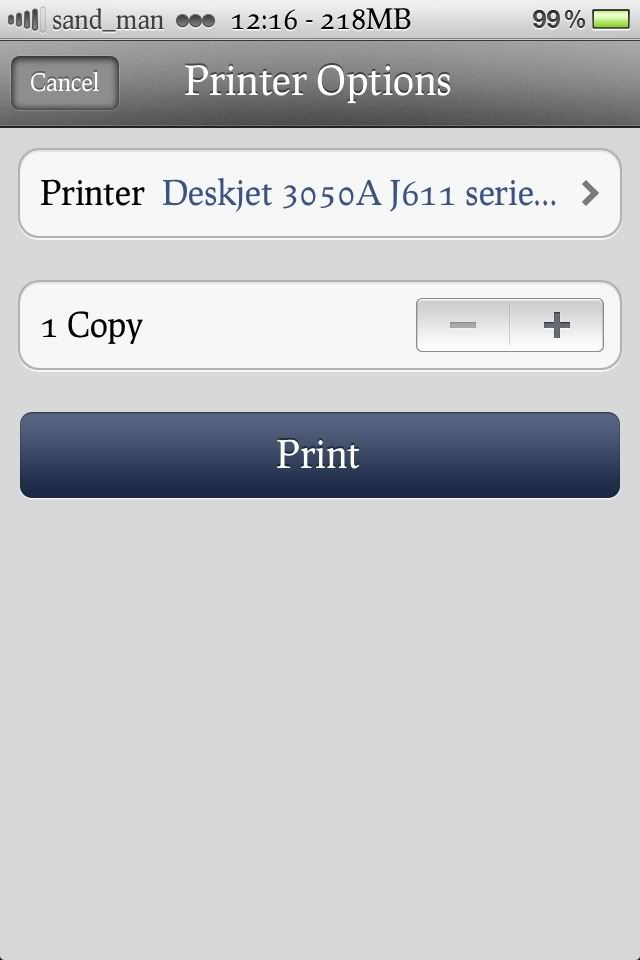
mmm. I'm able to print from either my iPad or iPhone using a tp-link w8960n in conjunction with the HP 3050A. Didn't install any 3rd party applications other than the printers drivers and software...

photo1-6.jpg


photo2-7.jpg


photo3-4.jpg
 
Last edited:
OP you dont need and Airprint compatible router.. just a printer. Any router should work unless there is something else wrong.
 
I have an Airport Extreme, so I can't comment from personal experience.
And any good wireless N router should work, unless it is blocking it for some reason.
According to this, a Netgear Wireless N router should be fine
https://discussions.apple.com/thread/2714503?start=0&tstart=0
Any good router should work - not in my experience and from many posts on the net listing problems....
I just don't know if all Netgear routers work with airprint, this is why I am asking for people that have it working and for the model of router.

mmm. I'm able to print from either my iPad or iPhone using a tp-link w8960n in conjunction with the HP 3050A. Didn't install any 3rd party applications other than the printers drivers and software...

photo1-5.png


b68f9c3a.jpg


54bb0dda.jpg
So maybe I should try a TP-Link w8960n - I like their kit, real value for money, just frustrated the 8961 gave me problems.
Do you ever have to reset the router to get Airprint working? Thanks for the screenshots, shows that it picks up the printer perfectly.

OP you dont need and Airprint compatible router.. just a printer. Any router should work unless there is something else wrong.
This is what I originally expected, and any router should work - reality is that this is not true as Airprint uses Bonjour protocol, which does not seem to be supported by all wireless vendors. a Google search shows many problematic devices. This is the reason for the post.
 
So maybe I should try a TP-Link w8960n - I like their kit, real value for money, just frustrated the 8961 gave me problems.
Do you ever have to reset the router to get Airprint working? Thanks for the screenshots, shows that it picks up the printer perfectly.

Nope, works flawlessly. I don't have Airprint installed though. Other than the printer software and drivers no additional software installed.
 
Nope, works flawlessly. I don't have Airprint installed though. Other than the printer software and drivers no additional software installed.
From the screenshots,you are using Airprint (it's built in from IOS 4 onwards), and the HP Deskjet 3050A J611 is Airprint enabled.
I assume that when you chose print it found the printer automatically - this is how Airprint is supposed to work, no drivers to be installed. If the Wireless network allows the Airprint (Bonjour) traffic to flow, your iPad/iPhone picks up the printer and you are able to print.

When the traffic cannot flow through, you have endless problems to get it working, and there is no troubleshooting you can do to on the iPad to figure out what is going on, and it is very frustrating.
 
I will go and get a TP-Link w8960n and give it a try - thanks again sand_man :)
 
I will go and get a TP-Link w8960n and give it a try - thanks again sand_man :)

Pleasure, hope you come right. I've used the 8961 in the past and I'm surprised you having issues with it. I found it reasonably stable..
 
I don't know about printing with an iPad - but guessing it needs to be compatible?
I can't use my Canon MF4010?
 
wow - tried it and it works perfectly too!
 
You can send direct to Dropbox too ...

Snap a photo or send an email/attachement, 'print' to Dropbox ... and have it available everywhere Dropbox is installed
 
And you can open the picture on your PC!

This has increased my iPad value :P
 
Yeah Dropbox effectively replaces file transfer by conventional methods. Thing is, it uses bandwidth and is slow as hell.
 
Yea, it slightly slow and does use bandwidth - but there's no alternative with all the locks and restrictions set?

This has to be the easiest way I've come across and it goes to show how fantastic the iPad could actually be. Imagine buying it from the box and you could download, print, beam files with no issues? The problem with the iPad is mainly the restrictions imposed by Apple.

Anyhow - we've covered the restriction debate many times. Does anyone have the software? The only annoying thing is the printer disappears (can't be found!) when left for a while? For example last night it's on , leave it for a certain amount of time and the printers disappear when I click print.

If I turn the iPad wifi off/on again - they're available again
 
An Update on routers:
I tried another TP-Link TD-W8961ND with default firmware. It works initially after changing the recommended settings as posted in the original post, then the Printer cannot be found. Have to reboot router, turn iPad WiFi off and on, then it works again. really frustrating.

I set up a TP-Link W8960N at a client who also has a HP Officejet 6500a and it worked well. I will be getting my own TP-Link W8960N soon and will post back on whether it is reliable.

Again, Please post for other routers too, as it will help to know what works (and what does't).
 
Top
Sign up to the MyBroadband newsletter
X