Connecting two monitors?

Ronjay

Expert Member
Joined
Aug 31, 2009
Messages
3,467
Reaction score
0
Location
Johannesburg
Please help.

I need to connect a second monitor to my pc. Both are old crt's and have the old connector, problem is that my graphics card only has one port for this connector. How can I connect the other monitor?:confused::confused:
 
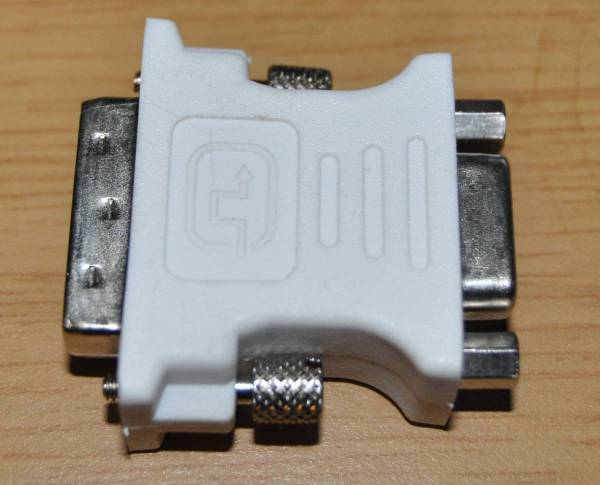
Does the graphics card have both a VGA (Blue) and a DVI output? (usually a white plug, but sometimes red or green for AMD or Nvidia)
 
I have a spare one of those floating around, I'll see if I can find it.

Edit: ok found it.

DSC_2576.JPG


you can have it if you are on the east rand (or are willing to travel :p)
 
Last edited:
Thanks guys.

@Brackish, thanks. Yeah, something that's a resource hog is not an option. Going to use the second monitor for games and hyperspin.

@MM88, cool, but I live in the south and travelling is a problem so it would not be an option. Thanks for the kind offer, though. I'm sure a little do-hicky like that can't cost much? I should find this thingy at Matrix?
 
Thanks guys.

@Brackish, thanks. Yeah, something that's a resource hog is not an option. Going to use the second monitor for games and hyperspin.

@MM88, cool, but I live in the south and travelling is a problem so it would not be an option. Thanks for the kind offer, though. I'm sure a little do-hicky like that can't cost much? I should find this thingy at Matrix?

The do-hickey shouldn't cost you more than R60, honestly. Get a passive DVI-VGA converter and plug the second monitor into that - problem solved. \

Looks like this:

1145-A.jpg


VGA on the one end, DVI on the other. There are no performance drops either.
 
Last edited:
Yea R60 sounds like a good price tho I have seen them going for up to R150. Matrix is about the best bet.


Sent from my HTC Desire using MyBroadband Android App
 
Thanks for the help everyone. I will go to Matrix on Saturday, if they don't have it I'll get it from the place Mier suggests.
 
Thanks for the help everyone. I will go to Matrix on Saturday, if they don't have it I'll get it from the place Mier suggests.

Why not just call them before driving there to find out they don't have them?
 
LOL, I went to buy the adaptor at Matrix today. Only R20. Got home now to install it and the pins are different.:cry: The DVI port on my GFX card does not have the 4 little pin holes where the flat pin is and the adapter has 4 pins there. So have to wait till tommorow to get another one. It's kinda dumb to have different types of ports like that, I thought they are all standard.
 
LOL, I went to buy the adaptor at Matrix today. Only R20. Got home now to install it and the pins are different.:cry: The DVI port on my GFX card does not have the 4 little pin holes where the flat pin is and the adapter has 4 pins there. So have to wait till tommorow to get another one. It's kinda dumb to have different types of ports like that, I thought they are all standard.
In that case, you won't be able to convert to VGA. Those converters rely on those little 4 pins - they carry the analogue signal. Sorry to be the bringer of bad news.
 
Close to Alberton. If I cant do the two crt monitors then I guess it's time for me to get an lcd. I was wanting to use the money for a new MB with crossfire support and another GFX but I really need two monitors to do what I want to do so......

I guess I can wait a few more months for the MB/extra GFX and get a decent LCD now.

PS, if I get a new LCD which one should I go for, budget R2,500 (can go up to R2,800 but would rather not). My GFX has HDMI so Iwouldn't mind if the LCD had on-board sound, and as big as possible.
 
Last edited:
For that budget go at least 27". Or high quality 24" - MVA or IPS if you care.
 
For that budget go at least 27". Or high quality 24" - MVA or IPS if you care.

Dude, wouldn't even know what that is. I was looking at a 27" Samsung today, but R4000 is not possible, unfortunately. Wouldn't mind a 27" monster though.
 
Top
Sign up to the MyBroadband newsletter
X