Does my PC have a virus?

DCBloodHound

Senior Member
Joined
Jul 14, 2010
Messages
695
Reaction score
19
Location
Pretoria
Lately my PC has been acting weird so and i think i have a virus which my anti-virus is not picking up.

rundll32.exe
wuauclt.exe
avgtray.exe
presentationFont
Taskmgr.exe
Xfire.exe
LGDCore.exe
jusched.exe
jgs.exe
plugin-container.exe
explorer.exe
winampa.exe
DTLite.exe
svchost.exe
avgcsrvx.exe
AVGIDMonitor
avgrsx.exe
SSScheduler.exe
avgemcx.exe
alg.exe
firefox.exe
avgnsx.exe
PnkBstrA.exe
nSvcLog.exe
msmsgs.exe
PnkBstrB.exe
Apache.exe
avgwdsvc.exe
spoolsv.exe
svchost.exe
svchost.exe
svchost.exe
svchost.exe
svchost.exe
nvsvc32.exe
Isass.exe
services.exe
winlogon.exe
csrss.exe
fdm.exe
svchost.exe
avgchsvx.exe
smss.exe
nSvcIp.exe
AVGIDSAgent.exe
RTHDCPL.exe
Apache.exe
System
System Idle Process

If i have any,which ones are they and how do i remove them?
 
try running malware bytes or spybot too( after normal AV scan).

Are you running legit windows? Then run microsoft security essentials rather. The file is smaller to DL & runs quicker coz it does not have all the bloatware bitdefender has.
 
RTHDCPL
Skytel
ALCMTR
NVCPL
NCMCTRAY
NWIZ
AVGTRAY
(BLANK) Nothing written here but it's on startup
LGDCore
JustChed
READER_SL
AdobeARM
amd_dc_opt
winampa
steam
msmsgs
dtlite
fdm
Comrade
McAfee Security Sc...
Xfire

Real version of WinXP home edition SP3
 
60% of malware today are trojans. this uses your bandwidth to do something. get something like wireshark, and check packet flow over your nic. close everything and see whats talking. next open up the process list. 95% of malware has an entry in there somewhere, often disguised as "Microsoft ... " or "Win..." .. with some googlin you can figure out how to see which process is generating the traffic. you can also see which file it resides in.

I would suggest, over the long run, to seperate data from OS on disk, and to clean install Windows once a month. No anti-virus software on the planet is as safe as a periodic reinstall.
 
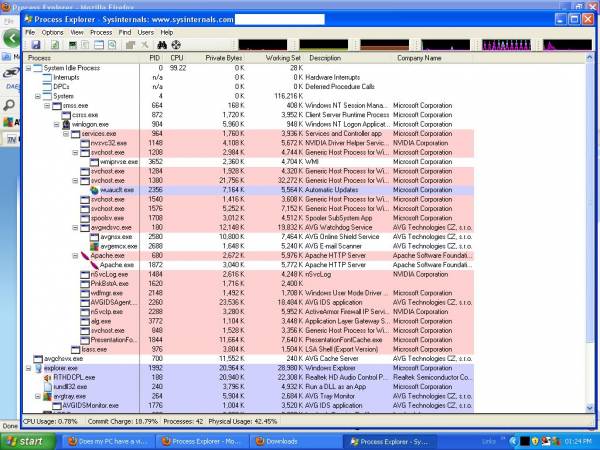
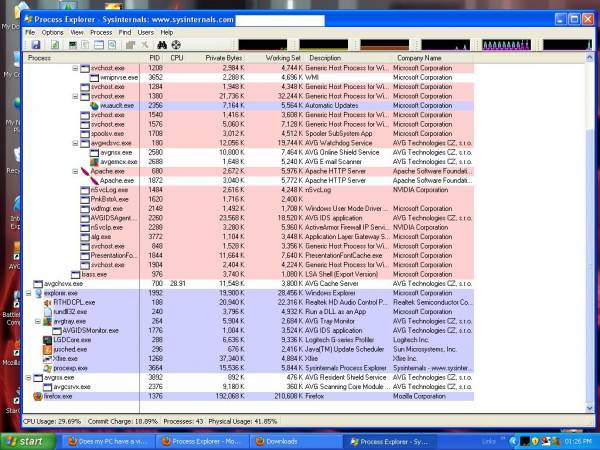
All those programs are confusing me. Please list the names of the running apps/exe's, INCLUDING their Publishers/Company Names, then we can have a better idea if one of those apps are suspicious. Even better, run Process Explorer, and take a snapshot (i.e. hit the "Print Screen" keyboard key), open MS Paint, paste the snapshot (i.e. hold "Ctrl" key and hit "V"), then save the file to a location on your PC that you can find easily. Finally, upload the image to an image host and paste the link here.
 
Soz i couldn't respond yesterday,installed bitdefender yesterday and my PC just rebooted on it's own.my PC then locked me out because Bitdefender was using too much memory.my keyboard doesn't turn on until the startup screen so i had to go buy one of those old keyboards that don't use usb.ran it in safemode and deleted bitdefender from there.

My pc seems better but just slow as hell.

explorer is using 26,000mem and firefox is using 181,480mem

system is using 116,213mem

i don't think firefox should be using that much mem.

downloading wireshark now and i'll run process explorer assoon as i can find it :o
 
New_Bitmap_Image_2_6.JPG

New_Bitmap_Image_3_3.JPG
 
Thanks sandmanm34

i disabled it in msconfig>startup and restarted my PC.everything is running smoothly again.uninstalling AVG now so i can install Avira.
 
Nope,had to download the english version which was 10mb bigger.both have the same name but the one from file hippo didn't want to install,gave me an error in another language.
 
Top
Sign up to the MyBroadband newsletter
X