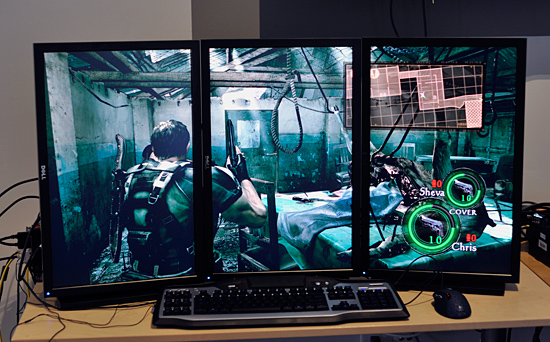
A number of questions have been asked regarding this tech and there seems to be quite a lot of confusion surrounding it. I for one have delved deep into eyefinity in my quest to setup a 3 monitor gaming rig.
I have successfully installed and configured a 3 display setup where by games can be run at a resolution of 5760 X 1080 thus spanning the game across your 3 screens giving you a breathtaking experience. At first I must say it is all very overwhelming and I even at some point felt nauseous looking at 3 screens during a game of Bad Company 2. But the good news is you get used to it.
So here is how and what you need to get Eyefinity up and running.
Firstly you will need an ATI HD 5xxx series card. I have heard Nvidia are also doing an eyefinity type thing, but I am not aware of what models support this.
Secondly you will need 3 monitors. (duh)
This is where the confusion steps in. 1 of the monitors you use HAS to either have a native display port OR you will have to buy an ACTIVE Display port adapter. The problem here is that DP monitors are not all that common from what I have seen, and they are dam expensive. Up until recently active DP adapters were also heavily priced and were in the region of R1000 - R2000. Bit nuts If you ask me. But luckily the prices on the adapters are dropping and Prophecy shop has a active DP - VGA adapter from Saphire for only R350!
Just a note, the adapter HAS to be an active adapter. An ordinary adapter won't work. This is where a lot of people make a mistake. Make sure it is active.
Once you have all your gear the rest is easy. In your ATI CCC you will need to create a group where by you setup your desktop as one big desktop with a resolution of 5760 X 1080.
Once this is down to get games running on all 3 displays, all you need to do is set the resolution within the game to 5760X 1080.
And that’s it, you are sorted.
I am however experiencing one issue with my setup which from what I have read is fairly common, the monitor running the DP adapter does not wake up once the pc goes to sleep. Its a bit frustrating but I am looking for a fix for this issue.
Hope this helped clear things up.
Cheers
Grim.
I have successfully installed and configured a 3 display setup where by games can be run at a resolution of 5760 X 1080 thus spanning the game across your 3 screens giving you a breathtaking experience. At first I must say it is all very overwhelming and I even at some point felt nauseous looking at 3 screens during a game of Bad Company 2. But the good news is you get used to it.
So here is how and what you need to get Eyefinity up and running.
Firstly you will need an ATI HD 5xxx series card. I have heard Nvidia are also doing an eyefinity type thing, but I am not aware of what models support this.
Secondly you will need 3 monitors. (duh)
This is where the confusion steps in. 1 of the monitors you use HAS to either have a native display port OR you will have to buy an ACTIVE Display port adapter. The problem here is that DP monitors are not all that common from what I have seen, and they are dam expensive. Up until recently active DP adapters were also heavily priced and were in the region of R1000 - R2000. Bit nuts If you ask me. But luckily the prices on the adapters are dropping and Prophecy shop has a active DP - VGA adapter from Saphire for only R350!
Just a note, the adapter HAS to be an active adapter. An ordinary adapter won't work. This is where a lot of people make a mistake. Make sure it is active.
Once you have all your gear the rest is easy. In your ATI CCC you will need to create a group where by you setup your desktop as one big desktop with a resolution of 5760 X 1080.
Once this is down to get games running on all 3 displays, all you need to do is set the resolution within the game to 5760X 1080.
And that’s it, you are sorted.
I am however experiencing one issue with my setup which from what I have read is fairly common, the monitor running the DP adapter does not wake up once the pc goes to sleep. Its a bit frustrating but I am looking for a fix for this issue.
Hope this helped clear things up.
Cheers
Grim.