HDD Backup & Cloning

iDOL

Expert Member
Joined
Nov 20, 2006
Messages
2,480
Reaction score
93
Location
Far & Away
Lo Lo there folks,

Me is requiring some additional input.

I am getting rid of my 750 GB hDD's , but I need to clone/backup these drives prior to letting them go.


I need recommendations on what best to use as a means of backup for my data.

In case you were wondering , I am going to be running the following new setup :

My motherboard :
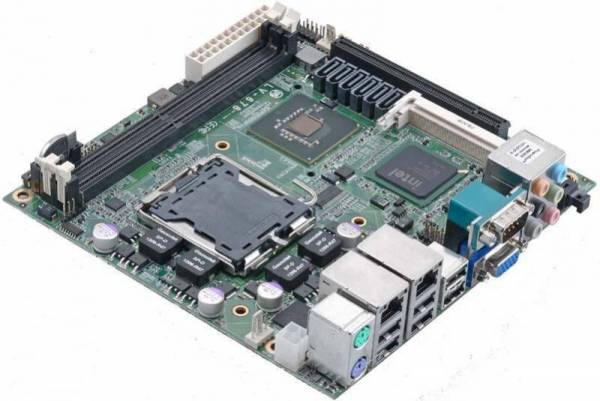
LV-678-3DB2.JPG

http://mybroadband.co.za/photos/data/500/medium/LV-678-3DB2.JPG

With an E8500 CPU,
4 GB DDR2 800Mhz
9600GT
6 x 1.5TB Seagates

I am also looking at going the raid route, as the board natively supports "RAID 0,1,5,10".
I will be upgrading these to 1.5TB's from Seagate. Initially
 
Acronis, how much size does it require, same or similar so for a 750GB HDD to DVD would require me to provide 160 dvd's or does it compress some of the data ?

Another factor is time, how long does it take.
 
Thank you gary , me will look at that .

You are just the guy I was looking at chatting to , I have to create a custom image of my xp install for this system, and you posted previously that you had all the updates and patches for that up to date.

Please I would like to get that from you.
 
Thank you gary , me will look at that .

You are just the guy I was looking at chatting to , I have to create a custom image of my xp install for this system, and you posted previously that you had all the updates and patches for that up to date.

Please I would like to get that from you.

Yes I do have it on CD... AutoPatcher.

PM me.
 
OK requirements,

How much space - is it like for like 750GB for 750GB or does it compress it down to a manageable size - say half 750GB becomes like 400GB.

How long does it take in terms of time to complete the backup.
 
Never mind the cloning (but I use XXCLONE to clone to another physical disk and runtime.org's DriveImage XML to go down to a file that can be browsed/recovered/written to a drive at a later date) - tell me about that board, dagnabit! :p ..as in: where can I get hold of 'em, and for how much?!

Oh, and DriveImage has a compress-the-image option too.

Now tell me about that board! :D
 
OK requirements,

How much space - is it like for like 750GB for 750GB or does it compress it down to a manageable size - say half 750GB becomes like 400GB.

How long does it take in terms of time to complete the backup.

depends which program... The imaging programs will be a one for one copy... so yes 750 Gb for 750 Gb.

If you are making backups it will depend on the program.... which one did you have in mind?
 
Which program, would backup my hdd and requires only half the size or less of the original drive.

As in my example, 750GB HDD backup = 400GB , able to restore completely back to 750GB from my 400GB backup.
 
Never mind the cloning (but I use XXCLONE to clone to another physical disk and runtime.org's DriveImage XML to go down to a file that can be browsed/recovered/written to a drive at a later date) - tell me about that board, dagnabit! :p ..as in: where can I get hold of 'em, and for how much?!

Oh, and DriveImage has a compress-the-image option too.

Now tell me about that board! :D

Cool, me read up on Drive Image
 
Which program, would backup my hdd and requires only half the size or less of the original drive.

As in my example, 750GB HDD backup = 400GB , able to restore completely back to 750GB from my 400GB backup.

where is the software???? im interest in that to......
 
Well , tyerone, me also still searching, will do more research over the next couple of days.
 
Top
Sign up to the MyBroadband newsletter
X