Helpful LINQ query

Solarion

Honorary Master
Joined
Nov 14, 2012
Messages
28,051
Reaction score
17,804
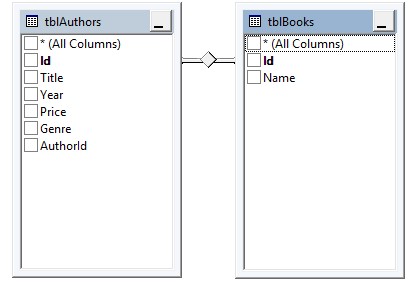
authorsbooks.jpg


I have two tables, Authors and Books

On my program I have pulled the information into List<Authors> and List<Books> and now obviously an Author can have 1 or many Books

What I would like is to filter the Authors list where an Author has written 5 or more Books.

I've wasted over 2 hours trying to figure this out so I have one question, is this even possible at all with LINQ or Lamda's? I came across another suggestion that I must use IQueryable instead of IList.

Is this possible?

Edit: Before you say anything, yes I should and probably will put an AuthorId column in the Books table!

This is what I've got and it works, albeit in a roundabout way.

Code:
var uniquelist = from x in Books
                 group x by x.AuthorID into g
                 let count = g.Count()
                 orderby count descending
                 select new { Name = g.Key, Count = count, g.First().AuthorID};

var morethanfivebooks = q.Where(x => x.Count >= 5).ToList();

authors = authors.Where(x => morethanfivebooks.Any(y => y.AuthorID == x.AuthorID)).ToList();

What I'm left with is a list of authors who have written 5 or more books.
 
Last edited:
Yeah it's possible, here's an example:

C#:
public class Author
{
    public int ipkAuthorId;
    public string name;
    public int ifkBookId;
    public Author(int p_ipkAuthorId, string p_name, int p_ifkBookId)
    {
        ipkAuthorId = p_ipkAuthorId;
        name = p_name;
        ifkBookId = p_ifkBookId;
    }
}
public class Book
{
    public int ipkBookId;
    public string title;
    public Book(int p_ipkBookId, string p_title)
    {
        ipkBookId = p_ipkBookId;
        title = p_title;
    }
}
public Form1()
{
    List<Author> authorList = new List<Author>();
    List<Book> bookList = new List<Book>();

    for (int i = 0; i < 17; i++)
        bookList.Add(new Book(i, "Book" + i));

    // Author named after how many books they have
    for (int i = 0; i < 3; i++)
        authorList.Add(new Author(i, "Name-3-Books", i));
    for (int i = 3; i < 10; i++)
        authorList.Add(new Author(i, "Name-7-Books", i));
    for (int i = 10; i < 15; i++)
        authorList.Add(new Author(i, "Name-5-Books", i));
    for (int i = 15; i < 17; i++)
        authorList.Add(new Author(i, "Name-2-Books", i));

    var query = from a in authorList
              join b in bookList on a.ifkBookId equals b.ipkBookId
              group a by a.name into aGroup
              where aGroup.Count() >= 5
              select new
              {
                  name = aGroup.Key,
                  count = aGroup.Count(),
              };
}

Mine isn't DB structures, so I'm just selecting the result into a new object to see it easier, but you can return anything you want.
 
Hehe, and as you say, you have a bit of a PK/FK issue. If we switch that around it becomes:

Code:
var query2 = from a in authorList
                join b in bookList on a.ipkAuthorId equals b.ifkAuthorId
                group b by b.ifkAuthorId into bGroup
                where bGroup.Count() >= 5
                 select new
                 {
                     ifkAuthorId = bGroup.Key,
                     count = bGroup.Count(),
                 };

var selectedAuthors = from a in authorList
                             join a2 in query2 on a.ipkAuthorId equals a2.ifkAuthorId
                             select a;
 
Note:
Your two table names IMO are inverted, see class comments below

Solution to filtering out Authors with 5 or more books
C#:
using System;
using System.Collections.Generic;
using System.Linq;

namespace AuthorBooks {
  // tblBooks -> Author
  public class Author {
    public int Id { get; set; }
    public string Name { get; set; }
    public override string ToString() => $"Author: [Id: {Id}, Name: {Name}]";
  }

  // tblAuthors -> Book
  public class Book {
    public Guid Id { get; set; }
    public int AuthorId { get; set; }
    public string Title { get; set; }
    public int Year { get; set; }
    public decimal Price { get; set; }
    public string Genre { get; set; }
    public override string ToString() => $"Book: [Id: {Id}, AuthorId: {AuthorId}, Title: {Title}]";
  }

  class Program {
    static void Main(string[] args) {
      // create test list of authors
      var authors = new List<Author> {
        new Author { Id = 1, Name = "Jack" },
        new Author { Id = 2, Name = "Mary" },
        new Author { Id = 3, Name = "Peter" },
        new Author { Id = 4, Name = "John" }
      };

      // create test list of books
      IEnumerable<Book> getBooks(List<Author> authors) {
        var qty = 3;
        foreach (var author in authors) {
          foreach (var i in Enumerable.Range(1, qty++)) {
            yield return new Book { Id = Guid.NewGuid(), AuthorId = author.Id, Title = $"Book{i} : {author.Name}]" };
          }
        }
      }
      var books = getBooks(authors);

      // Extract AuthorIds with 5 or more books
      var authorsGT5 = books
        .GroupBy(b => b.AuthorId)
        .Where(g => g.Count() >= 5)
        .Select(g => g.First().AuthorId);

      // Iterate over Authors with 5 or more books
      foreach (var author in authors.Where(a => authorsGT5.Contains(a.Id))) Console.WriteLine(author);
    }
  }
}
 
Last edited:
Top
Sign up to the MyBroadband newsletter
X