Home Network Setups

Ha ha ha.

Very similar to mine, except running a Unifi Dream Machine and TP-Link POE alongside the Microserver and then an Eaton UPS.

Bit of a waste having the UDM in the Graham though and losing out on the ninja access point in there.

****

What is on top of the Microserver with all the USB ports?
Yeah, UDM wasn’t ever gonna be on the cards. That makes my inner nerd sad though...

That would be this:
43CF3BBF-E437-458A-8461-E23FDF5CA047.jpeg
 
I saw that and wanted to comment that it arrived really quickly hey.. How are you finding it?

I really need to invest in a proper netwotk cabinet and rethink my home cabling
To be honest, it’s not much of an improvement on the Rpi 4 and SSD. Just a lot more elegant. I bought it in a moment of weakness lol. I’m not unhappy though, it does look a lot better than an SSD strapped to a Pi with rubber bands.
 
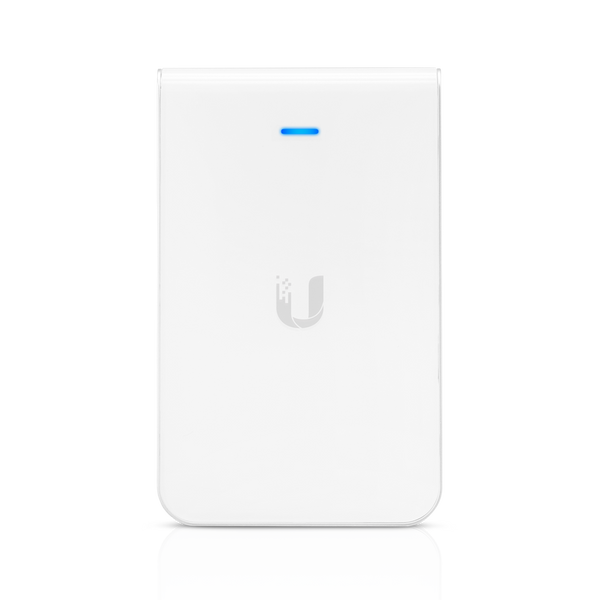
Does anyone in thread have a ceiling mount for ubnt ap's they want to sell (or give) me?
Mine are in China, my dumb ass didn't bring them with when I brought the AP's.
 
Thats my other option (other than the 6 lite I'm leaning towards), I like the dual port w/PoE on the inwall, so I get another connection, but I've already run cable to the ceiling's for the ap's, so a bit wasted for me.

Reviews on the 6 seem to like it.

Yeah it’s one of those hindsight if I did it all over again kind of things I would have gone this route.

As it stands I have 2 x LR’s and one Outside Mesh which do the job just fine.

But you are right with the Lites. If I did that it again like that I would have taken more Lites for the same money instead of the LR.
 
Yeah, UDM wasn’t ever gonna be on the cards. That makes my inner nerd sad though...

That would be this:
View attachment 985024

Aah didn’t even know such a thing exists.

Presumably a Pi in there?

As for the UDM it’s a stellar device. A bit pricey but I reckon most smaller homes could run just the UDM and be very happy.

Also have a UDM Pro but it’s more of a test unit for work and if I had loads of money would be running that with door access and cameras everywhere. Also an excellent product for its purpose.
 
Does anyone in thread have a ceiling mount for ubnt ap's they want to sell (or give) me?
Mine are in China, my dumb ass didn't bring them with when I brought the AP's.

Don’t ask me why I know...but double sided tape does a find job of keeping them up there.

They are pretty lightweight and if you stand and hold it for a minute or two it bonds and will be up there for years.
 
With some forward planning and of course spending some money you could have done every room with one of those.


Then you’d have a ninja wired and wireless network with genuine mesh roaming instead of multiple AP’s fighting each other to the death on the same SSID.
And a pretty hefty budget...
 
And a pretty hefty budget...
Not too bad - 1600-1900 odd locally depending on scoop or takealot or amazon...

I'm actually going to order one now, so I can move one of my AP's upstairs.
Having 2 ports is always good where you only have 1 drop, and don't feel like sticking a switch in.

They're far better than consumer level wifi - its mostly set and forget.
Sure, you need PoE, and its nice to have other unifi stuff, but you can get by without, although you'll need to run the controller software to program it initially.
 
And a pretty hefty budget...
When compared to one unit "gamer" routers and that kind of kak that do a half job it's not bad.

All depends on what you value I guess, over time people will easily spend as much replacing the same crap to try and find a solution to their problems and then never get there.

This is like a one shot kill, set and forget.

I reckon you'd not need more than a 5-pack in most homes and that will probably still be overkill.

But yes these are enterprise class devices, so they come for a similar price. Depending on the house like I said earlier a single UDM might do an awesome job and be an all wireless solution but that costs similar money.
 
They're far better than consumer level wifi - its mostly set and forget.
Sure, you need PoE, and its nice to have other unifi stuff, but you can get by without, although you'll need to run the controller software to program it initially.
While you can do that and it's fine if you have only one AP for instance, you wouldn't have proper handover of clients and such if you aren't running the controller full time.

At least that used to be the case, not sure if it is any more.
 
While you can do that and it's fine if you have only one AP for instance, you wouldn't have proper handover of clients and such if you aren't running the controller full time.

At least that used to be the case, not sure if it is any more.
Not for a long long time.

In version 3.x of UniFi, a next-generation, proprietary implementation of AP-assisted roaming is introduced: "Zero-handoff," for 0ms mobility of clients among WLAN groups on same channel/BSSID. This requires no special software, no drivers, and the UniFi controller need not be online. The UAPs themselves will determine the best UAP for the client based on signal, while preventing any packet loss or latency.


We're on 6.x now.
 
Aah didn’t even know such a thing exists.

Presumably a Pi in there?
Nope, it runs the Odriod N2+ and has a bit more horsepower than a Pi4:
https://www.hardkernel.com/shop/odroid-n2-with-4gbyte-ram-2/

Home Assistant did a limited run of these customised for an automation server. Pretty beefy spec; although still not cheap after shipping and duties.
https://www.home-assistant.io/blue

If I had to start over, I'd just get a NUC. It's got a lot more grunt for running many other services on it as well.
 
You running a bunch of Pi clusters?

1 K3s cluster of 3 x Pi 4's. The other Pi's are all 2's, 1 is running a sense hat, 1 is running Home Assistant and the other is just Raspbian for file creation/transfer. All for a work demo involving Stratus FT, Nifi, and Rancher/K3s
 
Not for a long long time.

In version 3.x of UniFi, a next-generation, proprietary implementation of AP-assisted roaming is introduced: "Zero-handoff," for 0ms mobility of clients among WLAN groups on same channel/BSSID. This requires no special software, no drivers, and the UniFi controller need not be online. The UAPs themselves will determine the best UAP for the client based on signal, while preventing any packet loss or latency.


We're on 6.x now.
Very interesting.

So I wonder if having the controller online still does a better job of it and this is just a failover thing, or if the controller no longer does it at all.

What does the HDMI output? I see there is a Zen and Dev mode, but how the hell does it work on Zen mode? Wifi?
 
Last edited:
Top
Sign up to the MyBroadband newsletter
X