How does randsomware get onto a pc?

Mars

Honorary Master
Joined
Feb 4, 2006
Messages
11,452
Reaction score
1,149
Location
Cape Town
I'm in a strange situation.

I have a pc that used to be the server of our pos system. The pos system is supplied by a business partner with which our relationship has soured somewhat. So at the beginning of the year we moved to a new pos system and in the process I just replaced the server pc with a new one.

Technically we still do business with said partner so there where still some tasks that needed to be completed on the old pos system along with the occasional old invoice lookup (we have the data elsewhere, this is just easer), so I took all other relevant info off the machine and this machines only function is to run this pos system and connect to the business partners servers to update pricing ect..

Since the beginning of the year no new software has been installed, no emails, no web browsing, nothing except this specific software runs, Dropbox shares a couple of folders with my pc.

On the first of this month we did an update on the pos system as normal.

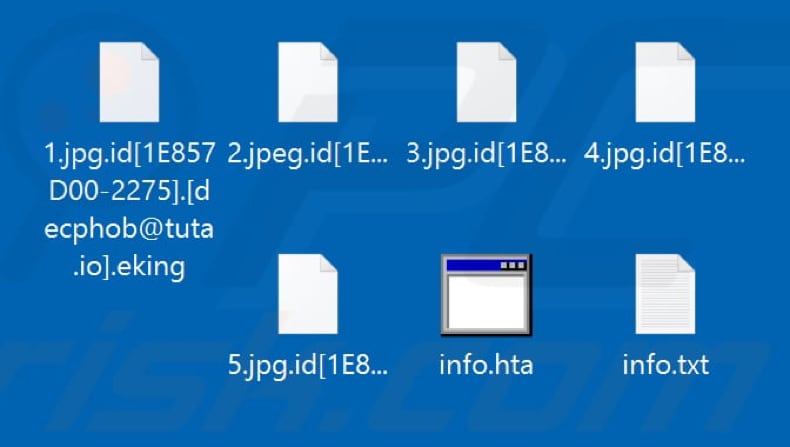
A few days ago I noticed that the files in those folders where renamed to a randsomeware name. When I did the rollback I noticed that they where encrypted on the second.

In a panic I did a check of every one of my pc's and every other machine cape up clean.

No one besides myself and my wife have access to this machine.

So, my conclusion is that the randsomeware came via the update on that pos system. The update was on the first and the machine encrypted on the second.

Is this a reasonable assumption? Is there another way that it could have gotten on there?

The pc was running windows 7 with all the security updates up until say Jan this year.
It was running the standard windows firewall and glasswire along with the windows anti-virus.
 
Not an expert on ransomware and only seen it come via EMAIL in my experience.

Just some things to note, you sure you checked every PC because perhaps it came through the network?

Secondly, you could check the date of the encrypted files and see if that clue helps you at all.
 
So, my conclusion is that the randsomeware came via the update on that pos system. The update was on the first and the machine encrypted on the second.

Is this a reasonable assumption? Is there another way that it could have gotten on there?
It's possible but I don't think you can make an assumption that it was the updates. Fake updates as a delivery mechanism for malware are a thing but AFAIK it is usually more of a social engineering thing to entice the unwary to download and activate malware. Supply chain attack on the vendor is possible if they got the attention of a well resourced and technically capable group.

The Windows 7 device in itself is vulnerable so there are lots of ways that it could have been compromised - email delivery or infected USB used on the device probably more likely, even if you think no-one would have done this - or another device on your network is compromised and the adversary launched an attack against the vulnerable and valuable looking Windows 7 box from there. Lots of possibilities.
 
Last edited:
Malware/viruses/ransomware can come through an innumerable number of attack vectors. Literally any piece of software with network access has the possibility to introduce issues.

Without a real in depth audit, it would be very difficult to pin point, even a potential culprit.
 
There are many ways for it to get onto a PC.
- phsihing
- usb / removable drives
- email
- browsing dodgy sites
- worms/malware - can download dropper file which then in turn downloads the ransomware.
- targetted attacks - using vulnerabilities on your network/servers to gain access and them install the ransonware.

Impossible to say where it came from without doing a audit. You need to put controls in place to stop attacks from all the above vectors.
 
I'm in a strange situation.

I have a pc that used to be the server of our pos system. The pos system is supplied by a business partner with which our relationship has soured somewhat. So at the beginning of the year we moved to a new pos system and in the process I just replaced the server pc with a new one.

Technically we still do business with said partner so there where still some tasks that needed to be completed on the old pos system along with the occasional old invoice lookup (we have the data elsewhere, this is just easer), so I took all other relevant info off the machine and this machines only function is to run this pos system and connect to the business partners servers to update pricing ect..

Since the beginning of the year no new software has been installed, no emails, no web browsing, nothing except this specific software runs, Dropbox shares a couple of folders with my pc.

On the first of this month we did an update on the pos system as normal.

A few days ago I noticed that the files in those folders where renamed to a randsomeware name. When I did the rollback I noticed that they where encrypted on the second.

In a panic I did a check of every one of my pc's and every other machine cape up clean.

No one besides myself and my wife have access to this machine.

So, my conclusion is that the randsomeware came via the update on that pos system. The update was on the first and the machine encrypted on the second.

Is this a reasonable assumption? Is there another way that it could have gotten on there?

The pc was running windows 7 with all the security updates up until say Jan this year.
It was running the standard windows firewall and glasswire along with the windows anti-virus.
Someone somewhere clicked a link or exe.
 
No one does anything on the machine. The pc was locked in our office, I removed all email addresses, there is no possible way any usb or dodgy website was visited since I moved everything off it. Only my wife and I have passwords. Could it be transfered from USB if the pc is locked?

All other pcs on the network are protected and run either win 10 or 11.

They all have malwarebytes, and Bitdefender. I seriously doubt that it could have come from the network.

This machine also had Bitdefender on it, but I suspect the subs may have lapsed.

It doesn't add up.


Only this pos software has downloaded something onto this pc. (And executed it)
 
There are many ways for it to get onto a PC.
- phsihing
- usb / removable drives
- email
- browsing dodgy sites
- worms/malware - can download dropper file which then in turn downloads the ransomware.
- targetted attacks - using vulnerabilities on your network/servers to gain access and them install the ransonware.

Impossible to say where it came from without doing a audit. You need to put controls in place to stop attacks from all the above vectors.

- phsihing - no one actually worked on this machine so there was no human to be phished
- usb / removable drives- Is it possible for a win7 pc to be infected while locked? If so then this is a remote possibility. Someone would have to sneak into my office and then plug the drive in without anyone noticing, so doubtful.
- email - No email is received on this pc. Even when it was, our emails are hosted with google so it was all browser based.
- browsing dodgy sites - No users on this pc.
- worms/malware - can download dropper file which then in turn downloads the ransomware. So this is what I think happened. I think the pos software downloaded and executed it.
- targetted attacks - using vulnerabilities on your network/servers to gain access and them install the ransonware. This is also a possibility I suppose, but would they not need to get past my routers firewall first? Or is that worthless? Besides the timing is suspicious. The day after the only activity on the machine in almost 40 days the randssomware deploys.

Anyway, I have notified said company about a possible breach on their servers, they are incredibly lax about their IT security. The developers who where developing the pos software have left the company years ago and they only have two juniors who keep patching it to keep it working. The software was originally written in Object Pascal and never actually completed. It was "ported" (whatever that means in this instance) to c# or something in the 2010s because it kept crashing on win7 and was unable to connect to the new version of the accounting software.
 
Any pop up messages or anything else actually demanding "ransom"?
I do know that in the early 2000's there were a couple of dodgy POS pos companies that would load a "booby trap" along with their software that would either encrypt your database or render the software inoperable if you didn't pay your monthly subscription or cancelled before your contract expired. Maybe the case here?
 
Yea it was this randsomware:


If this was a malicious action done by someone in my shop they would have targeted the new server.
I have literally lost nothing on this old machine.
 
I can see the date the files where encrypted on dropbox. The encryption started on the night of the 1st.
 
I can see the date the files where encrypted on dropbox. The encryption started on the night of the 1st.
Do is it possible that the Dropbox files are shared with another pc that got infected with Ransomeware and the encrypted files synced to Dropbox?

If it is only your Dropbox files that are encrypted then this is likely the case.
 
This machine also had Bitdefender on it, but I suspect the subs may have lapsed.


Only this pos software has downloaded something onto this pc. (And executed it)
This sounds like the only reasonble explanation.

It's possible it downloaded a infected file via the updates. If the AV is expired and not updating then this is also as good as useless.

Are the encrypted files only on dropbox or on the local drive as well?

Hope you have already done all the standard things like run a full AV Scan (make sure its updated), make sure all the OS and applications are fully patched, change passwods. Also make sure firmware on routers and other network device is up to date.

Though if it was infected with ransomware I would format and re-install. Also check that nothing has spread to any other devices (if there are any)
 
Have you enabled remote desktop and allowed access to it from the internet?
 
Top
Sign up to the MyBroadband newsletter
X