How is this thing connected?

GreGorGy

BULLSFAN
Joined
Jan 18, 2005
Messages
15,290
Reaction score
1,527
Location
Benoniebfkweesnie
So, I am at the pub yesterday and there sits the owner with his new iPad - it can't connect past the WiFi. So, I hit the Wifi and see (among other things) PPPoE user is guest@telkomadsl.

Well no wonder the iPad won't go further than the router!

He disagrees, saying his laptop is connected to that router and it does go further. So, I check out the laptop. It has the WiFi connection to the router and one other - called "Broadband Connection" - that is providing his outside bandwidth. He says when he connects, it asks him for a user/pass for that particular connection. My question is, does anyone know what kind of connection this is? It is windoze, hence my ignorance.
 
he is dialling a PPPoE connection with the router in bridge mode or something, not 100% sure as i am not clued up but that is what it sounds like.

but my guess is he needs to change off guest@telkomadsl to his actual account
 
tell him to put that username and password into his router instead
 
It is windoze, hence my ignorance.
As said, it's a PPPoE connection. Blaming your ignorance on Windows just goes to show that you're a bit of a noob, to be honest, as you get PPPoE pretty much everywhere.
 
Fairly simple,when requesting any website on his laptop windows automatically initiates the default Dialup/PPPoE connection ( Internet explorer settings -> Connections -> Dial whenever a network connection is not present ). This unfortunately is a per-device setting and the account needs to be set up on any PPPoE capable device wanting to connect out,effectively meaning the WiFi network is being used as a modem-bridge instead of a router

The iPad however doesn't have this functionality
 
Back in the day when we could get really cheap local bandwidth accounts I had 2 adsl accounts. Put my router in bridge mode, and dialed up like this, the old school method. And n ot only once, twice. I could run 2 accounts through my line. Then I used an app called route sentry to route traffic between the 2 connections. Local traffic went through my cheap local account, international through my more expensive international account.

I want to maybe get a similar setup. I have a download server and Cybersmart with Night Rider. What I am thinking of doing is set the server to dial up my every day ADSL account 7am in the morning and distribute it to everyone using the network, but 12:30 am when my Night rider starts, it disconnects my every day account and dial up my cybersmart account.

That was just to explain how these types of accounts can be used. If the person fears people using his adsl data when he is not there (plugging in a lan cable will let them bypass wifi keys) he can dial up (With a valid username and password, not the Telkom defaults) with his laptop. The router method is just way more comfortable. Constant connection, always connected.
 
As said, it's a PPPoE connection. Blaming your ignorance on Windows just goes to show that you're a bit of a noob, to be honest, as you get PPPoE pretty much everywhere.

Hey, who you calling noob? I'll slap you :)

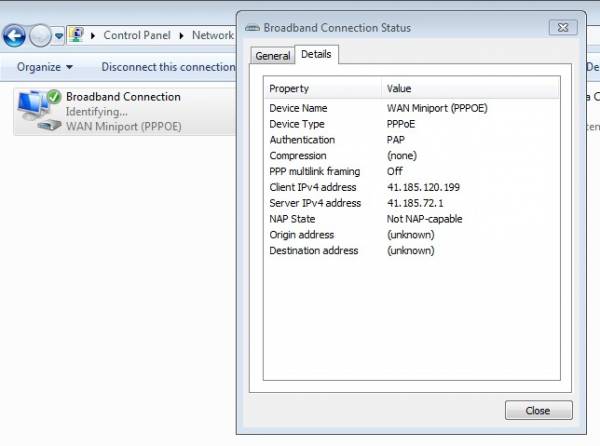
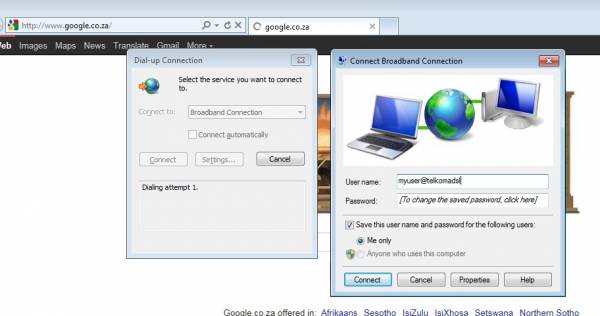
I only had a very brief look at this thing yesterday. Thanks to all - probably is PPPoE in bridge. And as indicated below, iPad does not have this functionality. Although, I am not sure about that. I will have to have a deeper look at it this afternoon. Windows does do things differently to my macs and linux pcs, like it or not. That it just calls the thing "Broadband Connection" and its properties do not display anything about PPPoE does affirm my stance. When he connects to the internet, he says it brings up a box asking for un/pw but he could not show me this functionality at the time as he was half-way through a huge DL and did not want to interrupt it.

Later and thanks...
 
That it just calls the thing "Broadband Connection" and its properties do not display anything about PPPoE does affirm my stance.
Screen12.jpg

When he connects to the internet, he says it brings up a box asking for un/pw
Screen21.jpg
 
Thanks for those screen shots. Slowly getting there. He knows his username is [email protected] but the password is set to remember. And he can't remember it. Baby steps. At least he buys me drink while I bash his router in...
 
There are a few tools to recover PPPoE passwords that are stored on the machine :)
 
Yeah thanks I will try these things. The big challenge I have of course is that the guy is downloading this and downloading that all the damn time and he doesn't quite grasp the concept that I have to mess around on his laptop to get any clues at all to what he is doing.

So, tomorrow will be the challenge to get 10 or so minutes on his laptop and router and get things working.

Thanks guys - I may require a little more help once I see exactly what is going on.
 
Hi there... use a toold called revelations to show the password on his laptop... then take those details and put into the router...
 
Top
Sign up to the MyBroadband newsletter
X