How to prevent auto-population of fields if said fields are empty? (JavaScript)

Agent67

Honorary Master
Joined
Nov 7, 2020
Messages
28,008
Reaction score
20,150
Location
Western Cape
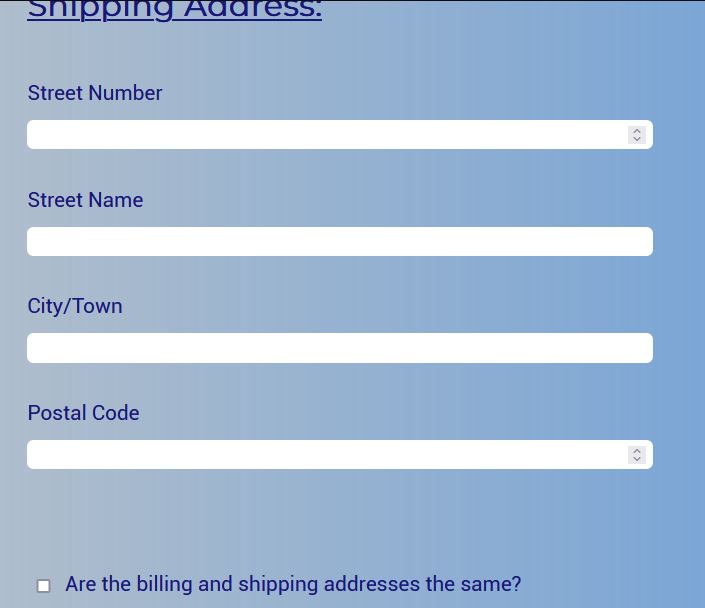
I'm trying to have my billing address fields auto-populated by the shipping address fields' values. And that works, but my next problem is to prevent the auto-population from happening if some of/all of the shipping address values are empty. I've tried using plain truthy values like
JavaScript:
if (variableLOL)
{
    console.log("we are truthy")
}

and checking for "" and null. But none of that seems to be working, it still just auto-populates the billing fields anyway?

Current code I'm using:
JavaScript:
// shipping and billing address field elements
let shipping_street_num = document.getElementById("shipping_street_num");
let shipping_street_name = document.getElementById("shipping_street_name");
let shipping_city = document.getElementById("shipping_city");
let shipping_postal_code = document.getElementById("shipping_postal_code");

let billing_street_num = document.getElementById("billing_street_num");
let billing_street_name = document.getElementById("billing_street_name");
let billing_city = document.getElementById("billing_city");
let billing_postal_code = document.getElementById("billing_postal_code");

let sameShipBillButton = document.getElementById("same_opt");

// Shipping and Billing address function, if the checkbox is clicked then the Billing address section
// is auto-populated and disabled
sameShipBillButton.addEventListener("click", () => {

    if (sameShipBillButton.checked)
    {
        if ((shipping_city !== "" || shipping_city !== null) && (shipping_postal_code !== "" || shipping_postal_code !== null)
        && (shipping_street_name !== "" || shipping_street_name !== null) && (shipping_street_num !== "" || shipping_street_num !== null))
        {
            billing_street_num.value = shipping_street_num.value;
            billing_street_name.value = shipping_street_name.value;
            billing_city.value = shipping_city.value;
            billing_postal_code.value = shipping_postal_code.value;

            billing_postal_code.disabled = true;
            billing_city.disabled = true;
            billing_street_num.disabled = true;
            billing_street_name.disabled = true;
        }
    }
    else
    {
        billing_street_num.value = "";
        billing_street_num.disabled = false;
        billing_street_name.value = "";
        billing_street_name.disabled = false;
        billing_city.value = "";
        billing_city.disabled = false;
        billing_postal_code.value = "";
        billing_postal_code.disabled = false;
    }
});

ship.jpg

bill.jpg
 
JavaScript:
let shipping_street_num = document.getElementById("shipping_street_num");

You're getting a DOM object here, not the value.
 
not really sure of the problem, but i'll give you general advice.

Code:
let shipping_street_num = document.getElementById("shipping_street_num");

Stop using pointless abbreviations like "num". They add NOTHING to the code base. They make it WORSE.
Less characters != more readable/clean

Code:
if ((shipping_city !== "" || shipping_city !== null) && (shipping_postal_code !== "" || shipping_postal_code !== null)
        && (shipping_street_name !== "" || shipping_street_name !== null) && (shipping_street_num !== "" || shipping_street_num !== null))

complex conditions like this are extremely difficult to grok.

an easy/quick refactor that you can do here, is just to move them into an function

Code:
sameShipBillButton.addEventListener("click", () => {
    const isShippingAddressValid = () => {
        return (shipping_city !== "" || shipping_city !== null)
             && (shipping_postal_code !== "" || shipping_postal_code !== null)
             && (shipping_street_name !== "" || shipping_street_name !== null)
             && (shipping_street_num !== "" || shipping_street_num !== null)
    }
    if (sameShipBillButton.checked)
    {
        if (isShippingAddressValid())
        {

Code:
let billing_postal_code = document.getElementById("billing_postal_code");
let sameShipBillButton = document.getElementById("same_opt");

stick to a consistent naming convention.
here you are mixing snake_case and camelCase.
you are also suffixing one of the elements (good), but not the other (bad)

I prefer camelCase, so
Code:
const billingPostalCodeInput = document.getElementById("billing_postal_code"); //it's fine that you element ID and your JS variable are different styles, but keep it consistent.
const shippingIsSameAsBillingButton = document.getElementById("same_opt"); // "same_opt" is very vague, and another abbreviation that makes the code more difficult to understand


Sorry that I couldn't help you with your actual issue :)
 
not really sure of the problem, but i'll give you general advice.
Let's say I type values into the shipping_street_num and shipping_street_name fields, but leave the other shipping fields empty. And then I click the checkbox.

My goal is, is that the billing fields shouldn't get any of the shipping values at all then unless all shipping fields are filled in.
stick to a consistent naming convention.
here you are mixing snake_case and camelCase.
you are also suffixing one of the elements (good), but not the other (bad)

I prefer camelCase, so
Code:
const billingPostalCodeInput = document.getElementById("billing_postal_code"); //it's fine that you element ID and your JS variable are different styles, but keep it consistent.
const shippingIsSameAsBillingButton = document.getElementById("same_opt"); // "same_opt" is very vague, and another abbreviation that makes the code more difficult to understand
That was an oversight admittedly...
 
Let's say I type values into the shipping_street_num and shipping_street_name fields, but leave the other shipping fields empty. And then I click the checkbox.

My goal is, is that the billing fields shouldn't get any of the shipping values at all then unless all shipping fields are filled in.

How I would approach this is to then disable the checkbox.

So you can only set your billing to the same as shipping if your shipping address is valid.

Otherwise, you are going to have this wonky checkbox that sometimes does something, and sometimes doesn't.


This just seems like better UX to me.
 
How I would approach this is to then disable the checkbox.

So you can only set your billing to the same as shipping if your shipping address is valid.

Otherwise, you are going to have this wonky checkbox that sometimes does something, and sometimes doesn't.


This just seems like better UX to me.

I totally get why you want to do what you want to do
This is why vanilla JS just sucks balls.

If you used alpine.js (can use it like jquery, but a million times better), this would be a joy to do, because you could have a backing model, and you could just watch for changes.

Code:
if (addresses.billingIsSameAsShipping) {
   addresses.billing = { ...addresses.shipping }
}
^^ this is not actual alpine.js implemention, just a conceptual idea


This is just fresh in my mind, because I build this exact functionality yesterday in a legacy .NET MVC application, using angular.js

Code:
this.$scope.$watch(
    _ => this.addressesModel.postalAddressSameAsHomeAddress,
    this.setPostalAddressToHomeAddress.bind(this)
);
this.$scope.$watch(_ => this.addressesModel.homeAddress, this.setPostalAddressToHomeAddress.bind(this), true);

setPostalAddressToHomeAddress() {
    if (this.addressesModel.postalAddressSameAsHomeAddress) {
       this.addressesModel.postalAddress = { ...this.addressesModel.homeAddress };
    }
}
 
Last edited:
How I would approach this is to then disable the checkbox.

So you can only set your billing to the same as shipping if your shipping address is valid.
So how would one approach this? Keep the event listener for the checkbox, and check the shipping addresses like above, but instead, disable the checkbox if all addresses aren't filled?
 
This is why vanilla JS just sucks balls.

If you used alpine.js (can use it like jquery, but a million times better), this would be a joy to do, because you could have a backing model, and you could just watch for changes.

Code:
if (addresses.billingIsSameAsShipping) {
   addresses.billing = { ...addresses.shipping }
}
Lol. Yeah, I'm doing this for an assignment (so I have to use vanilla JS).

I don't even know what alpine.js is...
 
So how would one approach this? Keep the event listener for the checkbox, and check the shipping addresses like above, but instead, disable the checkbox if all addresses aren't filled?

So think keep the event listener for the checkbox.

ALL it does is set the billing to the shipping, and disables/enables the fields.
it does not care about the state of the shipping address.

then we just need to figure out how to enable/disable the checkbox.

psuedo code
Code:
const shippingAddressLine1Input = document.getElementById('some_id');
const shippingAddressLine2Input = document.getElementById('some_id');
const shippingAddressLine3Input = document.getElementById('some_id');
const checkbox = document.getElementById('checkbox_id');
const shippingInputs = [shippingAddressLine1Input, shippingAddressLine2Input, shippingAddressLine3Input]

const isShippingAddressValid = () => {
        return (shippingAddressLine1Input.value !== "" || shippingAddressLine1Input.value !== null)
             && shippingAddressLine2Input.value !== "" || shippingAddressLine2Input.value != null)
             && shippingAddressLine3Input.value !== "" || shippingAddressLine3Input.value != null)

}

// here we are going to add an "onchange" listener to all our shipping address inputs
shippingInputs .forEach(input => {
    input.addEventListener('change', (event) => {
        if (isShippingAddressValid() {
           checkbox.enabled = true;
        } else {
           checkbox.enabled = false;
        }
    });
});

const billingAddressLine1Input = document.getElementById('some_id');
const billingAddressLine2Input = document.getElementById('some_id');
const billingAddressLine3Input = document.getElementById('some_id');

checkbox .addEventListener("click", () => {
     if (checkbox.value == true) {
         billingAddressLine1Input.value = shippingAddressLine1Input.value;
         billingAddressLine1Input.disabled = true;
         // etc
     }
});

something like this :)
 
So think keep the event listener for the checkbox.

ALL it does is set the billing to the shipping, and disables/enables the fields.
it does not care about the state of the shipping address.

then we just need to figure out how to enable/disable the checkbox.

psuedo code
Code:
const shippingAddressLine1Input = document.getElementById('some_id');
const shippingAddressLine2Input = document.getElementById('some_id');
const shippingAddressLine3Input = document.getElementById('some_id');
const checkbox = document.getElementById('checkbox_id');
const inputs = [shippingAddressLine1Input, shippingAddressLine2Input, shippingAddressLine3Input]

// here we are going to add an "onchange" listener to all our shipping address inputs
inputs.forEach(input => {
    input.addEventListener('change', (event) => {
        if (shippingAddressLine1Input.value != ''
           && shippingAddressLine2Input.value != ''
           && shippingAddressLine3Input.value != ''
        ) {
           checkbox.enabled = true;
        } else {
           checkbox.enabled = false;
        }
    });
});

something like this :)
Thx. Now I learned something new. Didn't think to put the inputs in an array, and then use forEach to give them all event listeners...

Thx again.
 
not really sure of the problem, but i'll give you general advice.

Code:
let shipping_street_num = document.getElementById("shipping_street_num");

Stop using pointless abbreviations like "num". They add NOTHING to the code base. They make it WORSE.
Less characters != more readable/clean

Code:
if ((shipping_city !== "" || shipping_city !== null) && (shipping_postal_code !== "" || shipping_postal_code !== null)
        && (shipping_street_name !== "" || shipping_street_name !== null) && (shipping_street_num !== "" || shipping_street_num !== null))

complex conditions like this are extremely difficult to grok.

an easy/quick refactor that you can do here, is just to move them into an function

Code:
sameShipBillButton.addEventListener("click", () => {
    const isShippingAddressValid = () => {
        return (shipping_city !== "" || shipping_city !== null)
             && (shipping_postal_code !== "" || shipping_postal_code !== null)
             && (shipping_street_name !== "" || shipping_street_name !== null)
             && (shipping_street_num !== "" || shipping_street_num !== null)
    }
    if (sameShipBillButton.checked)
    {
        if (isShippingAddressValid())
        {

Code:
let billing_postal_code = document.getElementById("billing_postal_code");
let sameShipBillButton = document.getElementById("same_opt");

stick to a consistent naming convention.
here you are mixing snake_case and camelCase.
you are also suffixing one of the elements (good), but not the other (bad)

I prefer camelCase, so
Code:
const billingPostalCodeInput = document.getElementById("billing_postal_code"); //it's fine that you element ID and your JS variable are different styles, but keep it consistent.
const shippingIsSameAsBillingButton = document.getElementById("same_opt"); // "same_opt" is very vague, and another abbreviation that makes the code more difficult to understand


Sorry that I couldn't help you with your actual issue :)
Amen brother!

a couple of intermediate boolean vars to simplify some conditions and improve readability will simply be optimised by the compiler with no performance impact
 
Why use event listeners? I would have used OnClick and used a function to copy the address fields to the postal fields.

document.getElementById('postaladdressline1').value = document.getElementById('physicaladdressline1').value;

Then use a boolean to check if the check box is ticked. If ticked copy the address if not clear it.

But this wouldn't update if the person checks the box and then fills in the physical address this relies on the person to check the box after the fact.

However, you could make it call an update function on focus change of the address fields and it will also update the fields appropriately.
 
Last edited by a moderator:
@_kabal_

So I've tried to implement your solution, but there's a problem. I only filled in the postal_code field, yet the isValid function is returning true. (Even tho it shouldn't?)

Code:
JavaScript:
// check if all shipping address fields are filled in.
const isShippingAddressValid = () => {
    if ((shipping_street_name.value !== "" || shipping_street_name.value !== null)
    && (shipping_street_num.value !== "" || shipping_street_num.value !== null)
    && (shipping_city.value !== "" || shipping_city.value !== null) &&
    (shipping_postal_code.value !== "" || shipping_postal_code.value !== null))
    {
        console.log("success");
    };
    return ((shipping_street_name.value !== "" || shipping_street_name.value !== null)
    && (shipping_street_num.value !== "" || shipping_street_num.value !== null)
    && (shipping_city.value !== "" || shipping_city.value !== null) &&
    (shipping_postal_code.value !== "" || shipping_postal_code.value !== null));
};

const shippingInputs = [shipping_street_num, shipping_street_name, shipping_city, shipping_postal_code]
shippingInputs.forEach((input) => {
    input.addEventListener("change", () => {
        console.log(isShippingAddressValid());
        if (isShippingAddressValid())
        {
            sameShipBillButton.disabled = false;
        }
        else
        {
            sameShipBillButton.disabled = true;
        }
    });
});

Console returns:
console.JPG

P.S Excuse the styling, I'll fix it when I solve this problem...
 
Last edited:
@Kabal

So I've tried to implement your solution, but there's a problem. I only filled in the postal_code field, yet the isValid function is returning true. (Even tho it shouldn't?)

Code:
JavaScript:
// check if all shipping address fields are filled in.
const isShippingAddressValid = () => {
    if ((shipping_street_name.value !== "" || shipping_street_name.value !== null)
    && (shipping_street_num.value !== "" || shipping_street_num.value !== null)
    && (shipping_city.value !== "" || shipping_city.value !== null) &&
    (shipping_postal_code.value !== "" || shipping_postal_code.value !== null))
    {
        console.log("success");
    };
    return ((shipping_street_name.value !== "" || shipping_street_name.value !== null)
    && (shipping_street_num.value !== "" || shipping_street_num.value !== null)
    && (shipping_city.value !== "" || shipping_city.value !== null) &&
    (shipping_postal_code.value !== "" || shipping_postal_code.value !== null));
};

const shippingInputs = [shipping_street_num, shipping_street_name, shipping_city, shipping_postal_code]
shippingInputs.forEach((input) => {
    input.addEventListener("change", () => {
        console.log(isShippingAddressValid());
        if (isShippingAddressValid())
        {
            sameShipBillButton.disabled = false;
        }
        else
        {
            sameShipBillButton.disabled = true;
        }
    });
});

Console returns:
View attachment 1383154

P.S Excuse the styling, I'll fix it when I solve this problem...

it's because of the '|| / OR'

if the string is "" then it is != null, so it is "true"

just change it to use type coercion

Code:
 if (shipping_street_name.value
    && shipping_street_num.value
    && shipping_city.value
    && shipping_postal_code.value
){
    console.log("success");
};

1663150679129.png
 
it's because of the '|| / OR'

if the string is "" then it is != null, so it is "true"

just change it to use type coercion

Code:
 if (shipping_street_name.value
    && shipping_street_num.value
    && shipping_city.value
    && shipping_postal_code.value
){
    console.log("success");
};

View attachment 1383170
Excellent! The feature works now as it should. Thx so much for the help!
 
Excellent! The feature works now as it should. Thx so much for the help!
Full solution:
Code:
// check if all shipping address fields are filled in.
const isShippingAddressValid = () => {
    return (shippingStreetName.value && shippingStreetNum.value && shippingCity.value && shippingPostalCode.value);
};

const shippingInputs = [shippingStreetNum, shippingStreetName, shippingCity, shippingPostalCode]
shippingInputs.forEach((input) => {
    input.addEventListener("change", () => {
        if (isShippingAddressValid())
        {
            sameShipBillButton.disabled = false;
        }
        else
        {
            sameShipBillButton.disabled = true;
        }
    });
});
@_kabal_ I finally did the styling. lol
 
Your brace positioning is offensive and snake_case? ugh
 
Top
Sign up to the MyBroadband newsletter
X