interesting interview question?

Jet-Fighter7700

Honorary Master
Joined
Mar 12, 2008
Messages
31,618
Hi Guys,

so a friend of mine showed me a interview question he just got asked, thought it was quite interesting so I thought Id share it....

How do you connect two pcs to a router (which has 4 ports) with 4 rj45 jacks and one piece of network cable? You can only use the whole network cable, you may not cut it into two pieces

clearly you will need 2 cables to connect both PC's to a router, and if you cant cut the one cable, how could you do this?

I mean yeah, cheat.... wi-fi one of them.....

but otherwise it does not seem possible to be done?
 

PsyWulf

Honorary Master
Joined
Nov 22, 2006
Messages
16,576
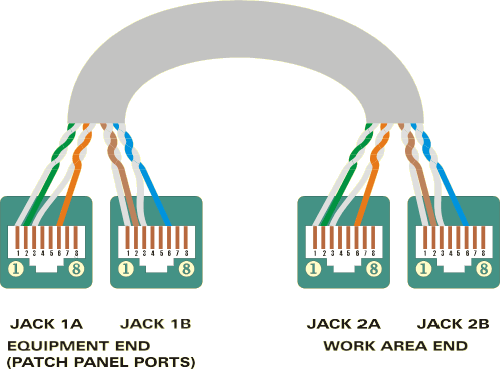
Only need 2 pairs per PC for Base100/Base10 so technically you can wire 2 PCs -> 2 RJ45 -> 1 Cable -> 2 RJ45 -> 2 Ports on router

Any lazy cabler has done it in a pinch ;)
 

Gtx Gaming

Gtx Gaming
Joined
Aug 25, 2008
Messages
25,509
Network cable normally has 4 pairs inside, for a total of 8 small cables inside. You only need 1 pair/2 small cables for the network to work.
 

Jet-Fighter7700

Honorary Master
Joined
Mar 12, 2008
Messages
31,618
Only need 2 pairs per PC for Base100/Base10 so technically you can wire 2 PCs -> 2 RJ45 -> 1 Cable -> 2 RJ45 -> 2 Ports on router

Any lazy cabler has done it in a pinch ;)

but how, if you only have one cable, how could you join 3 devices with one cable essentially?
I mean yes you could connect one to another with crossover cable, but not everything to a router.

its not possible...
 

PsyWulf

Honorary Master
Joined
Nov 22, 2006
Messages
16,576
but how, if you only have one cable, how could you join 3 devices with one cable essentially?
I mean yes you could connect one to another with crossover cable, but not everything to a router.

its not possible...

I answered this and showed how?
 

Ancalagon

Honorary Master
Joined
Feb 23, 2010
Messages
18,140
but you will need to cut the cable into 2 at some point?

You are just splitting the ends of the cable, not the whole cable. One length of cable that splits into 2 at both ends.

Stupid interview question though.
 

xrapidx

Honorary Master
Joined
Feb 16, 2007
Messages
40,309
Crossover cable :D EDIT: Nevermind, missed to the router part
 

PsyWulf

Honorary Master
Joined
Nov 22, 2006
Messages
16,576
but you will need to cut the cable into 2 at some point?

No,you'll have to strip quite a bit of the covering off,but technically a network cable is just a bunch of thin wires wrapped up together,of which you can get away using half per pc
 

dadecoza

Expert Member
Joined
Aug 30, 2006
Messages
1,294
^ what they said, if it is not a POE device the blue and brown pairs can be used (568B).
 

PsyWulf

Honorary Master
Joined
Nov 22, 2006
Messages
16,576
forgive me but Im not really following,

can you make 3 devices connect with one cable, I mean yes split the pairs, but surely that wont work?

split_cable.gif


Pretty picture
 

Slootvreter

Honorary Master
Joined
Aug 7, 2008
Messages
30,273
A bit of a trick question then.

Emphasis is thus on not cutting the cable into two pieces?

I'd have assumed that the cable should not be cut at all.

Also, that does NOT look like best practice to me :p
 

PsyWulf

Honorary Master
Joined
Nov 22, 2006
Messages
16,576
Same reason why a bad crimp will sometimes mean your network speed drops to 10/100mbps if all the pairs arent properly seated
 

Thor

Honorary Master
Joined
Jun 5, 2014
Messages
44,236
Interviewer (Director): If I abuse one of my employees what will you do.
 

PsyWulf

Honorary Master
Joined
Nov 22, 2006
Messages
16,576
A bit of a trick question then.

Emphasis is thus on not cutting the cable into two pieces?

I'd have assumed that the cable should not be cut at all.

Also, that does NOT look like best practice to me :p

Combines knowledge on CAT5/Networking and some ingenuity
 

dadecoza

Expert Member
Joined
Aug 30, 2006
Messages
1,294
Crossover cable :D EDIT: Nevermind, missed to the router part

also ... I'm pretty sure you can connect two pc's directly without a crossover ... these newfangled computers can figure these things out.
 

Jet-Fighter7700

Honorary Master
Joined
Mar 12, 2008
Messages
31,618
split_cable.gif


Pretty picture

thanks for this, so essentially if I understand it right you will have ONE cable connecting 2 computers to 2 ports,

I get it now, interesting take on crimping and cabling I must say....

my friend just said Wlan , but technically that's cheating.....
me I would have even gone with Power over LAN, as technically what if the 2 PC's aren't next to each other.....
 
Top