Internet Connection Sharing through lan cable with Broadband Connection

pokkel

Well-Known Member
Joined
May 22, 2008
Messages
101
Reaction score
0
Hi guys...

I got a Cell C 10GB internet package. I'm using a Huawei dongle...

I want to share my connection with my girlfriend via a lan cable connection. I've tried everything!

Does anybody know how to do this?
 
Use a cross over cable if you are not using a switch or a router.
 
ghoti:
pretty much all the new network cards support Auto-MDIX, which would mean that you won't require a cross-over LAN cable.

pokkel:
Go to the network connections on the PC/laptop with the 3G device.
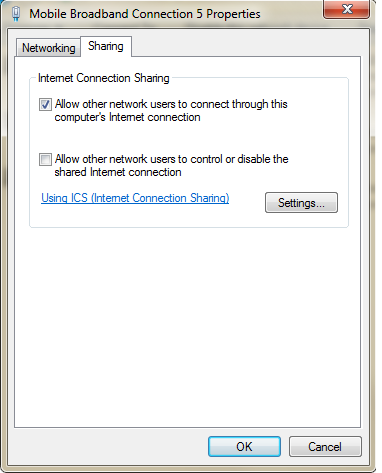
Then go to the properties of the 3G device, and choose to share it.
It should then automatically change the IP address of your LAN interface to 192.168.137.1 if you have Windows 7.

Then you ensure that your girlfriend's LAN interface's IP settings are on 'Automatically obtain', and then you simply connect the 2 computers with the LAN cable.
Her computer's LAN interface should then get an IP address in the 192.168.137.* range, and then she should have Internet access.
 
ghoti:
pretty much all the new network cards support Auto-MDIX, which would mean that you won't require a cross-over LAN cable.

pokkel:
Go to the network connections on the PC/laptop with the 3G device.
Then go to the properties of the 3G device, and choose to share it.
It should then automatically change the IP address of your LAN interface to 192.168.137.1 if you have Windows 7.

Then you ensure that your girlfriend's LAN interface's IP settings are on 'Automatically obtain', and then you simply connect the 2 computers with the LAN cable.
Her computer's LAN interface should then get an IP address in the 192.168.137.* range, and then she should have Internet access.

this ^^

just remember you gonna need to right-click the broadband connection, go to properties and there is a sharing tab. Tick the box that says share this connection and choose which connection is shares through ie. local area connection

http://i53.tinypic.com/2r2prps.jpg

I tried it this weekend while connected to my iPhone hotspot and works like a charm

:D
 
Last edited:
I've tried to do that, but my ICS box doesn't show which connection to share it with...

sharing.png
 
It won't prompt you with the connection that you want to share it with, UNLESS you have multiple connections that you can share it with.

eg. if you only have 2 connections (3G + LAN), then it won't give you a list to choose from.
if you have like 3 connections (3G + LAN + WiFi), then you'll be given a list to choose between the LAN/WiFi when you're trying to share the 3G connection
 
I've managed to solve the problem.

My wireless card was the problem. I had to uninstall the driver and reseat it. I removed the sharing from the wireless settings and then assigned it to the lan connection.

Thanks for your help guys...:wtf:
 
Top
Sign up to the MyBroadband newsletter
X