Logitech MX Master 4 - The worst mouse I've ever experienced

So Ironically all the Temu replacement covers, only cover the buttons, there is nothing to cover the entire mouse.

I will have to do this eventually. I'm not there yet.

If anyone does find a cleaning solution that does not destroy the rubber that would be amazing.
I don't think a 70% or maybe even 50% should do much damage. Dell recommends it to clean their products. Obviously do at own risk.
 
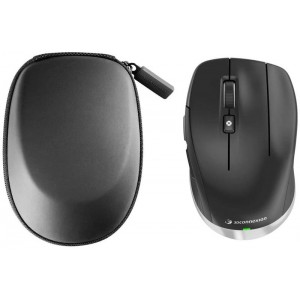
It looks like a good mouse for the CAD environment. I was looking at maybe getting one of the MX Master 4 or something similar to the one below:

s-zoom.file


3D Connexion has some good CAD Mouse selections. What I like about them is that there is a left-handed option!!!
Until mid-last year, I had the earlier version of the Space Mouse.

1778672034450.png
 
I've heard worse about the 4 than the 3S. People were very happy with the 3S, not as much with the 4.

R 1,799 if you want one:

 
I've heard worse about the 4 than the 3S. People were very happy with the 3S, not as much with the 4.

R 1,799 if you want one:

Is this the one that doesn't have Bluetooth support? Or is it the other way around, the bluetooth one doesnt have logi bolt support?
 
Is this the one that doesn't have Bluetooth support? Or is it the other way around, the bluetooth one doesnt have logi bolt support?
This particular one is Bluetooth AND Bolt. PN 910-006559, which as seen on the side of the box supports both (and includes the Bolt receiver).

WhatsApp Image 2026-05-14 at 09.25.48.jpeg
 
I've had the MX Master 3S for just over a year and it's gathering dust in my drawer. I was a bit disappointed after all the hype. I prefer the Magic Mouse, but Apple's trackpad wins for me for most tasks.
 
The plastic overall feels very nice. It is this part:
View attachment 1907803

It is like a sharp edge and slightly elevated.
Maybe yours is defective/damaged or they just have build quality issues. That area is different to previous models, but on mine it's definitely not elevated or intrusive in any way.

I upgraded from the 2S and I'm quite happy. I prefer the placement of the side buttons and scroll wheel on the 4, but that's largely dependent size and shape of your hands.
 
I have been using budget mice for a long time and finally decided to invest in what is considered one of the best options available. I am not sure whether the issues I encountered are specific to this model or shared with previous versions, as reviews seem mixed. I chose this mouse because it was recommended on CAD forums for our software. It is possible mine was defective.


For context: I do have fairly large hands, so size is not the issue. I am accustomed to a smaller mouse and a claw grip, but I believe I could adjust if the mouse were comfortable enough.

I am sending it back to Takealot and really hoping for a refund.


Pros:


  • Many programmable buttons. Having so many assignable buttons is genuinely useful, and I mapped them to various tools in my software. That said, see the Cons section.
  • Logitech Options+ worked well on my PC, and the Action Rings performed well too. I think it is a reasonable alternative to Kando. Some users dislike needing Options+ to access most of the mouse's features, which is a fair criticism.
  • Rechargeable. No complaints here. A must have.
  • Haptic feedback with Windows Haptic Support. This is neither a clear pro nor a con for me personally. I found it distracting and switched it off, but it may appeal to users who like tactile feedback when changing screens or hovering over UI elements (Windows support this). With Smart Actions it could have some practical use, but it is not something I need from a mouse at this stage.
  • Scroll wheel (free-spin mode). When navigating large documents, the free-spin mode is genuinely useful. You can spin it freely and it covers a lot of ground quickly. (@Binary_Bark, you will enjoy spinning this one. Zzzzzzzzwwwwwweeeeeeeeeeeeeeeeeeee)
  • Build Quality and materials feels solid, cons asside.

Cons:


  • Button actuation force and placement. The buttons require noticeably more force than expected. The middle mouse button is the worst offender, which is a significant problem in CAD software where it is used constantly. I am not sure whether mine is defective. There is also a rattle to the button, which is not a serious issue but is noticeable. You can reassign middle-click to the mode shift button, but that button sits further down the mouse and requires repositioning your hand, which defeats the purpose. It is also loud. You cannot assign a true middle button hold (press, wait, release) to the Action Ring button. On Windows, you can work around this using AutoHotkey to simulate a keystroke and then assign that keystroke to the Action Ring button. I actually like that solution, but the Action Ring button itself is not easy to press. The cumulative result of all of this is hand fatigue and, in my case, cramps and pain.
  • Scroll wheel feel. There is a plastic component near the scroll wheel that is uncomfortable during use. The wheel also appears to slip when scrolling quickly.
  • Side button placement. The three side buttons require you to shift your hand position to reach them. This doesn't make sense.
  • Weight. The mouse is heavier than expected. Some additional weight is acceptable, but this feels excessive rather than purposeful.
  • Scroll wheel sensitivity. Because of the free-spin mechanism, the wheel remains quite sensitive even after adjusting settings in the software. You cannot fully stop the spinning, which means when zooming in CAD, the wheel often overshoots and drifts back slightly before settling. The wheel was also glitching noticeably in my use. Additionally, the edge below the wheel is sharp and can catch your finger if your hand drifts back too far.
I am keen to hear what others think, or if there are some of the points above you can relate with. I do realise every person is different.


Would you guys say the MX3 and MX2 could be a better experience?
I have the MX3 and have used the MX4 so it would be difficult to compare them directly. For CAD work I have reassigned the middle click to the forward of the two buttons on the left side (the ones directly under the scroll thing). This button is where the thumb naturally falls, and makes CAD a lot easier.
 
I'm now considering something like this (I do think one can find them for around R1500):


I have a Logitech MX Anywhere 2S which has a middle click button in the same spot directly behind the scroll wheel. This requires clawing the finger back to use. Fine for the occasional middle click, but tiring on heavy usage. Despite this, still better than being on the scroll wheel.
 
I have the MX3 and have used the MX4 so it would be difficult to compare them directly. For CAD work I have reassigned the middle click to the forward of the two buttons on the left side (the ones directly under the scroll thing). This button is where the thumb naturally falls, and makes CAD a lot easier.
That is another option. It was nice using that as "ESC". Because in Archicad after the use of an action or tool you follow with escape to "put it down". But they will need to fix the scroll wheel drifting then as something was not right there. I hope they give a refund, if not, at least a replacement mouse and then hope for a better experience.
 
The problem is that all of them eventually stop clicking correctly and the batteries keep dying within a month. I do like wireless but would love to have rechargable.

I think I might give the Cadmouse a try. The compact one.
I had the 2S. When it was working, it was the best mouse; good buttons and battery life. Then the buttons started doing things like double-clicking every time I clicked. No fix. So frustrating for such an expensive mouse. I now use a Redragon Mirage Pro. Not as good, but way more reliable and cheaper.
 
Takealot has credited my account. So now the hunt again for a mouse.

My options are:

  • 3Dconnexion CadMouse Compact:

I like the dedicated middle mouse button. I am used to claw grip and compact will work great for travel as well. Don't like the USB-A charging but not a big deal. USB-C would be better. Dedicated support for CAD software is good, some do complain about the software being buggy.

Many seem satisfy with the 3S and also those who don't like the Master 4. Master 2S has the best feedback. 3s does have the downside of the rubber material not doing so well over time. Assign Middle Mouse to one of the side buttons.

  • Logitech MX Ergo S:
Try something completely different. Assign Middle click to the side button.
 
Takealot has credited my account. So now the hunt again for a mouse.

My options are:

  • 3Dconnexion CadMouse Compact:

I like the dedicated middle mouse button. I am used to claw grip and compact will work great for travel as well. Don't like the USB-A charging but not a big deal. USB-C would be better. Dedicated support for CAD software is good, some do complain about the software being buggy.

Many seem satisfy with the 3S and also those who don't like the Master 4. Master 2S has the best feedback. 3s does have the downside of the rubber material not doing so well over time. Assign Middle Mouse to one of the side buttons.

  • Logitech MX Ergo S:
Try something completely different. Assign Middle click to the side button.
What do you think about this (if you are looking for something different) ?

Logitech Lift Vertical Ergonomic Mouse​


What do you think about this (if you are looking for something different) ?

Logitech Lift Vertical Ergonomic Mouse​


I've tried a little bit with a friend's mouse and it was a bit too weird for me. I also didn't like the pressure on the right side of my hand. But same as the trackball it is something that probably requires a week of using before you will know if it works or not.
 
Trying the MX Ergo S Trackball.

Wowwweeeeeees!

My muscle memory is super confused , but man it feels amazing. The buttons are super gentle. And middle button works like it should. It also doesn't have that weird endless scrolling thing of the MX 4 (which does not work for CAD in my opinion)

Day and night difference and ergonomically 100 times better than the MX 4.

Gonna give it a day or two to see if I can adjust to the different way of scrolling. Currently I am like a drunk in a Catholic Church walking down the isle.
 
Top
Sign up to the MyBroadband newsletter
X