Logitech MX Master 4 - The worst mouse I've ever experienced

RedViking

Nord of the South
Joined
Feb 23, 2012
Messages
87,549
Reaction score
73,671
Location
>> CLICK HERE TO FIND COFFEE <<
I have been using budget mice for a long time and finally decided to invest in what is considered one of the best options available. I am not sure whether the issues I encountered are specific to this model or shared with previous versions, as reviews seem mixed. I chose this mouse because it was recommended on CAD forums for our software. It is possible mine was defective.


For context: I do have fairly large hands, so size is not the issue. I am accustomed to a smaller mouse and a claw grip, but I believe I could adjust if the mouse were comfortable enough.

I am sending it back to Takealot and really hoping for a refund.


Pros:


  • Many programmable buttons. Having so many assignable buttons is genuinely useful, and I mapped them to various tools in my software. That said, see the Cons section.
  • Logitech Options+ worked well on my PC, and the Action Rings performed well too. I think it is a reasonable alternative to Kando. Some users dislike needing Options+ to access most of the mouse's features, which is a fair criticism.
  • Rechargeable. No complaints here. A must have.
  • Haptic feedback with Windows Haptic Support. This is neither a clear pro nor a con for me personally. I found it distracting and switched it off, but it may appeal to users who like tactile feedback when changing screens or hovering over UI elements (Windows support this). With Smart Actions it could have some practical use, but it is not something I need from a mouse at this stage.
  • Scroll wheel (free-spin mode). When navigating large documents, the free-spin mode is genuinely useful. You can spin it freely and it covers a lot of ground quickly. (@Binary_Bark, you will enjoy spinning this one. Zzzzzzzzwwwwwweeeeeeeeeeeeeeeeeeee)
  • Build Quality and materials feels solid, cons asside.

Cons:


  • Button actuation force and placement. The buttons require noticeably more force than expected. The middle mouse button is the worst offender, which is a significant problem in CAD software where it is used constantly. I am not sure whether mine is defective. There is also a rattle to the button, which is not a serious issue but is noticeable. You can reassign middle-click to the mode shift button, but that button sits further down the mouse and requires repositioning your hand, which defeats the purpose. It is also loud. You cannot assign a true middle button hold (press, wait, release) to the Action Ring button. On Windows, you can work around this using AutoHotkey to simulate a keystroke and then assign that keystroke to the Action Ring button. I actually like that solution, but the Action Ring button itself is not easy to press. The cumulative result of all of this is hand fatigue and, in my case, cramps and pain.
  • Scroll wheel feel. There is a plastic component near the scroll wheel that is uncomfortable during use. The wheel also appears to slip when scrolling quickly.
  • Side button placement. The three side buttons require you to shift your hand position to reach them. This doesn't make sense.
  • Weight. The mouse is heavier than expected. Some additional weight is acceptable, but this feels excessive rather than purposeful.
  • Scroll wheel sensitivity. Because of the free-spin mechanism, the wheel remains quite sensitive even after adjusting settings in the software. You cannot fully stop the spinning, which means when zooming in CAD, the wheel often overshoots and drifts back slightly before settling. The wheel was also glitching noticeably in my use. Additionally, the edge below the wheel is sharp and can catch your finger if your hand drifts back too far.
I am keen to hear what others think, or if there are some of the points above you can relate with. I do realise every person is different.


Would you guys say the MX3 and MX2 could be a better experience?
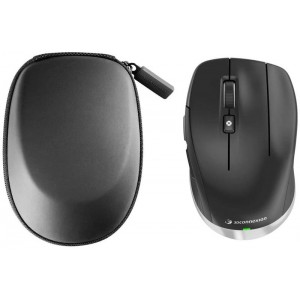
 
I'm now considering something like this (I do think one can find them for around R1500):


Or alternative the MX3S or MX2S depending on availability.

@Soul Assassin also recommended this one: https://www.wootware.co.za/lamzu-maya-x-30k-dpi-wireless-optical-black-gaming-mouse.html
 
I have the mx3s and I have no complaints.. I can relate to the freewheel scrolling sensitivity, but I am also a little overzealous when using it.. You can always change to the notched option..

I know they changed the textures on the mx4s and maybe this is where the uncomfortable plastic bit comes from when you scroll.. I don't notice anything of the kind on the mx3s.. it also doesn't have the third side button, so won't need to stretch to reach it..

I am not saying that you will have a better experience using the mx3s, as ultimately you would have to test drive one to know for sure..

The mx3s is also lighter than the mx4..

It does sound as though some of the changes made for the mx4 could be contributing to your bad experience..

That said, since the primary use case is CAD, maybe a 3Dconnexion like the cadmouse pro would be better suited for you..
 
I have been using budget mice for a long time
Same. A lot of CAD work. I keep looking at more expensive mouses and keep coming back to the budget one (basic 3 button dell etc.). Guess I'm just used to it now.
 
I've got the MX Master 3, love this mouse. Only complaint I have is that the battery life is not great, and that Linux support is a bit hacky (have to use a third party tool called Solaar which isn't that polished).

It fits my hand perfectly, all the buttons are exactly where my fingers rest. Can agree that on this mouse that the middle button does require a bit more force to click but I don't know if that's a bad thing as I wouldn't want to be accidentally clicking it.

Will probably get the Master 4 when this one eventually dies.

Oh yes, the other complaint is the rubberised plastic finish which I hate, but it doesn't affect the usability just makes it impossible to keep clean.
 
Same. A lot of CAD work. I keep looking at more expensive mouses and keep coming back to the budget one (basic 3 button dell etc.). Guess I'm just used to it now.
The problem is that all of them eventually stop clicking correctly and the batteries keep dying within a month. I do like wireless but would love to have rechargable.

I think I might give the Cadmouse a try. The compact one.
 
I've got the MX Master 3, love this mouse. Only complaint I have is that the battery life is not great, and that Linux support is a bit hacky (have to use a third party tool called Solaar which isn't that polished).

It fits my hand perfectly, all the buttons are exactly where my fingers rest. Can agree that on this mouse that the middle button does require a bit more force to click but I don't know if that's a bad thing as I wouldn't want to be accidentally clicking it.

Will probably get the Master 4 when this one eventually dies.

Oh yes, the other complaint is the rubberised plastic finish which I hate, but it doesn't affect the usability just makes it impossible to keep clean.
From what I can see on pictures the MX4 is different to the MX3 and things are spaced differently. The MX3 actually looks a more compact , on my screen anyways.
 
I have been using budget mice for a long time and finally decided to invest in what is considered one of the best options available. I am not sure whether the issues I encountered are specific to this model or shared with previous versions, as reviews seem mixed. I chose this mouse because it was recommended on CAD forums for our software. It is possible mine was defective.


For context: I do have fairly large hands, so size is not the issue. I am accustomed to a smaller mouse and a claw grip, but I believe I could adjust if the mouse were comfortable enough.

I am sending it back to Takealot and really hoping for a refund.


Pros:


  • Many programmable buttons. Having so many assignable buttons is genuinely useful, and I mapped them to various tools in my software. That said, see the Cons section.
  • Logitech Options+ worked well on my PC, and the Action Rings performed well too. I think it is a reasonable alternative to Kando. Some users dislike needing Options+ to access most of the mouse's features, which is a fair criticism.
  • Rechargeable. No complaints here. A must have.
  • Haptic feedback with Windows Haptic Support. This is neither a clear pro nor a con for me personally. I found it distracting and switched it off, but it may appeal to users who like tactile feedback when changing screens or hovering over UI elements (Windows support this). With Smart Actions it could have some practical use, but it is not something I need from a mouse at this stage.
  • Scroll wheel (free-spin mode). When navigating large documents, the free-spin mode is genuinely useful. You can spin it freely and it covers a lot of ground quickly. (@Binary_Bark, you will enjoy spinning this one. Zzzzzzzzwwwwwweeeeeeeeeeeeeeeeeeee)
  • Build Quality and materials feels solid, cons asside.

Cons:


  • Button actuation force and placement. The buttons require noticeably more force than expected. The middle mouse button is the worst offender, which is a significant problem in CAD software where it is used constantly. I am not sure whether mine is defective. There is also a rattle to the button, which is not a serious issue but is noticeable. You can reassign middle-click to the mode shift button, but that button sits further down the mouse and requires repositioning your hand, which defeats the purpose. It is also loud. You cannot assign a true middle button hold (press, wait, release) to the Action Ring button. On Windows, you can work around this using AutoHotkey to simulate a keystroke and then assign that keystroke to the Action Ring button. I actually like that solution, but the Action Ring button itself is not easy to press. The cumulative result of all of this is hand fatigue and, in my case, cramps and pain.
  • Scroll wheel feel. There is a plastic component near the scroll wheel that is uncomfortable during use. The wheel also appears to slip when scrolling quickly.
  • Side button placement. The three side buttons require you to shift your hand position to reach them. This doesn't make sense.
  • Weight. The mouse is heavier than expected. Some additional weight is acceptable, but this feels excessive rather than purposeful.
  • Scroll wheel sensitivity. Because of the free-spin mechanism, the wheel remains quite sensitive even after adjusting settings in the software. You cannot fully stop the spinning, which means when zooming in CAD, the wheel often overshoots and drifts back slightly before settling. The wheel was also glitching noticeably in my use. Additionally, the edge below the wheel is sharp and can catch your finger if your hand drifts back too far.
I am keen to hear what others think, or if there are some of the points above you can relate with. I do realise every person is different.


Would you guys say the MX3 and MX2 could be a better experience?
Sounds like they really stuffed up the 4 because the 3 is the best mouse I have ever had.

I have to say though - I like a heavy mouse and the 3 could be heavier so I think that might be a personal thing.

I think the wheel on the 3 behaves differently - If I touch it, it will stop spinning immediately, its one of my favorite things on the mouse. Possibly this is a setting.

Normal scroll also has a click to it and seems optimal to me... so I hope this is not something they have broken.

I only have 2 gripes with the MX3:

Side scroll only works in excel, if I use it in the browser it moves between tabs. I can't side scroll on anything other than a spreadsheet.
The rubber covering is peeling off and I can't see where you can get some kind of replacement. For a R2k mouse this is pathetic.
 
Side scroll only works in excel, if I use it in the browser it moves between tabs. I can't side scroll on anything other than a spreadsheet.
The rubber covering is peeling off and I can't see where you can get some kind of replacement. For a R2k mouse this is pathetic.
I saw this from others as well. Side Scroll you should be able to assign different configurations in the Options+ software if it is something you use.

Rubber coating seems to be a big compliant and see some of 3D printed new casings.

Have you tried using 70% isopropyl alcohol/30% water mix. ? It obviously might remove. Naked mouse:
1778669264172.png

And then spray this one, do at your own risk, lol. Or ask someone to 3d print a new shell to put over.
1778669361155.png
 
Meh, xiaomi comfort mouse. done! Its cheap as chips, feels great and is just a simple, well built 2 botton + scroll wheel wireless mouse.
 
I saw this from others as well. Side Scroll you should be able to assign different configurations in the Options+ software if it is something you use.

Rubber coating seems to be a big compliant and see some of 3D printed new casings.

Have you tried using 70% isopropyl alcohol/30% water mix. ? It obviously might remove. Naked mouse:
View attachment 1907812

And then spray this one, do at your own risk, lol. Or ask someone to 3d print a new shell to put over.
View attachment 1907814
I did the isopropyl trick with my Xbox Elite controller and it worked really well but was not easy. If I have the energy I might just do it on my mouse too.
 

The Razer DeathAdder Essential Gaming Mouse is cost effective and good for big mitts.

 
I saw this from others as well. Side Scroll you should be able to assign different configurations in the Options+ software if it is something you use.

Rubber coating seems to be a big compliant and see some of 3D printed new casings.
So Ironically all the Temu replacement covers, only cover the buttons, there is nothing to cover the entire mouse.
Have you tried using 70% isopropyl alcohol/30% water mix. ? It obviously might remove. Naked mouse:
View attachment 1907812

And then spray this one, do at your own risk, lol. Or ask someone to 3d print a new shell to put over.
View attachment 1907814
I will have to do this eventually. I'm not there yet.

If anyone does find a cleaning solution that does not destroy the rubber that would be amazing.
 
Personally stopped buying Logitech mice completely because all their scroll wheel sensors start failing the same way.

My experience, working CAD in CATIA for 20 years, have had a MX 3 in the past, as well as other expensive models, but always return to the cheap HP or dell models. Specifically, for CAD work.

Buttons and particularly the scroll wheel and wheel click sensors do not fail with those.
Also, the cheaper models use a basic hard plastic surface, whereas the more expensive models like one you show use mixture of materials which degrade at different rates, particularly the thumb rest rubber tends to peel off or become gummy depending on the material and if you have sweaty hands.

Worst yet is when they apply a coating to give the mice a texture, as this wears down the surface becomes tacky.
Trying to use rubbing alcohol only makes it worse.

The more expensive models always develop issues with either scroll wheel sensor or the wheel click sensor.
Scrolling the wheel in a direction, the sensor would constantly scroll both up and down.

IMO basic 3 button HP or dell mice made of one type of material is the most reliable and durable and best for CAD.
Especially if you do it as your job, 8 hours a day, day in day out, nothing more frustrating and embarrassing than fighting your mouse during a meeting to review a design.
 
Top
Sign up to the MyBroadband newsletter
X
