


leonb
Senior Member
Is there an elegant way to stop the alarm beeping when power is down, i.e other than opening the box and removing beeper?
South Africa’s biggest forum. Discuss, discover, and connect with thousands of members.


Yeah it works well but its still audible, and for some people its still annoying AFA bit of press-stick stuck to its top. Good attenuation.
Load the software that came with it. You can mute the buzzer from there.Is there an elegant way to stop the alarm beeping when power is down, i.e other than opening the box and removing beeper?
Load the software that came with it. You can mute the buzzer from there.

i like my buzzer still there as the buzzer can warn you of something wrong. Happened once to me many years ago, warning me that my batteries are busy collapsing so i swapped out new batteries and all was happy againBest way is to remove the buzzer. Speaking from experience
Can't recall one losing it's settings ever. Maybe when the battery is removed/flat.Now see, that is an elegant solution. Tried it and is working. For how long does the UPS "remember" this setting? I dont have a computer connected permanently.
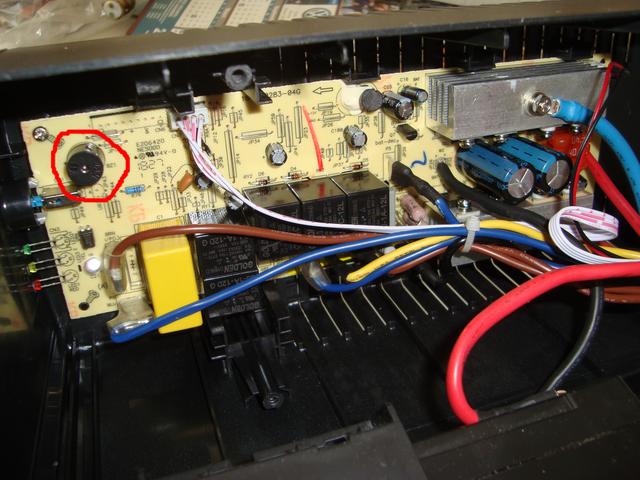
So did it work?That beeping noise is annoying as hell. If I wanted to permanently mute/remove the buzzer, just want to make sure that I don't do surgery to the wrong area. ;p
So it's that little component towards the top left area of the pic?
Didn't want any type of shocking surprise so I first disconnected the batteries, and then forced it right off.So did it work?


The setting is maintained with no PC connected or with the UPS switched off, however if the battery is run flat (not something you should do anyway) the setting is defaulted.Guys no need to destroy the speaker/risk damaging it..it may very well in fact be needed to warn you of impending failure when the batteries start losing their capacity...
It's very easy to disable it via s/w and I can confirm it works for both the 2000 and 1000VA models ,and the settings are not lost on disconnecting laptop or switching off the UPS.
I'll see what I can do to upload the s/w as a image file later tonight..


