MKV streaming machine

SLN1

Active Member
Joined
May 18, 2010
Messages
36
Reaction score
0
Location
JHB
So finally the finance minister has given me the green light for a media streaming machine. problem is so much choices and it can get quite confusing..Current environment is PS3 connected via LAN on single core machine (PS3 media server software will be on this machine), HP i3 and Mac Pro i5 and HUAWEI 520c router (which sometimes fails me when streaming)..

The ideal setup : i5 chip with 8gig RAM, 8tera hard space and a router that could stream MKV's and connect the other laptop's without complaining. not bothered much about the machine graphics..

now the questions : i5 will i be better off with an i3?
which OS to install? Win 7 64 or the Windows Home Server?
which router must i be looking at ?
which cooling system is best for this setup?
which power supply?

Current budget is at R6k and not wanting it to go any higher...

Thanks in advance guys.
 
It'll have to be "Windows Home Server 2011 (codename Vail)" as normal WHS is too much like SBS = limitations.

Windows Home Server is based on Small Business Server
Windows Home Server 2011 is based on Server 2008 R2

But I'm not even sure if "Vail" is available in SA.
no clue.
If it is, get it.
if not, get Windows 7 64bit.

Personally I'd go with 7.
:-)


The i5 (Lynnfield) CPU is a quad core, the i3 is a dual core.
The i5 has turbo boost, the i3 doesn't.
The i3 has hyper-threading, the i5 doesn't.

I'd get an i5.


(if your finance minister is paying :-))
 
thanks for the advise....i was also veering towards the i5 (to try and future proof the machine), checking on the availability of Vail in SA and nothing :( so Win 7 64bit...

(prob the 1st and last time she going to be paying...hi hi hi )

once again thanks
 
I would say something completely different!

Here is my answers to your questions!

Buy a media player(eGreats are great i have 3 in my house must get a M31b or M34a because they can use YAMJ-google it if u dont know, they are like popcornhours) - R1300
Buy a HP MicroServer - R1300
Buy 2 x 2TB Drives - R1400
2GB Ram to add - R300
Gigabit switch - R250
Network Cable etc - R200

Total R4750

The reason i say the above is because the little micro server can out of the box handle 4 x 2TB drives (If you use esata it can handle 7) Its more than powerfull enough to run your download app, YAMJ, TV-Rename, and in my case Flexraid.

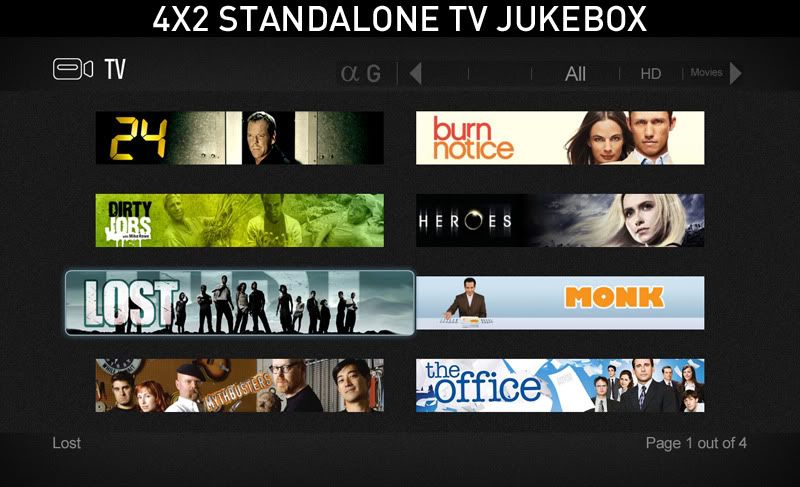
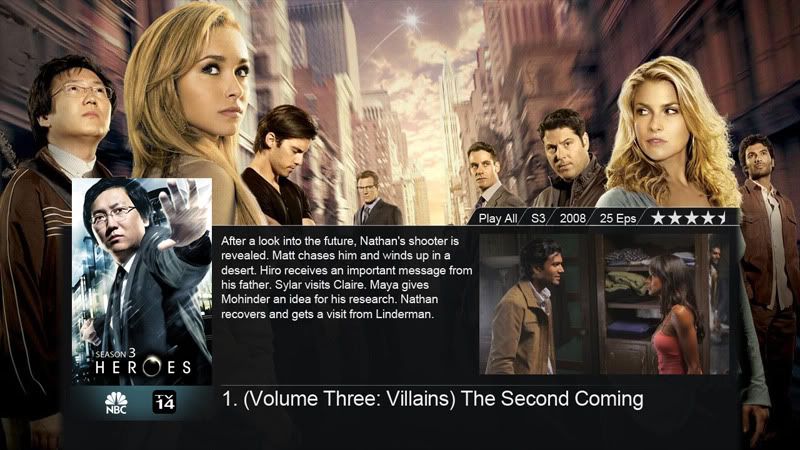
This little server at the moment serves 3 of the media players in my house most of the time all running at the same times and doesn't flinch, and it gives opportunity to add more media players(would never happen but yea). Just a simple run down of how my setup works. I have all my downloads automated, my series are then moved by TV-rename (on task schedule 3 x a day) and then my single jukebox is created by YAMJ for all 3 media players (also 3 times a day after the series is moved). So when i arrive at the tv my episodes and movies display like this with all the info you would need:

3853755804_c2b9b2a241_o.jpg


2-4x2tv.jpg


21_tv_dim.jpg


Then at 12 in the night flex raid runs which creates parity for the raid engine it uses so if ever one of my drives did fail i can swop it out and it would rebuild it for me! If you're the type is a great little project! I actually only got mine a couple weeks ago but i was running it on my home pc but i decided to get a little dedicated box!
 
Last edited:
@Freaksta - interesting setup. Is the YAMJ database stored on the network so that all 3 media players access the same central database?

@SLN1 - For an HTPC, you do NOT need more than an i3. i3 is great, and infact, the new AMD A6 and A8 processors will even beat it (just not sure which is cheaper).
My suggestion to you is to get the i3 and install an Nvida Geforce 450 (or better) graphics card into the system. This will allow you to set up your computer with MadVR renderer, which will upscale your SD content to make it look fantastic. I've seen reports that MadVR can accomplish stuff that only hugely expensive hardware upscalers can accomplish. You can get a full guide on how to set that up at: http://www.homecinema-hd.com
Infact, if you decide not to use MadVR and use another good renderer like 'EVR custom', then you can EASILY get away with a Celeron E3400 and a Radeon HD5450 graphics card for even 1080P content.
I personally have both a Celeron system in my bedroom and the i3 system in my HT room (as this needs the best quality on my 120 inch screen), and both work great and can handle any file I throw at them!
Both system use XBMC which does a great job at putting series and movies into a nice looking library (sorta like YAMJ above)

Re Router - Your best bet is to get a gigabit capable router with a NAS (or HP Microserver) attached to it. You can also get some routers that have a USB port allowing you to connect a hard drive, although it will not perform as fast as a proper NAS. Alternatively, if you only have 1 HTPC, then put everything on a hard drive inside the PC itself.
Re Fan - Both the Celeron and i3 should run quite with stock fans (I'm using the stock fans and can hardly hear anything). Also the HD5450 and Geforce 450 have relatively quite fans that can hardly be heard. Something I am still looking into is getting a quite 120mm case fan for the i3 system as the MadVR renderer causes it to run quite hot (and noisy) after an hr or so of watching.
Re PSU - The Corsair CX430 comes with high recommendations, is relatively quite and is very reasonable priced. I have it in my i3 system, and can only hear it if I put my ear right next to the PC.
 
Last edited:
The PS3 interface is very limited for a Media Player. Took me a month to get annoyed with it. Get a HP Micro server and a Mede8tor, you wont be sorry...
 
Top
Sign up to the MyBroadband newsletter
X