Solarion
Honorary Master
- Joined
- Nov 14, 2012
- Messages
- 28,198
- Reaction score
- 17,990
For starters I am using a sample taken from here. I am however only using the Customers for now just to wrap my head around this.

These are the classes I get generated from the above.
I just quickly put this code together just for illustrating the problem I'm getting.
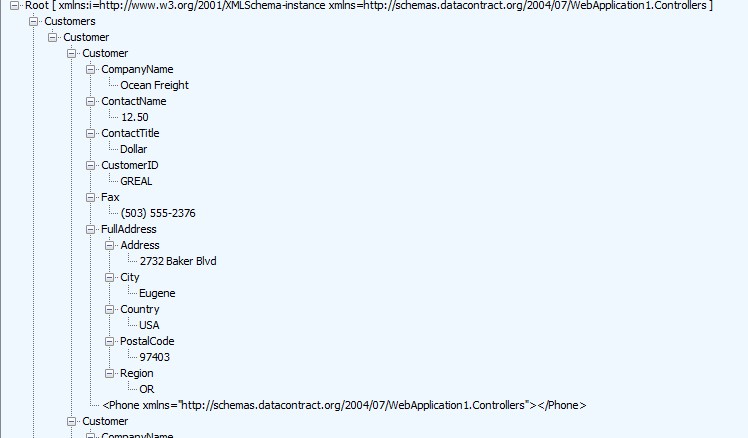
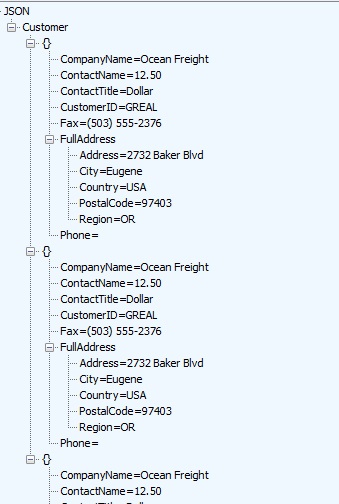
This is the API code I'm using to populate the customers, address etc. But as you can see my output is not the same as you can see I'm getting a nested list inside Customer. So it's become Customers > Customer > Customer.
It has something to do with the way I'm defining or populating the customer/customer list. I'm wracking my brain with this since yesterday morning. Where am I going wrong please guys!
Sample XML file: Customers and orders in a namespace- LINQ to XML - .NET
This XML file—which is used in examples—has data, in a namespace, about customers and orders.
docs.microsoft.com
XML:
 <Customers>
    <Customer CustomerID="GREAL">
      <CompanyName>Great Lakes Food Market</CompanyName>
      <ContactName>Howard Snyder</ContactName>
      <ContactTitle>Marketing Manager</ContactTitle>
      <Phone>(503) 555-7555</Phone>
      <FullAddress>
        <Address>2732 Baker Blvd.</Address>
        <City>Eugene</City>
        <Region>OR</Region>
        <PostalCode>97403</PostalCode>
        <Country>USA</Country>
      </FullAddress>
    </Customer>
    <Customer CustomerID="HUNGC">
      <CompanyName>Hungry Coyote Import Store</CompanyName>
      <ContactName>Yoshi Latimer</ContactName>
      <ContactTitle>Sales Representative</ContactTitle>
      <Phone>(503) 555-6874</Phone>
      <Fax>(503) 555-2376</Fax>
      <FullAddress>
        <Address>City Center Plaza 516 Main St.</Address>
        <City>Elgin</City>
        <Region>OR</Region>
        <PostalCode>97827</PostalCode>
        <Country>USA</Country>
      </FullAddress>
    </Customer>
    <Customer CustomerID="LAZYK">
      <CompanyName>Lazy K Kountry Store</CompanyName>
      <ContactName>John Steel</ContactName>
      <ContactTitle>Marketing Manager</ContactTitle>
      <Phone>(509) 555-7969</Phone>
      <Fax>(509) 555-6221</Fax>
      <FullAddress>
        <Address>12 Orchestra Terrace</Address>
        <City>Walla Walla</City>
        <Region>WA</Region>
        <PostalCode>99362</PostalCode>
        <Country>USA</Country>
      </FullAddress>
    </Customer>
    <Customer CustomerID="LETSS">
      <CompanyName>Let's Stop N Shop</CompanyName>
      <ContactName>Jaime Yorres</ContactName>
      <ContactTitle>Owner</ContactTitle>
      <Phone>(415) 555-5938</Phone>
      <FullAddress>
        <Address>87 Polk St. Suite 5</Address>
        <City>San Francisco</City>
        <Region>CA</Region>
        <PostalCode>94117</PostalCode>
        <Country>USA</Country>
      </FullAddress>
    </Customer>
  </Customers>
These are the classes I get generated from the above.
C#:
    [XmlRoot(ElementName="FullAddress")]
    public class FullAddress {
        [XmlElement(ElementName="Address")]
        public string Address { get; set; }
        [XmlElement(ElementName="City")]
        public string City { get; set; }
        [XmlElement(ElementName="Region")]
        public string Region { get; set; }
        [XmlElement(ElementName="PostalCode")]
        public string PostalCode { get; set; }
        [XmlElement(ElementName="Country")]
        public string Country { get; set; }
    }

    [XmlRoot(ElementName="Customer")]
    public class Customer {
        [XmlElement(ElementName="CompanyName")]
        public string CompanyName { get; set; }
        [XmlElement(ElementName="ContactName")]
        public string ContactName { get; set; }
        [XmlElement(ElementName="ContactTitle")]
        public string ContactTitle { get; set; }
        [XmlElement(ElementName="Phone")]
        public string Phone { get; set; }
        [XmlElement(ElementName="FullAddress")]
        public FullAddress FullAddress { get; set; }
        [XmlAttribute(AttributeName="CustomerID")]
        public string CustomerID { get; set; }
        [XmlElement(ElementName="Fax")]
        public string Fax { get; set; }
    }

    [XmlRoot(ElementName="Customers")]
    public class Customers {
        [XmlElement(ElementName="Customer")]
        public List<Customer> Customer { get; set; }
    }
I just quickly put this code together just for illustrating the problem I'm getting.
This is the API code I'm using to populate the customers, address etc. But as you can see my output is not the same as you can see I'm getting a nested list inside Customer. So it's become Customers > Customer > Customer.
It has something to do with the way I'm defining or populating the customer/customer list. I'm wracking my brain with this since yesterday morning. Where am I going wrong please guys!
C#:
       public Customers Get()
        {
            FullAddress address = new FullAddress();
            address.Address = "2732 Baker Blvd";

            address.City = "Eugene";
            address.Region = "OR";
            address.PostalCode = "97403";
            address.Country = "USA";

            List<Customer> customersList = new List<Customer>()
            {
                new Customer { CompanyName = "Ocean Freight", ContactName = "12.50", ContactTitle = "Dollar",Phone="", FullAddress= address, CustomerID="GREAL", Fax="(503) 555-2376"},
                new Customer { CompanyName = "Ocean Freight", ContactName = "12.50", ContactTitle = "Dollar",Phone="", FullAddress= address, CustomerID="GREAL", Fax="(503) 555-2376"},
                new Customer { CompanyName = "Ocean Freight", ContactName = "12.50", ContactTitle = "Dollar",Phone="", FullAddress= address, CustomerID="GREAL", Fax="(503) 555-2376"},
            };

            Customers customerList = new Customers();
            customerList.Customer = customersList;

            return customerList;

        }
XML:
<?xml version="1.0" encoding="UTF-8"?>
<Customers xmlns="http://schemas.datacontract.org/2004/07/WebApplication1.Controllers" xmlns:i="http://www.w3.org/2001/XMLSchema-instance">
   <Customer>
      <Customer>
         <CompanyName>Ocean Freight</CompanyName>
         <ContactName>12.50</ContactName>
         <ContactTitle>Dollar</ContactTitle>
         <CustomerID>GREAL</CustomerID>
         <Fax>(503) 555-2376</Fax>
         <FullAddress>
            <Address>2732 Baker Blvd</Address>
            <City>Eugene</City>
            <Country>USA</Country>
            <PostalCode>97403</PostalCode>
            <Region>OR</Region>
         </FullAddress>
         <Phone />
      </Customer>
      <Customer>
         <CompanyName>Ocean Freight</CompanyName>
         <ContactName>12.50</ContactName>
         <ContactTitle>Dollar</ContactTitle>
         <CustomerID>GREAL</CustomerID>
         <Fax>(503) 555-2376</Fax>
         <FullAddress>
            <Address>2732 Baker Blvd</Address>
            <City>Eugene</City>
            <Country>USA</Country>
            <PostalCode>97403</PostalCode>
            <Region>OR</Region>
         </FullAddress>
         <Phone />
      </Customer>
      <Customer>
         <CompanyName>Ocean Freight</CompanyName>
         <ContactName>12.50</ContactName>
         <ContactTitle>Dollar</ContactTitle>
         <CustomerID>GREAL</CustomerID>
         <Fax>(503) 555-2376</Fax>
         <FullAddress>
            <Address>2732 Baker Blvd</Address>
            <City>Eugene</City>
            <Country>USA</Country>
            <PostalCode>97403</PostalCode>
            <Region>OR</Region>
         </FullAddress>
         <Phone />
      </Customer>
   </Customer>
</Customers>
Last edited:
![[)roi(]](/forum/data/avatars/m/8/8711.jpg?1563828683)