Need to move ONT

yeshanp

Member
Joined
Feb 27, 2013
Messages
19
Reaction score
3
Ok so here's my situation:

I just moved into my new home and of course the fibre guys (that installed before I got there) put it smack dab in the middle of the living room, closet to the plug point, which I can understand.

Goal: I need an ethernet connection in my office which is upstairs.

I thought of leaving the ONT Box where it is and just running an ethernet cable, the problem is (thanks to loadshedding) I would need to have 2 UPSes one for the ONT and one for the router upstairs. Which isn't exactly cost effective.

Can I buy a longer fibre cable, like 30 meters, (the one that goes from the fibre box in the house to the ONT) and run it up to the office then have both the ONT and router on the same UPS or do I have to give in buy a second UPS?
 
simplest option would be to log a ticket with your ISP to move the ONT and they will send out a tech from your fibre provider (i.e Frogfoot/openserve/vuma) etc. They will most likely charge you a small fee depending on distance to move it.
 
simplest option would be to log a ticket with your ISP to move the ONT and they will send out a tech from your fibre provider (i.e Frogfoot/openserve/vuma) etc. They will most likely charge you a small fee depending on distance to move it.
I should have mentioned that actually,y bad. called them for a quote before any of this. They quoted 2 grand to move the box. Which is a bit out of budget at the moment after the move. So I'm looking into cheaper options. I mean if I can extend the fibre cable or 30m of ethernet and a second UPS, both would be cheaper than the quote.
 
It's not going to be a small fee - they will charge you a call-out while the materials will be minimal but I reckon it will be close to the same as a second Router anyway
 
simplest option would be to log a ticket with your ISP to move the ONT and they will send out a tech from your fibre provider (i.e Frogfoot/openserve/vuma) etc. They will most likely charge you a small fee depending on distance to move it.
It's never a small fee, it's the standard installation fee..
 
A mini UPS for your router is going to be way cheaper.
I was thinking the same, prices has dropped on those mini ups.


To op, buy a long ass cat 6 ethernet cable. I prefer Ugreen flat, as it glues nicely. Buy a mini ups, take router to your preferred location and connect to cable and mini ups. problem solved.
 
Mini ups on both sides is your best bet.

If you want to go cheap, a poe injector/splitter on both sides is your friend, with a single miniups then being able to power it all. Obviously you need to observe voltages, voltage drop etc
 
Also it's not like getting two mini ups units is wasted expense, obviously they'll last longer each powering one device. Unless the ONT was really in a terrible place that required moving I agree with everyone else, ethernet cable and another mini UPS.
 
You could look at a coupler and a fibre extension. It isn't the recommended way, though.
 
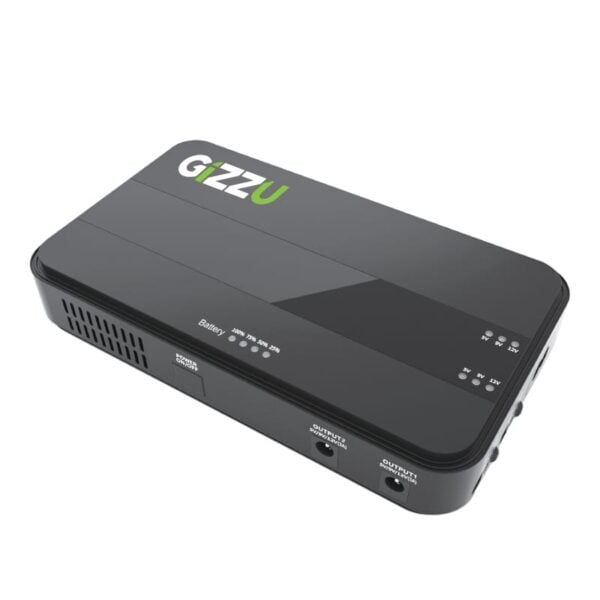
I have one Gizzu on my ONT and one on my Router. I can go 18 hours with this setup during load shedding

GIZZU 60W 65Wh 17600mAh Mini POE DC UPS Lithium - Black - Syntech
 
Check the wall box to see what type of socket is in the wall box.
It will either be APC (green) or UPC (blue).
If it's small in size with a small clip, it's LC
If it's large, it's SC.

Chances are it'll be a LC APC.

Then repeat as above at the ONT.

Chances are it'll be a SC APC.

Measure the distance of the fibre route. Add about 2 meters for in case,

Go to your nearest "computer shop" and ask them if they are resellers of Mustek. If they say they are, you're in business. If not move onto the next computer shop. You're probably better off with a mom and pop operation or a branch of a small chain than a franchise.

Then, ask the manager to get hold of his account manager at Mustek and to get you a quote for a custom made PPC fibre with the correct connector pre terminated on each side. For example 25m PPC LC APC to SC APC.

Pays your moneys and waits your turn.

We've been using this specific fibre since it became available in South Africa. It's slightly more expensive than the normal "drop fibre", but it's seriously techy stuff. The usual bend radius rules don't apply. You can knot the fibre and it'll still work. You can stick it to your skirting or corner of the wall with a glue gun. Once colour matched, it's near invisible.

If you don't come right with a computer shop, send me a PM with the length and connectors needed and I'll send you a price as soon as I receive one.
 
Check the wall box to see what type of socket is in the wall box.
It will either be APC (green) or UPC (blue).
If it's small in size with a small clip, it's LC
If it's large, it's SC.

Chances are it'll be a LC APC.

Then repeat as above at the ONT.

Chances are it'll be a SC APC.

Measure the distance of the fibre route. Add about 2 meters for in case,

Go to your nearest "computer shop" and ask them if they are resellers of Mustek. If they say they are, you're in business. If not move onto the next computer shop. You're probably better off with a mom and pop operation or a branch of a small chain than a franchise.

Then, ask the manager to get hold of his account manager at Mustek and to get you a quote for a custom made PPC fibre with the correct connector pre terminated on each side. For example 25m PPC LC APC to SC APC.

Pays your moneys and waits your turn.

We've been using this specific fibre since it became available in South Africa. It's slightly more expensive than the normal "drop fibre", but it's seriously techy stuff. The usual bend radius rules don't apply. You can knot the fibre and it'll still work. You can stick it to your skirting or corner of the wall with a glue gun. Once colour matched, it's near invisible.

If you don't come right with a computer shop, send me a PM with the length and connectors needed and I'll send you a price as soon as I receive one.
O wise one, explain more about this magic cable?
 
Check the wall box to see what type of socket is in the wall box.
It will either be APC (green) or UPC (blue).
If it's small in size with a small clip, it's LC
If it's large, it's SC.

Chances are it'll be a LC APC.

Then repeat as above at the ONT.

Chances are it'll be a SC APC.

Measure the distance of the fibre route. Add about 2 meters for in case,

Go to your nearest "computer shop" and ask them if they are resellers of Mustek. If they say they are, you're in business. If not move onto the next computer shop. You're probably better off with a mom and pop operation or a branch of a small chain than a franchise.

Then, ask the manager to get hold of his account manager at Mustek and to get you a quote for a custom made PPC fibre with the correct connector pre terminated on each side. For example 25m PPC LC APC to SC APC.

Pays your moneys and waits your turn.

We've been using this specific fibre since it became available in South Africa. It's slightly more expensive than the normal "drop fibre", but it's seriously techy stuff. The usual bend radius rules don't apply. You can knot the fibre and it'll still work. You can stick it to your skirting or corner of the wall with a glue gun. Once colour matched, it's near invisible.

If you don't come right with a computer shop, send me a PM with the length and connectors needed and I'll send you a price as soon as I receive one.
Awesome advice here.

Just to add my 2c...don't use a glue gun. You can buy the small bottles of glue that Telkom uses for phone lines. I've seen it in Builder's Warehouse and Bright's. It is a off-white squeeze bottle with a tapered point.

That stuff NEVER comes loose...glue comes loose with damp and temp fluctuations and generally just looks like schit.
 
I should have mentioned that actually,y bad. called them for a quote before any of this. They quoted 2 grand to move the box. Which is a bit out of budget at the moment after the move. So I'm looking into cheaper options. I mean if I can extend the fibre cable or 30m of ethernet and a second UPS, both would be cheaper than the quote.

I assure you it will be cheaper to buy a CAT 7 or 8 cable and run it from your router upstairs.
 
O wise one, explain more about this magic cable?

Originally known as m2fx, this stuff is magic.

It was developed at BT's Adastral Park research facility and then spun off into a commercial entity. It uses recycled car bumpers for the sheath. It's ridiculously strong and can easily be pushed up to 300m in a microduct using their special machine that is powered by a cordless drill. Needless to say, it can also be blown using more traditional methods.

 
  • Love
Reactions: rh1
I have one Gizzu on my ONT and one on my Router. I can go 18 hours with this setup during load shedding

GIZZU 60W 65Wh 17600mAh Mini POE DC UPS Lithium - Black - Syntech
Really getting 1 of these for the ont is going to be the least effort and probably most cost effective too, they have dropped in price, there are some for R400 bucks.
 
Really getting 1 of these for the ont is going to be the least effort and probably most cost effective too, they have dropped in price, there are some for R400 bucks.
Correct, I even picked up one of mine on BOBshop (2nd hand on auction) a few months ago for under R400 including R30 delivery to my front door by Courier Guy
 
Awesome advice here.

Just to add my 2c...don't use a glue gun. You can buy the small bottles of glue that Telkom uses for phone lines. I've seen it in Builder's Warehouse and Bright's. It is a off-white squeeze bottle with a tapered point.

That stuff NEVER comes loose...glue comes loose with damp and temp fluctuations and generally just looks like schit.
Learn this the hardway. One heatwave, and cables come loose. I use the alarm cable glue. It is R25 a tube at any security store.
 
Top
Sign up to the MyBroadband newsletter
X