


P
Picard
Guest
Firstly, this is suppose to be a very basic setup but I've found myself having lost much networking knowledge to the passage of time with little to no need for keeping it updated.
Anyway, I know have difficulty setting up even this basic network.
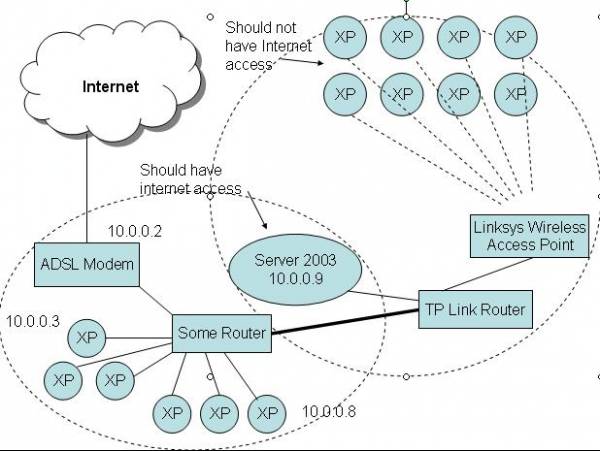
What I basically need is this: The cluster of 8 (it's actually 50 PCs) is connected to the Linksys wireless router via wireless NICs. The dotted cicle around them and the server, access point and router is physically in one classroom.
The other computers (the dotted circle bottom-left) is elsewhere in the building and is connected to the ADSL Modem.
Basically I want the 50 PCs to have file-sharing access to the server. This means I would like to know how I should configure IP addresses for the various computers.
My server should have access to the 10.x.x.x network and also have internet. My server should also be on the isolated 50 PC network (for file-sharing) but those 50 PCs should not have Internet access. Some bridging might be needed maybe. I'm not exactly sure how to do this, but some pointers will help alot.
Could someone please guide me to set up this network.
I'll elaborate if you need more information.
Anyway, I know have difficulty setting up even this basic network.
What I basically need is this: The cluster of 8 (it's actually 50 PCs) is connected to the Linksys wireless router via wireless NICs. The dotted cicle around them and the server, access point and router is physically in one classroom.
The other computers (the dotted circle bottom-left) is elsewhere in the building and is connected to the ADSL Modem.
Basically I want the 50 PCs to have file-sharing access to the server. This means I would like to know how I should configure IP addresses for the various computers.
My server should have access to the 10.x.x.x network and also have internet. My server should also be on the isolated 50 PC network (for file-sharing) but those 50 PCs should not have Internet access. Some bridging might be needed maybe. I'm not exactly sure how to do this, but some pointers will help alot.
Could someone please guide me to set up this network.
I'll elaborate if you need more information.
Last edited by a moderator:


